
You are staring at No SIM Card Installed on a phone that has worked perfectly for years, and every page you open tells you to pop the tray out and put the card back in.
Before you go looking for a paperclip, check one thing with me. Does your iPhone even have a tray? On a lot of phones sold today there is nothing in there to reseat.
That single check decides which half of this page is yours, and it takes about two seconds.
Work out first whether your phone takes a card
Apple states it plainly for its own repair staff: "Some iPhone models, such as iPhone 14 and later models purchased in the United States, don't have a physical SIM card and SIM tray. These models have an eSIM."
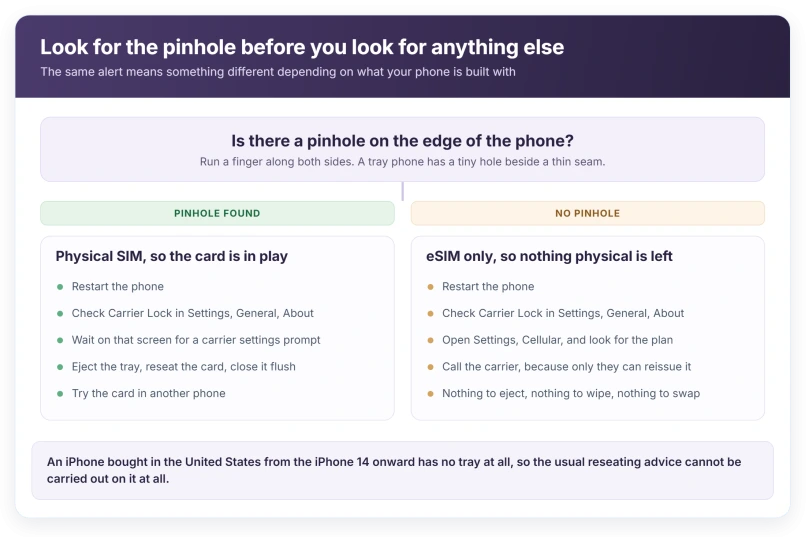
The check takes two seconds. Look along the edges for a pinhole. Phones with a tray have one, on the left on recent models, on the right on older ones.
No pinhole means no tray, so there is nothing to eject, nothing to wipe and no friend's card to borrow. Skip to the eSIM section and save yourself twenty minutes.
Note the wording of the message too. Apple's technicians are given three separate strings: "Invalid SIM card installed", "No SIM card installed" and "Different SIM detected".
The third one is the interesting one, because it means the phone can read a card perfectly well and is telling you it is not the card it expected.
If your phone has no tray, Apple's advice is one line
For an eSIM iPhone showing this message, Apple, on its invalid SIM and no SIM page, gives a single instruction: "If your device has an eSIM, contact your carrier."
Short, but not a brush-off. An eSIM is a carrier profile living inside the phone. It is either there and active or it is not, and only the carrier can reissue it.
What you can do before ringing them is check that the line still exists. Open Settings, then Cellular, and look for your plan.
A missing plan and a live plan reading No Service are different problems. Only the first one is this article.
If your eSIM is there but stuck part way through setting itself up, that is a different fault, and our page on an eSIM stuck on Activating covers it.
The check that belongs before all the others
Apple's list has seven steps, and the one worth doing second is buried in the middle of it.
Apple: "If your iPhone is locked to a carrier, it can be used only by that carrier."
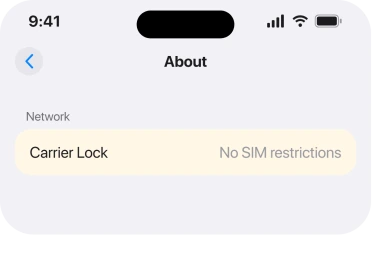
Open Settings, then General, then About, and find the row called Carrier Lock. An unlocked phone reads No SIM restrictions there.
Anything else means the phone is tied to one network. A SIM from a different one produces this message every time, on a perfectly healthy phone.
That covers a very ordinary situation: a second-hand phone, or one off an old contract, meeting a new carrier's card. Nothing is broken. The phone is doing what it was sold to do.
Apple's technicians get the same point from another angle: "Inserting a SIM card that isn't the SIM used for the current iPhone activation may cause SIM alert messages."
If your Carrier Lock row says anything other than No SIM restrictions, I would stop here and ring the network that sold you the phone.
Carrier settings, and the odd place they live
The second software step is a carrier settings update, and it does not appear in Software Update.
Open Settings, then General, then About, and wait. If an update exists, a prompt appears on that screen within about fifteen seconds.
It is the same screen as the Carrier Lock row, which makes this two checks for one trip.
Restart the phone first if you have not already. Apple puts a restart third in its own order, before either of these.
If you do have a tray
Now the physical steps make sense, and there is a caution in Apple's wording worth reading twice.
Apple: "Make sure that the SIM tray closes completely and isn't loose. If you use a SIM tray from a different model iPhone, iPad, or from another phone manufacturer, it might not fit properly."
Trays are not interchangeable. Apple's repair note adds that they "vary slightly in size and shape", so a replacement tray bought for the wrong model will seat and still read nothing.
Push the pin straight in, not at an angle. If the tray will not come out under steady pressure, stop. Apple tells its own technicians that a tray which is hard to eject gets replaced, not forced.
With the tray out, look at the card itself for a chip that is scratched, discoloured or worn shiny. Then look at the tray for a bend.
Put it back with the card sitting flush, not proud of the frame, and press until the tray is level with the case.
Deciding whether it is the card or the phone
One swap answers it. No shop required.
Put your SIM in another phone. If the message follows the card, the card is the problem and your carrier will replace it, usually free.
If the card works elsewhere and your phone still complains with a different SIM in it, the phone is the problem.
Apple ends its page at the same place: "If you still see an alert about your SIM card, you might need service."
Worth doing before you book anything, because a replacement SIM from a carrier shop takes ten minutes and a repair booking takes a week.
If the message follows the card, I would ring your carrier rather than book anything, because a replacement SIM is usually free and takes minutes.
What does not work
- Reset Network Settings. It clears Wi-Fi passwords, VPN and APN settings, and Apple does not list it anywhere on its no-SIM page. Save it for a phone that sees the network and cannot use it.
- Airplane Mode on and off. Fine for a dropped signal. It does not make an unreadable card readable, and it will not unlock a carrier-locked phone.
- Restoring the phone. A restore rewrites software. Carrier lock, a dead card and a bent tray all survive it intact.
- Cleaning the card with an eraser or alcohol. No Apple page suggests it, and rubbing the contacts is a good way to turn a working card into a dead one.
If the phone is showing SOS or No Service rather than a SIM alert, that is a network problem rather than a card problem, and our page on an iPhone stuck on SOS is the right one.
Status: iOS 26.6, checked 16 August 2026. Apple's no-SIM page, doc 108914, was last published on 17 December 2025 and its steps are unchanged.
Why does my iPhone say No SIM when there is a SIM in it?
Three ordinary reasons, in order of likelihood: the phone is locked to a different carrier, the tray is not fully closed, or the card has failed. The message is about what the phone can read, not about whether something is physically present, which is why a properly seated card still triggers it.
Can an iPhone with no SIM tray still say No SIM Card Installed?
Yes. The message covers the eSIM as well, and on an iPhone 14 or later sold in the United States there is nothing to remove or reseat. Apple's instruction for that case is to contact the carrier, because only they can reissue the profile.
Does No SIM mean my iPhone is broken?
Usually not. The two commonest causes, a carrier lock and a failed SIM card, are both outside the phone. Apple only raises service at the end of its list, after a restart, a carrier settings update and a card swap have all been tried.
The Short Version
- Look for the pinhole first. No pinhole means no tray, and nothing physical is left to try.
- On an eSIM phone, Apple's instruction is to contact your carrier, because the profile lives with them.
- Check Carrier Lock at Settings, General, About. It should read No SIM restrictions.
- The carrier settings update prompt appears on that same About screen, not in Software Update.
- A tray from another model may seat and still read nothing. They vary by model.
- Swap the card into another phone. Whichever device the message follows is the one to fix.
- Reset Network Settings, Airplane Mode and a full restore change none of the real causes.
Where to Next
The pinhole is the fork in the road and it takes two seconds to check. Everything after it depends on the answer.
On an eSIM this is a phone call rather than a repair, so make it early. On a tray phone the order is restart, Carrier Lock, carrier settings, then the card, and only then a shop.
And if the card is present but nothing works since the update, that is a different seven-step list.
SOS in the status bar is a different message with a different meaning. It means your carrier is unreachable, not that the phone has failed.
The one thing I would not do is a restore. It is the longest step on the list and it cannot touch a single one of the likely causes. If your carrier says the line is fine and the message stays, tell me below.

Isaac Smith is the founder and editor of PC Glance, a website that covers computers, laptops, and technology. He is a tech enthusiast and a computer geek who loves to share his insights and help his readers make smart choices when buying tech gadgets or laptops. He is always curious and updated about the latest tech trends.