
Your phone signs you out of iMessage, you sign back in, and a few minutes later it has done it again. Somewhere in the middle a prompt appears about Contact Key Verification, which sounds alarming on top of everything else.
That is a horrible combination to live with. I want to tell you plainly where this stands rather than hand you a fix that does not exist.
Status: reported since September 2025 on iOS 26 and macOS Tahoe 26. Still unresolved. Last checked 17 August 2026 on iOS 26.6.
Who this is not about
Read this bit first, because three different problems get filed under the same words.
Has iMessage never activated on this phone? Are you watching "Waiting for activation"?
That is a separate fault with its own answers, and our page on iMessage that will not activate is the right one.
If you are being asked for your Apple Account password over and over rather than being signed out of Messages specifically, that loop is different again.
This page is for the case where iMessage was working, and now it signs you out repeatedly, often with a Contact Key Verification prompt beside it.
1. What the Contact Key Verification prompt actually means
Start here, because the wording frightens people into doing something drastic.
Contact Key Verification checks you are messaging the person you think you are. Apple lists four reasons you might get an alert from it. Only one involves an attacker.
Apple, on alerts from iMessage Contact Key Verification: "There's an issue with iMessage Contact Key Verification. This alert might mean that there's an issue with one of your devices or your account, or that a sophisticated attacker might be attempting to eavesdrop on the conversation."
An issue with one of your devices or your account. That is the first half of Apple's own sentence, and it is the far likelier half when the prompt arrives alongside repeated sign-outs on your own phone.
The other three Apple lists are just as ordinary. The person you are messaging turned the feature off. A new device was added to their account. Or the service is temporarily unavailable.
2. Check every device for an account alert, not just the phone
This is Apple's own first instruction for this exact alert, and it is the most useful thing on this page.
Apple: "Check Settings (or System Settings) on all of your devices for alerts to update your Apple Account settings. First, address any alerts about a 'Contact Key Verification Issue.'"
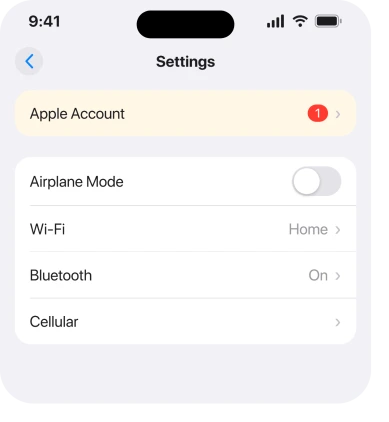
All of your devices. So open Settings on the iPhone. Then do the same on any iPad and any Mac signed in to that account. Look at the top of the list for a red badge asking you to update your account settings.
That ordering matters. Apple says clear the Contact Key Verification alert first, then deal with any other settings prompt.
3. Turn Contact Key Verification off while you wait
A trade rather than a fix, and I would rather you made it knowingly.
If the prompts are what is disrupting you, the feature can be switched off. It lives under Settings, your name, then Contact Key Verification. That is the whole route.
What you give up: Apple describes the feature as detecting sophisticated threats against iMessage servers. Turning it off removes that detection. Ordinary iMessage encryption is untouched.
Do this only if you turned it on yourself. Contact Key Verification is not on by default, so if you have it, somebody chose it, and that somebody may have had a reason.
4. Sign out and back in properly, once
Do this once, carefully, rather than the fifteen frustrated times this problem invites.
Go to Settings, your name, scroll to the bottom and tap Sign Out. Choose Sign Out But Don't Erase so your data stays. Restart the phone. Sign back in.
Then leave it alone for a day. Repeating it hourly tells you nothing new. Every round costs you the re-download of your messages.
5. Check the clock, because it breaks handshakes silently
Small, quick, and genuinely a cause of authentication failures.
Go to Settings, General, Date & Time, and turn Set Automatically on. A drifted clock breaks the checks that keep you signed in. So does the wrong time zone.
Thirty seconds to rule out, and it takes nothing away from you.
6. Report it, because that is what actually moves this one
Not satisfying, and it is what actually shifts an unresolved break.
The people reporting this have already been through Apple Support. One owner had contacted them twice and was still being signed out.
Send Apple feedback from your phone. If you have a Genius Bar within reach, book it and let them log the case. A break that is only visible in forum threads gets fixed slowly. A break with case numbers behind it gets fixed faster.
What we do not know
I would rather print the gaps than fill them.
Nobody has published which iOS 26 build introduced it. Apple has not acknowledged it in any release notes I could find.
Nobody has established whether it needs a Mac on the same account, though every report I read involved more than one device.
No fix has been confirmed by anybody. One person updated to a later build and was still logged out. A point release had not cleared it for them.
What not to do
- Do not erase the phone. No report supports it and you would spend a day restoring for a problem that follows your account rather than the hardware.
- Do not delete and re-add your Apple Account on every device in one go. If it does not help you have lost a great deal of state at once.
- Do not turn off iMessage entirely unless you accept that your texts to other iPhones become SMS. If that is the trade you want, our page on texts to Android going green explains what changes.
- Do not assume you have been hacked. Apple's own list puts a device or account issue ahead of an attacker, and the reports look nothing like a targeted attack.
- Do not keep signing back in every few minutes. It changes nothing and it re-downloads your library each time.
Status: iOS 26.6, checked 17 August 2026. Reported since September 2025 and still unresolved. No fix has been confirmed by any owner, and Apple has published nothing about it.
Why does my iPhone keep signing me out of iMessage?
Nobody has established the cause. Owners have reported it since September 2025 on iOS 26, usually alongside a Contact Key Verification prompt and usually with more than one Apple device on the account.
Apple has published nothing about it and no fix has been confirmed.
Is the Contact Key Verification alert a sign I have been hacked?
Not on its own. Apple lists four reasons for the alert, and the first possibility it gives for the general issue alert is a problem with one of your devices or your account. An attacker is listed as the alternative, not the default.
Should I turn Contact Key Verification off?
You can, at Settings, your name, Contact Key Verification, and it stops the prompts. You lose the detection Apple built it for, and ordinary iMessage encryption is unaffected. Only do it if you switched the feature on yourself.
The Short Version
- Reported since September 2025 on iOS 26, still unresolved, and no owner has confirmed a fix.
- The Contact Key Verification prompt and the sign-out are the same event, not two problems.
- Apple's own wording puts a device or account issue ahead of an attacker.
- Check every device signed in to your account for a settings alert, and clear the Contact Key Verification one first.
- Turning the feature off stops the prompts and costs you its protection.
- Sign out and back in once, not repeatedly.
- Do not erase the phone over this.
Where to Next
There is no satisfying ending here yet, and pretending otherwise would waste your evening. Apple documents the alert but never joins it to the sign-outs, so that connection is ours.
What you can do is clear any account alert sitting on your other devices, decide whether you want the verification prompts at all, and get your case recorded with Apple.
I will update this page when a build fixes it or Apple says something, because that is the only honest way to end an article about a break nobody has solved.
If you are getting this and you only own one Apple device, tell me, because every report I have read involves two or more and that would genuinely narrow it down.

Isaac Smith is the founder and editor of PC Glance, a website that covers computers, laptops, and technology. He is a tech enthusiast and a computer geek who loves to share his insights and help his readers make smart choices when buying tech gadgets or laptops. He is always curious and updated about the latest tech trends.