
Somebody tells you they rang and could not leave a message. Your mailbox is full, apparently, or it has not been set up, and you have been deleting voicemails all week.
It is the sort of fault you only find out about second hand, which makes it worse, and I can take you through where those messages actually live.
That last part is the key to all of it, so start there.
1. Your voicemails are not on your phone
Read this before you delete anything else. It explains why deleting has not worked.
Visual Voicemail shows you a list on the phone. The messages themselves sit on your carrier's system, and the mailbox has a size limit the carrier sets. Not your storage.
So a mailbox reporting itself full while your list looks empty is not a contradiction. The phone is showing you its copy of a list the carrier holds.
That is why several of the fixes further down involve ringing your own voicemail rather than tapping anything in the Phone app.
2. Check whether it is your mailbox or theirs
Quick, and it saves you fixing a problem you do not have.
If a caller hears that the mailbox has not been set up, that can be about your line or about a completely different number they rang.
On a community thread from somebody hearing exactly that message, a Level 10 member was blunt about which: "it means exactly what is say, the person you're calling hasn't set up their voicemail, nothing you can do to fix it."
So confirm it is yours. Ring your own number from another phone and listen to what happens.
If you get your own greeting and a beep, your mailbox is fine, and whoever told you otherwise rang a wrong number or hit a network problem at their end.
3. Set voicemail up, properly, from the Phone app
If ringing yourself produced a not-set-up message, this is the whole job.
Apple's route is Phone, then Voicemail, then Set Up Now. Create a password when asked. Then record a greeting or take the default.
Two things people miss. The password is the carrier's, not your Apple Account's, and you need it again for rung 4. And on some networks a mailbox with no greeting recorded behaves as though it was never set up.
If Voicemail is not in the Phone app at all, that is a carrier or plan issue rather than a phone one, and the number to ring is theirs.
If the tab is there but your own voicemails are the ones missing, that is the opposite fault and our page on voicemail and missed calls disappearing is the right read.
4. The password trick that resets a full mailbox
This is the fix owners keep confirming. It looks like nonsense until you have read rung 1.
On a community thread about a voicemail stuck on full, the top answer was a two-part sequence:
"Settings -> Phone -> Change Voicemail Password. Enter new PIN twice and it should save. Go to Home screen. Call *86. Prompt will ask for voicemail PIN. Do NOT enter it. Just hang up."
The person who posted it added: "Worked for me as I immediately tested it from my landline."
Apple does not document that sequence anywhere, so reading it as a forced re-handshake is ours. What it appears to do is make the phone and the carrier agree again, which clears a stale full flag.
The *86 code is specific to Verizon. On other networks the number differs, and the general version is to touch and hold 1 in the keypad to dial your own voicemail.
Another owner on the same thread reported having to enter the password, being told the mailbox was full, hanging up and dialling again, at which point the message was gone.
5. Listen to the deleted-messages prompt
Smaller and stranger, and an owner on the same thread confirmed it.
Dial your voicemail by touching and holding 1. Enter your code. Then wait through the menu until it offers you your deleted messages.
That owner's outcome was short: "Mine reset after the message."
Deleted voicemails are not gone from the carrier immediately. They sit in a deleted area that still counts against your limit until the system clears it, and stepping into that menu can be what prompts it.
6. Ring the carrier and ask for a mailbox reset
Last, because it is the one that ends this when nothing on the phone helps.
The owner who started that thread got there in the end.
After reaching Verizon's second-level support, the representative found voicemails still sitting on the carrier's system despite having been deleted on the device, and was able to do a reset to remove them.
So use these words. My visual voicemail list is empty. Callers are told the mailbox is full. Please check for messages on your side and reset the mailbox.
Ask for second-level or technical support if the first person cannot see them. The messages are invisible to you by definition. That is exactly why you need somebody who can see the other side.
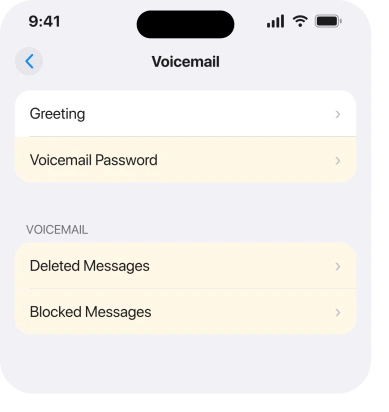
One thing worth ruling out first, because it is free: blocked callers can still leave voicemails, and those land silently in a Blocked Messages section at the bottom of your voicemail list where they still take up space.
Our page on blocked numbers still getting through explains that behaviour.
What does not help
- Deleting voicemails you can see. If the list is already short, the ones filling the mailbox are ones the phone is not showing you.
- Reset Network Settings. It wipes your saved Wi-Fi passwords and does not touch a carrier-side mailbox.
- Restarting the phone. The state you are fighting is on the network, not in memory.
- Turning Wi-Fi Calling off and on. It changes how calls are carried, not whether the mailbox accepts a message.
- Freeing up storage on the phone. Your voicemail limit is the carrier's, and it has nothing to do with your free space.
Status: iOS 26.6, checked 17 August 2026. Apple documents the Phone app setup route. Every clearing fix on this page is user-reported and the carrier reset is the only one confirmed to end it.
Why do callers get told my iPhone voicemail is full?
Because your carrier's mailbox is full, not your phone's storage. Deleted voicemails can sit on the carrier's system still counting against your limit, which is why deleting the ones you can see often changes nothing.
Why does my iPhone say voicemail is not set up?
Either it genuinely is not, in which case Phone, Voicemail, Set Up Now is the fix, or the caller rang a different number. Ring your own line from another phone and listen for your greeting before assuming it is yours.
How do I reset a stuck iPhone voicemail?
Owners report changing the voicemail password in Settings, Apps, Phone, then dialling voicemail and hanging up at the PIN prompt, which forces a re-handshake.
If that fails, ask your carrier's technical support to reset the mailbox from their side.
The Short Version
- Voicemails live on your carrier's system, not on your phone.
- Ring your own number first to confirm the problem is yours and not the caller's.
- Change the voicemail password, then dial voicemail and hang up at the PIN prompt.
- Step into the deleted-messages menu when you dial in, which reset it for one owner.
- Blocked callers leave voicemails that sit silently at the bottom of your list, taking up space.
- Deleting messages you can already see will not clear a mailbox filled by ones you cannot.
- A carrier-side reset is what ends this when nothing on the phone helps.
Where to Next
The reason this is so frustrating is that you are trying to fix something that is not on your phone. Everything you can see and tap is a copy of a list held somewhere else, and the thing filling it up is invisible to you by design.
Ring your own number first. That one test tells you whether you have a problem at all, and it takes fifteen seconds.
And if the problem is your own greeting refusing to record, that has seven fixes of its own.
If your greeting plays normally and callers still cannot leave a message, tell me which network you are on, because the reset codes and the second-level support routes differ from one to the next.

Isaac Smith is the founder and editor of PC Glance, a website that covers computers, laptops, and technology. He is a tech enthusiast and a computer geek who loves to share his insights and help his readers make smart choices when buying tech gadgets or laptops. He is always curious and updated about the latest tech trends.