
Record it, tap Save, and the next caller still hears the robotic default announcement. Or Save never lights up at all. It is a small thing.
It makes a whole phone feel broken, and I am sorry, this one is genuinely fiddly rather than obvious.
It is fiddly for a reason worth knowing before you start. Your greeting does not really live on the iPhone. It lives on your carrier's voicemail system, and the screen in the Phone app is a remote control for it.
That single fact explains most of what goes wrong, and it changes which of the seven fixes will be yours.
1. Ring your own number before you fix anything
Do this first. It takes twenty seconds, and it saves some people the whole rest of the page.
Call your own number from another phone and let it go to voicemail. Listen to what a caller actually hears.
One owner, posting as SherBare, found exactly that: "I called the phone and my custom greeting DID pick up, despite it looking like it didn't save!"
So the screen can lie, quite badly. It can fail to show the saved state while the carrier is playing your recording perfectly happily. If callers hear you, there is nothing to fix.
2. Tap the right button, because iOS 26 has two Phone layouts
Cannot even find the greeting control? This is probably why. It is not your fault.
Apple, in Change your voicemail greeting and settings on iPhone, gives two different routes depending on which Phone layout you are using:
- Unified layout: "Tap Calls, tap Edit, then tap Edit Voicemail Greeting."
- Classic layout: "Tap Voicemail, then tap Greeting."
Two layouts, two completely different paths. Instructions written for one read as broken on the other, and that is where a lot of "the Greeting button is gone" reports come from.
We covered the wider redesign in voicemail and missed calls gone after iOS 26.
3. Record a brand new greeting rather than re-saving the old one
Now the fix that started one of the busiest threads on Apple's forum. If it helps at all, 268 people have hit Me Too on it, so your version of this is a common one.
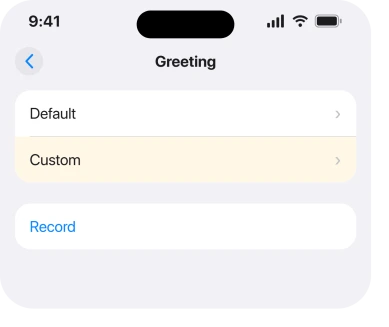
Do not open the existing recording and press Save again. Tap Custom, tap Record, record the whole thing from scratch, then Stop and Save.
The person who opened that thread found the difference. Record a completely new one. Do not try to save the greeting already sitting there. That is what made it stick.
It costs a minute, which makes it the cheapest thing left after the phone test.
4. Turn Live Voicemail off, record, then decide about turning it back on
This one has a real success record. It also has a real failure record, and you are getting both.
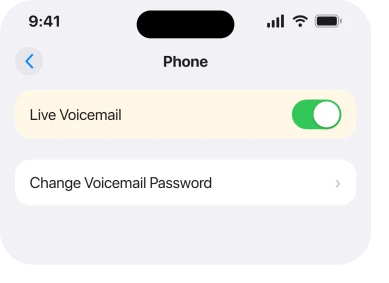
Go to Settings > Apps > Phone > Live Voicemail and turn it off. Then record your greeting. Then turn Live Voicemail back on and test it again with a call.
Jaybird2112 described the pattern: "Try turning off Live Voicemail. For me, with Live Voicemail on it always defaults to a personal greeting." Mgervais666 did the same and reported it in two words: "Problem solved."
Then the other side of it. The owner who opened that thread came back weeks later to say the same workaround "does not appear to be rectified by disabling the Live Voicemail feature" on a later build.
And FrustratedItunesUserII turned Live Voicemail off and got a different fault instead: "white bar across the top…can't choose any options…doesn't prompt to enter greeting."
So try it. Test it with a real call. Put it back if it changes nothing.
5. Set the greeting from your carrier's own voicemail menu
This is the rung that fixes what nothing on the phone will touch. It comes straight from the mechanism in the intro.
Call your voicemail system directly and set the greeting there, in the carrier's own menu, rather than through the Phone app.
amvacctech, on an iPhone 17 after moving from T-Mobile to Verizon, dialled \*86 and found the reason nothing had worked: the voicemail box had never been initialised.
The carrier's system walked through a password and a greeting, and afterwards the custom greeting showed a checkmark in the phone's own settings.
Their conclusion is the useful part: "most carries have a way to call into the Voicemail platform and configure settings there. Those settings seem to push down to the iPhone."
On AT&T, owners describe the same route differently. Noogie947: "Press and hold 1. The automation will give you some options. When it says the 'Greetings' option, press the corresponding number." HeyButton gave the same instruction and said it connects you to the voicemail operator.
Ctine99 used the carrier menu and watched the phone catch up: "selected custom and my old recording was there…setting changed before my eyes."
If your voicemail box was never set up properly, or you switched carrier or moved a number recently, that is very likely your answer.
The same uninitialised box is one reason callers cannot leave you a voicemail at all, which is a related fault worth ruling out.
For another handset on the line, the Android mailbox setup steps separate carrier prompts from the visual message list.
6. If Custom is missing entirely, your carrier may simply not offer it
Apple puts this in a parenthesis. Almost nobody reads it. It is the one cause with no fix on the phone.
Apple, on the same page: "Tap Custom, then tap Record (not supported by all carriers or in all countries and regions)."
Apple says the same thing again on its Set up Voicemail page, about the whole feature: "Voicemail, Visual Voicemail, and Live Voicemail are available from select carriers in select countries or regions."
Read that plainly. A custom greeting is a carrier feature, and some carriers and some countries do not have it. On a line like that, no reset adds the option. No update either, and no restore. It was never yours to set.
Ring your carrier and ask whether custom greetings are supported on your plan. It is a two minute call. It either gives you the fix or ends the search honestly.
7. If you see error 1034, treat it as the same carrier problem
Some people get a specific failure message rather than a silent revert.
The wording reported is: "The operation couldn't be completed. (com.apple.mobile-phone error 1034.)"
I want to be straight about the sourcing on this one. That string comes from an owner running iOS 17.2 on an iPhone 13 Pro. Not from an Apple page. And I found no current Apple document explaining the number.
So treat it as a label for the failure rather than a diagnosis of it.
What the same thread showed is that the workarounds are the ones already listed. Live Voicemail off, then record. Failing that, the carrier menu in rung 5. The owner reporting it eventually saw it clear on a later iOS release.
Another poster reported it still present on the release after that.
What does not help
- Resetting all settings. Nothing in your settings holds the greeting, so there is nothing there to reset.
- Resetting network settings on its own. It is widely suggested and nobody in the threads read reported it fixing the greeting.
- Deleting and re-adding contacts, or restoring the phone. The recording is not stored on the phone.
- Recording somewhere noisy. Not a fix as such, but a greeting that saves and sounds unusable wastes the whole trip.
Status: iOS 26.6.1, checked 18 August 2026. Reported on iOS 26 with 18 Me Too on one thread. Apple documents Custom as carrier dependent, and the confirmed fix came from a carrier menu.
Why does my iPhone voicemail greeting keep going back to default?
Usually because the recording never reached your carrier's voicemail platform, which is where greetings actually live. Live Voicemail has been reported forcing the default back, and a voicemail box that was never initialised behaves the same way.
Where is the voicemail greeting on iOS 26?
It depends on your Phone layout. On the Unified layout it is Calls, Edit, Edit Voicemail Greeting. On the Classic layout it is Voicemail, then Greeting. That difference explains most reports of a missing button.
Can I set my iPhone voicemail greeting by calling in?
Yes, and on some lines it is the only thing that works. Dial your voicemail system, follow its greeting menu, and the setting is reported pushing back down to the iPhone afterwards.
Why is Custom greyed out on my iPhone voicemail?
Apple states in its own instructions that Custom recording is "not supported by all carriers or in all countries and regions". If your carrier does not offer it, no setting on the phone will turn it on.
The Short Version
- The greeting lives on your carrier's system, not on the iPhone.
- Ring your own number first, because it may have saved and simply not shown it.
- Two Phone layouts on iOS 26 means two different routes to the Greeting button.
- Recording a fresh greeting works better than re-saving the existing one.
- Live Voicemail off has fixed it for some people and done nothing for others.
- Calling the carrier voicemail menu is the fix when nothing on the phone helps.
- Apple says Custom is not offered by every carrier or in every country.
Where to Next
Nearly every page about this treats it as an iPhone bug and sends you round the usual resets. The threads say something different. The successes come from the carrier side.
The failures come from people repeating phone side fixes on a voicemail box that was never switched on properly.
So the rung to try is number 5. Dial in and set the greeting where it actually lives.
Where the thing refusing to save is an Office document on a Mac, the 0x0 error means something specific.
Tell me which carrier you are on and which code you dialled, if the carrier menu is what did it. The shortcodes differ from network to network, and a proper list would beat leaving people to guess at their own.

Isaac Smith is the founder and editor of PC Glance, a website that covers computers, laptops, and technology. He is a tech enthusiast and a computer geek who loves to share his insights and help his readers make smart choices when buying tech gadgets or laptops. He is always curious and updated about the latest tech trends.