
You type a name into Calendar, get an empty screen back, and the event is sitting right there in the month view where you can see it. That is a maddening thing for a phone to do, and I know it makes you wonder whether the event ever saved.
It saved. What has usually failed is Calendar's search index, not your calendar.
There is an order to fixing it that matters, because the quick version does nothing for a lot of people. I have put the seven in the order that solves the most cases first.
1. Turn Calendar's two Search switches off and on
Start with this one. Thirty seconds, and it is reversible.
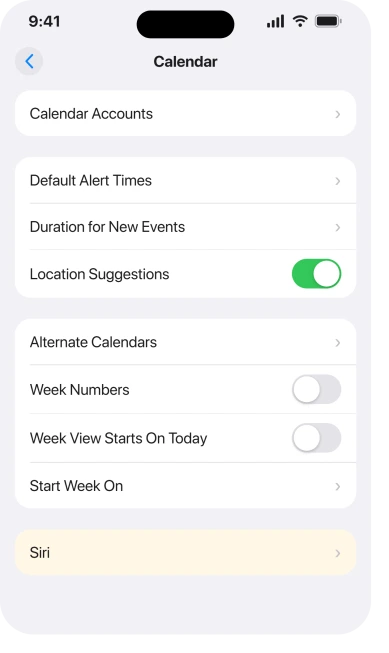
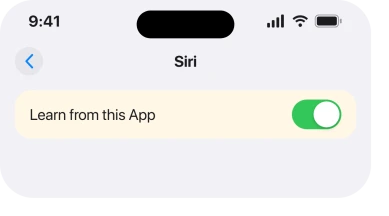
Open Settings, tap Apps, then Calendar, then Siri. Two of the controls on that screen govern whether Calendar's content is searchable at all. Turn them off, back out of the screen, go in again, and turn them on.
Apple describes the same screen in Change your Calendar settings on iPhone: "You can also allow suggestions and content from Calendar to appear in Search, widgets, and as notifications."
One owner, russpie, reported it working in those words on Apple's own forum: "Try going to settings, calendar, search & turn the two options off & on again. Worked for me." A second person on the same thread confirmed it.
Older instructions send you to Settings > Siri & Search > Calendar. That is not where this lives on iOS 26, and it is why so many people report the switches missing. Our page on where iPhone app settings moved to covers the wider change.
2. Do the same thing with a full power off in the middle
This is the version that works when the quick one does not. The difference is a proper restart, not a screen lock.
Turn the switches off. Then power the phone all the way down. Wait about a minute, then start it again. Only then turn the switches back on.
SteamIron2 described exactly that sequence and called it "the only way it worked for me".
jackiefrompanama city, on an iPhone 16 Plus, gave the longer version: search off, back up the phone, power off, restart after about a minute, search on.
That order matters because the plain toggle is reported failing. ctb1, who started one of the threads, tried it and said it "did not work". cris.galicinao tried the same steps on an iPhone 13 mini and reported no change.
3. Give the index the time it actually needs
Nothing you do here is instant, and that is what makes people give up too early.
6×6, a Level 7 member on Apple's forum, put the waiting step into the instructions rather than leaving it out: "Wait a few minutes for the search index to rebuild."
For some people that is minutes. For a phone with years of events across several accounts, owners report far longer. So do the toggle, put the phone down, and come back to it rather than repeating the fix five times in ten minutes.
4. Make sure every calendar is switched on
Now something completely different, and one tap rules it out.
Open the Calendar app and tap Calendars at the bottom of the screen. If a calendar is unticked, its events are hidden, and hidden events do not come back in search results either.
Tap Show All Calendars, then search again.
This catches people with several calendars on the phone. A work account, a shared family calendar, a subscribed holiday calendar. One untick can empty out most of what they are searching for.
If your events have gone missing from the grid as well, that is a different fault and iPhone Calendar events disappeared covers it properly.
5. Search for something Calendar can actually read
Apple states the scope of Calendar search in one line, and it is narrower than most people assume.
Apple, in Search for events in Calendar on iPhone: "You can search for events by title, invitees, location, and notes."
Four fields. Title, invitees, location, notes.
So a search for the name of the calendar itself returns nothing. So does a search for text inside an attachment, or for a word that only appears in a linked email. None of that is broken. It is simply outside what the field looks at.
Test it with a word you know sits in an event title. That tells you whether search is dead or simply looking in the wrong place.
6. Swap your default calendar and swap it back
This one is stranger, and no Apple page mentions it anywhere. An owner worked it out and posted it.
Rsmseymour posted it as: "go to the calendar app and then 'default calendars'. Select a different default and then change back". You will find the control at Settings > Apps > Calendar > Default Calendar.
Why it helps is not documented anywhere I could find. So I am reporting it, not explaining it. It is free and it undoes itself, which is why it earns a place this far down the list.
7. Check which iOS build you are on, because this has been fixed twice
The fault arrived with the first iOS 26 release. Apple has patched it more than once since.
rold4784: "Just did the 26.0.1 update and calendar search is back." ctb1 updated a second phone in the house to 26.0.1 and reported the same result. Jeff Tan reported both 26.0.1 and 26.2 clearing it.
And it has come back. The same rold4784 later reported that search "quit working again after iOS 26.1 update".
So an update is worth having, but it is not a guarantee. Go to Settings > General > Software Update, get onto the current build, then run the switch fix again if search is still empty.
What does not help
- Searching from the Home Screen instead. lisbonbhoy suggested swiping down for Spotlight, and it does find events. It does not repair Calendar's own field. If Spotlight is empty too, iPhone Spotlight search not working is the page you want.
- Deleting the app. Calendar's index is not stored inside the app icon, and removing a built-in app puts local calendars at risk for no gain.
- Waiting for the next update on its own. It has already regressed once after a point release.
- Repeating the toggle over and over. Two owners reported the plain toggle failing outright, and repeating it does not change that.
Status: iOS 26.6.1, checked 18 August 2026. Two point releases fixed this and owners report it returning. The Settings route and the four searchable fields are Apple's own wording.
Why is my iPhone Calendar search not working?
Almost always the search index rather than your events. iOS 26 shipped with a fault that emptied Calendar search results, and turning Calendar's search controls off and on with a full restart in between is what rebuilds the index for most people.
Where are the Calendar search settings on iOS 26?
Settings, then Apps, then Calendar, then Siri. They are no longer under Siri and Search in the main Settings list, which is why guides written before iOS 26 send you to a screen that is not there.
Does Calendar search look inside event notes?
Yes. Apple lists notes as one of four searchable fields, alongside title, invitees and location. Anything outside those four, including attachment contents and calendar names, will not return a result.
Will updating iOS fix Calendar search?
It has for a lot of people, on 26.0.1 and again on 26.2. It is not certain, because at least one owner had search break again after a later update. Update, then redo the switch fix if it is still empty.
The Short Version
- The events are fine. The search index is what failed.
- Calendar's search controls live at Settings, Apps, Calendar, Siri on iOS 26.
- Toggling alone fails for many people, so power the phone off between off and on.
- Give the index minutes rather than seconds before deciding it did not work.
- An unticked calendar hides its events from search as well as from the grid.
- Calendar only searches title, invitees, location and notes.
- Point releases have fixed this twice, and it has come back once.
Where to Next
What trips everybody up is that the fix and the failed fix look identical. Same two switches, same screen. The only difference is whether the phone was powered off in between, and that is the detail almost everybody leaves out.
So if you tried the quick version already and wrote it off, it is genuinely worth one more go with the restart in the middle.
And if searching inside Settings returns nothing, seven fixes cover that one.
Where the calendar reply refuses to send rather than search failing, seven things cause that.
Where a repeating event refuses to delete rather than refusing to be found, six reasons explain it.
How long did yours take to come back? The reports run from a couple of minutes to most of a day and nobody has pinned down why. Drop me your model and roughly how many calendars are on the phone and I will keep a note of it.

Isaac Smith is the founder and editor of PC Glance, a website that covers computers, laptops, and technology. He is a tech enthusiast and a computer geek who loves to share his insights and help his readers make smart choices when buying tech gadgets or laptops. He is always curious and updated about the latest tech trends.