
Your FaceTime switch will not move, and the whole row may have vanished from Settings altogether. That is a strange thing for a built-in Apple app to do, and I get how worrying it looks.
It almost never is.
FaceTime is one of the very few Apple apps that can be switched off by somebody else, or by where the phone was bought. Those are two completely different situations and only one of them has a fix.
1. Screen Time restrictions, which remove the switch entirely
Start here. It is the commonest cause and it explains a missing row rather than a dead one.
Content and Privacy Restrictions can switch FaceTime off at a level your Settings cannot reach. When they do, the row does not dim. It disappears.
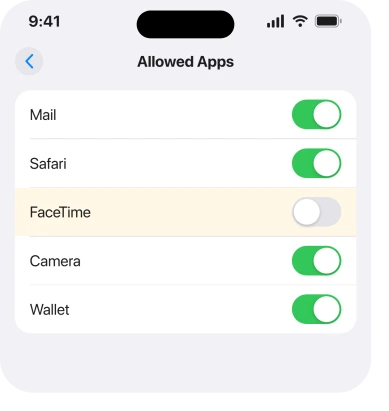
Go to Settings, Screen Time, Content & Privacy Restrictions, then Allowed Apps. Find FaceTime and switch it on.
Restrictions switched off entirely? Then this is not your cause. On, with a passcode you never set? Then somebody else configured this phone, and rung 5 is where you belong.
2. Turn FaceTime on where Apple actually puts it
The route moved, and plenty of guides still send you somewhere that no longer exists.
Apple's current route, from its Set up FaceTime page: Settings, tap Apps, then tap FaceTime.
Apple's own wording for what you do next: "If FaceTime is turned off, turn it on."
It is Settings, Apps, FaceTime, not a FaceTime row in the main Settings scroll. App settings were gathered into that Apps list, which is exactly why people report the row as missing when it has only moved.
Our page on where app settings went covers the change.
3. Your country, which no setting overrides
FaceTime is not available on iPhones bought or used in some countries, and for the people it affects that is the entire answer. Saudi Arabia, Pakistan and the United Arab Emirates come up constantly.
On a phone sold into one of those markets, FaceTime can be absent at the firmware level. No switch. No restriction to lift. No reinstall that brings it back.
Apple does not publish a current country list for this; treat it as widely reported rather than documented. That distinction matters if you are about to buy a handset on the strength of it.
Accept this one quickly rather than fighting it. People lose days to restrictions and resets over something that was never on the handset.
Bought it in one of those regions, or second hand without knowing where it came from? That is very likely your answer.
4. Check whether it is FaceTime or your Apple Account
Small, and it separates a blocked app from a sign-in problem.
FaceTime opening but refusing to activate is not the same fault as a dead switch. Apple lets you use it with just your phone number, or with your Apple Account, and a stalled activation looks exactly like a broken app.
Go to Settings, Apps, FaceTime. See whether it is asking you to sign in.
If it is stuck waiting for activation, that is the same family as iMessage refusing to activate, and that page walks through it.
5. Somebody else set this phone up
Narrower again, and it applies to work, school and family phones.
A configuration profile removes FaceTime as firmly as a regional block does, and Apple states that managed devices can have features restricted. Nothing in Settings overrules it.
Look at Settings, General, VPN & Device Management. Anything listed there means the phone is managed. The person who manages it is the only one who can change this.
A Screen Time passcode you did not set works the same way. Rung 1 shows you the switch, then refuses to let you move it.
6. If the icon is gone but Settings looks normal
Last, because it is the opposite problem and it has a much easier answer.
A missing icon with a healthy Settings entry means the app is installed. It is simply not on a page you look at.
Swipe down from the middle of the Home Screen and type FaceTime. Search finds it? Touch and hold the result, then choose Add to Home Screen.
If search finds nothing at all, the app has genuinely been removed, and it can be reinstalled from the App Store like any other built-in app.
Our page on an iPhone deleting apps by itself covers what does that.
What does not help
Resetting all settings does not help. It does not lift a restriction, a profile or a regional block. No update adds FaceTime to a phone sold where it is unavailable either.
Signing out of your Apple Account will not fix it either. FaceTime works with just a phone number, so this is not it. Hunting for FaceTime in the main Settings list will not help. It lives under Apps now.
Restoring the phone will not do it either. A regional block survives a restore, because it is not in your settings.
Status: iOS 26.6.1, checked 18 August 2026. The Settings route and the on-switch wording are Apple's own. The regional block is widely reported and no setting on the phone changes it.
Why is FaceTime greyed out on my iPhone?
Usually Content and Privacy Restrictions under Screen Time, which can remove the row entirely rather than dimming it.
If the row is present but dead, check whether a configuration profile or a Screen Time passcode you did not set is in the way.
Where is FaceTime in Settings on iOS 26?
Settings, then Apps, then FaceTime. It is no longer a row in the main Settings scroll, which is why it gets reported as missing when it has simply moved.
Why is FaceTime not on my iPhone at all?
FaceTime is unavailable on iPhones bought or used in some countries, including Saudi Arabia, Pakistan and the United Arab Emirates. On those handsets no setting, update or restore brings it back.
Can I reinstall FaceTime if I deleted it?
Yes. Search the App Store for FaceTime and download it again, the same as any other built-in app. If it does not appear in search results at all, a restriction or a regional block is the reason.
The Short Version
- Screen Time restrictions remove the FaceTime row completely rather than greying it out.
- Apple's route is Settings, Apps, FaceTime, which is not where older guides send you.
- FaceTime is unavailable on phones sold in some countries and no setting changes that.
- A work, school or family profile can remove it just as firmly.
- A stalled activation is a different fault from a blocked switch.
- A missing icon with healthy Settings just means the app left your Home Screen.
Where to Next
The thing that makes this confusing is that four completely different causes produce almost the same screen. A restriction, a profile, a region and a moved menu all end with you staring at a FaceTime setting you cannot use.
So the order matters more than the individual fixes. Check restrictions. Then the Apps list. Then where the phone came from. Two minutes and you have your answer.
Where tapping FaceTime opens something else entirely, that swap has six fixes.
And do say so out loud if the regional answer turns out to be yours, rather than quietly giving up on it. Where was the phone bought? I would like a clearer picture of which markets this still affects in 2026.

Isaac Smith is the founder and editor of PC Glance, a website that covers computers, laptops, and technology. He is a tech enthusiast and a computer geek who loves to share his insights and help his readers make smart choices when buying tech gadgets or laptops. He is always curious and updated about the latest tech trends.