
FaceTime isn't working even though ordinary iPhone calls connect? Check the internet connection and the number or email enabled for FaceTime first. Carrier voice calls can work while FaceTime's separate internet call fails.
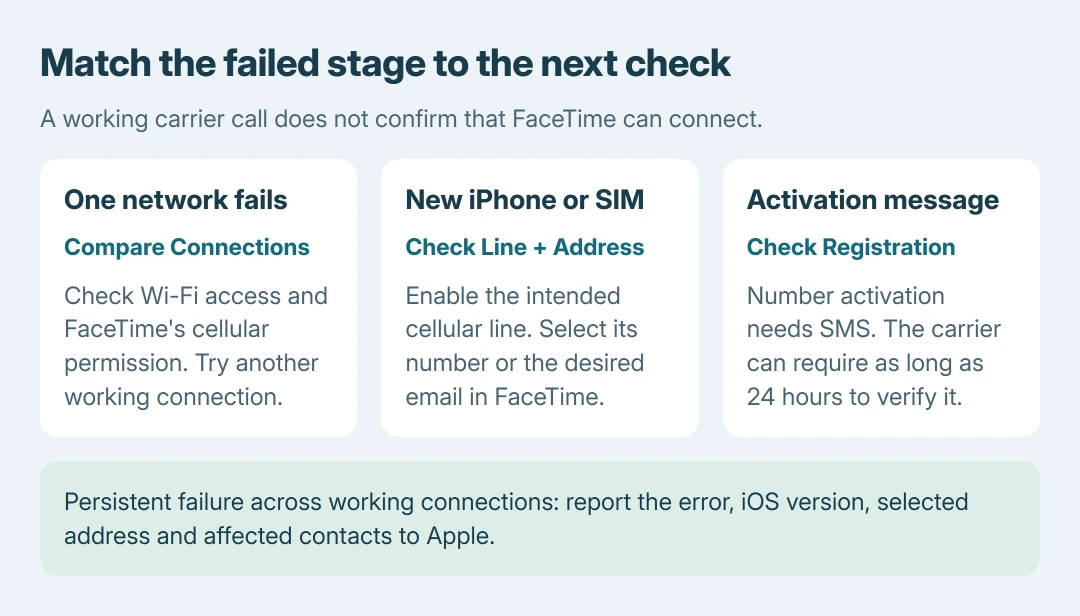
After setting up a new iPhone or changing SIMs, also check that the intended line is enabled. Failed calls, pending activation and absent controls require separate actions.
Check internet access and the selected FaceTime address
Open a webpage on the iPhone to check the current internet connection. Then open Settings > Apps > FaceTime and confirm FaceTime is enabled. Sign in if the account option requests it.
Apple documents the address choices in its FaceTime setup guide. In the reachable-address section, select the number or email people should call; Caller ID controls the outgoing identity separately.
Status: FaceTime calling, setup and activation instructions checked October 26, 2026. This guide concerns iPhone call failures. No FaceTime call was placed.
Ask the other person to call a selected address. For an outgoing test, open FaceTime > New Call and enter the number or email they confirm is enabled at their end. This address comparison is ours, not a hardware test.
If a contact shortcut launches a different app, check the calling-app selection instead. That is a different symptom from FaceTime attempting a call and failing.
If one contact fails but another connects, check that first person's enabled address and connection. That result does not establish that this iPhone needs a reset.
Compare Wi-Fi with cellular data
Try the call over a second working internet connection. Before using cellular, check the plan's data allowance and Settings > Cellular: the FaceTime data switch must be on.
Apple says FaceTime supports cellular calling in its iPhone calling instructions. A FaceTime-specific cellular switch can explain calls working on Wi-Fi but failing after leaving it.
For calls that connect but freeze, break up or drop, have both people check their connections. Pause large downloads or other heavy use on the shared network and retry near reliable coverage.
Apple's call-failure guidance names slow networks and access restrictions from routers, firewalls or security software. A call working elsewhere points toward that connection, rather than proving the app itself is damaged.
On a school or work network, ask its administrator about the restriction. Check Apple's System Status link on the support page as well; during a reported FaceTime outage, settings changes do not restore the service.
Restore the right line after new-phone setup
Update through Settings > General > Software Update if an iOS update is available. Next, open Settings > Cellular and check the line intended for FaceTime is switched on, especially with multiple SIMs.
Return to Settings > Apps > FaceTime. Turn FaceTime off and back on, then select the desired phone number. Apple's post-setup checklist also calls for automatic date and time and a device restart.
Check Settings > General > Date & Time > Set Automatically. Restart normally, then retry the same call. If an activation message appears, follow that branch before making further call-setting changes.
Treat a waiting activation message separately
Apple states in its activation instructions that phone-number registration needs SMS and the carrier may need as long as 24 hours to complete verification. Carrier charges can apply to the activation text.
Check internet access, iOS and the correct time zone. If verification still has not completed after that period, ask the carrier whether international SMS can be sent and received, then follow Apple's escalation instructions.
For the full activation sequence, the iMessage and FaceTime activation checks cover that shared registration task. Avoid treating repeated call attempts as proof that activation finished.
Missing controls and persistent failures need different help
A missing or unusable FaceTime setting belongs with the FaceTime availability checks. Apple's current checklist includes both Camera and FaceTime under Screen Time's Allowed Apps & Features.
Some countries, regions and carriers limit FaceTime features. A missing feature does not establish a faulty camera or an account password problem.
Contact Apple Support if calls fail across working connections. Supply the iOS version, error, activation status and affected contacts. Identify the selected line if the trouble began after moving SIMs.
The Short Version
Check internet access and FaceTime's enabled address, then compare Wi-Fi with cellular data. Verify the line and number after new-phone setup. Follow activation errors separately; take persistent call failures to Apple.

Isaac Smith is the founder and editor of PC Glance, a website that covers computers, laptops, and technology. He is a tech enthusiast and a computer geek who loves to share his insights and help his readers make smart choices when buying tech gadgets or laptops. He is always curious and updated about the latest tech trends.