
AirPods cleaning depends on the part: wipe the body, rinse detached silicone tips separately, and use Apple's model-specific procedure for the meshes. Check the AirPods generation before applying liquid to a speaker or microphone opening.
The current mesh method covers AirPods 3, 4 and 5, plus AirPods Pro 2 and 3. It requires specified supplies and complete drying before the earbuds return to the charging case.
Identify the model before cleaning an opening
On the paired iPhone, open Settings > Bluetooth and open the AirPods entry with its information control. Compare the model number with Apple's AirPods identification page.
Apple documents different mesh-cleaning areas for each supported model. Open its regular AirPods cleaning page or AirPods Pro page and match the circled areas to the earbuds.
Status: AirPods maintenance checked October 26, 2026. Mesh coverage includes AirPods 3, 4, 5 and Pro 2, 3. No earbuds were cleaned or measured.
The liquid-and-brush mesh procedure is not listed for AirPods 1, AirPods 2 or AirPods Pro 1 on those pages. Do not extend it to another generation or to AirPods Max.
Wipe the body and clean the case
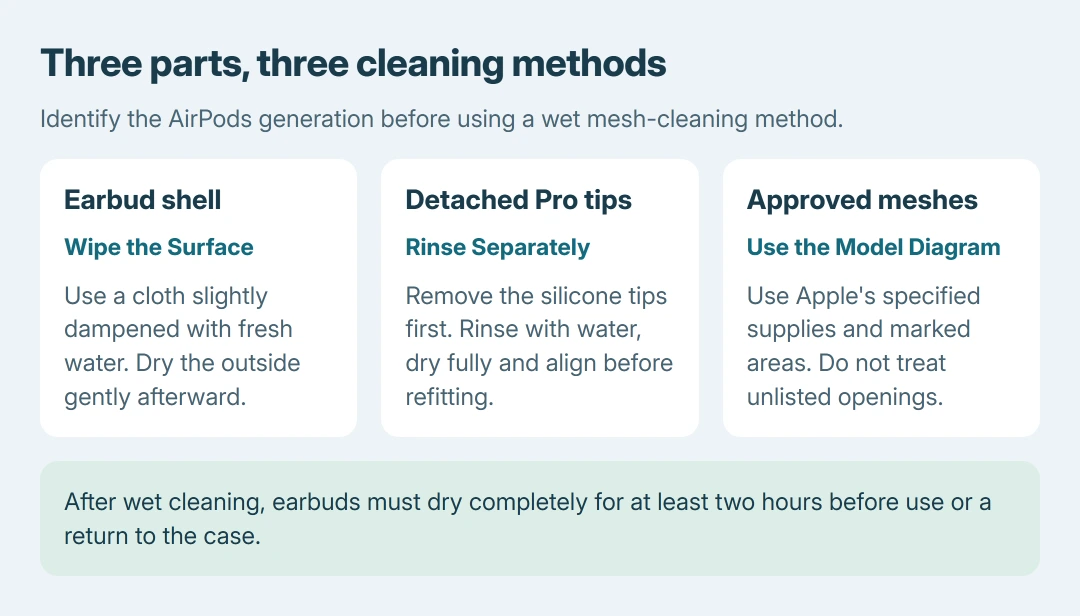
For dirt or residue on an earbud's body, wipe with a cloth barely dampened with fresh water, then dry it using a soft cloth that leaves no lint. Do not run earbuds under a faucet or scrape them with a sharp tool.
Wipe the case with a dry cloth. Apple says a little isopropyl alcohol on that cloth is permitted when needed; keep liquid out of the charging openings and let the case dry.
Use a clean brush with soft, dry bristles to remove loose dirt around the case's charging socket. Avoid inserting an object into the port or scraping its metal contacts.
If one bud remains empty after safe cleaning and charging, the separate earbud battery checks show how to distinguish the case from a single-earbud problem.
Remove and rinse AirPods Pro ear tips separately
Grip each silicone tip at its base and pull it off. Rinse the detached tip with water, without soap or household cleaner. Dry it completely, align its oval opening and press it back until it clicks into place.
Apple states that tips must be removed before cleaning Pro 2 or Pro 3 meshes. A rinsed tip and a wet earbud are different things; keep the loose tips separate while working on the earbuds.
Apple also lists an optional immersion procedure specifically for Pro 3. It has additional handling requirements; do not apply that model-only procedure to older AirPods or treat it as permission to rinse every earbud.
Brush only the meshes Apple marks for this model
Use the cleaning kit Apple lists, or gather its specified alternative supplies: micellar water containing PEG-6 Caprylic/Capric Glycerides, distilled water, a child's soft toothbrush, two cups and a paper towel.
For AirPods Pro, use the model diagrams to locate the permitted areas after removing the tips. For AirPods 3, 4 or 5, use the corresponding diagrams on the regular AirPods page.
- Pour a little micellar water into one cup and saturate the brush bristles.
- Hold the earbud so the selected mesh faces upward. Brush in circles for roughly 15 seconds.
- Invert the earbud and blot the mesh against the paper towel.
- Repeat that wet-brush and blot sequence twice more, making three cycles for the mesh.
- Rinse the brush in distilled water. Use distilled water for another brush-and-blot pass to remove the micellar residue.
Avoid treating unmarked openings. The diagrams matter because the authorized cleaning areas differ between generations; a generic earbud drawing cannot establish which opening is safe.
Let the cleaned earbuds dry before use
After the wet cleaning, leave the earbuds until completely dry, with at least two hours before wearing or putting them in the case. Check that any detached tips are dry too.
Drying time is part of Apple's cleaning method. Charging immediately to test the result skips that instruction.
If cleaning leaves the sound or charging fault unchanged, request Apple service, identifying the generation and troublesome earbud. For a separate connection fault, use the model-matched AirPods reset controls after everything is dry.
The Short Version
Match the model and the part first. Wipe the shell and case, rinse detached tips, and clean only the meshes Apple marks using its specified supplies. Finish the drying period before charging or listening again.

Isaac Smith is the founder and editor of PC Glance, a website that covers computers, laptops, and technology. He is a tech enthusiast and a computer geek who loves to share his insights and help his readers make smart choices when buying tech gadgets or laptops. He is always curious and updated about the latest tech trends.