
You go to add a second line, open Cellular, and Add eSIM is simply not on the screen. I know how that lands when you have already bought the plan, and I am sorry, because two of the six reasons have no fix at all.
The other four do have answers. One of them takes about ten seconds to check.
I have put them in the order that fits the most people first.
1. Check the EID, because it tells you whether the hardware is there
Do this before anything else, because it splits the whole problem in two.
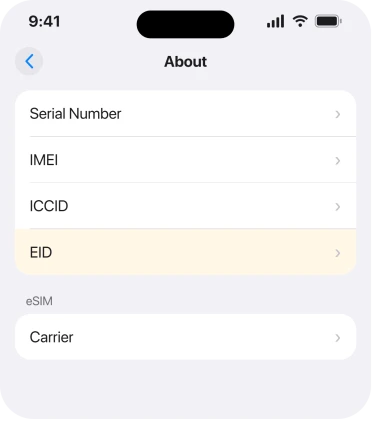
Apple, in Find the serial number, EID, or IMEI on your iPhone: "Open the Settings app, then tap General. Tap About. Look for the serial number. You might need to scroll down to find the EID, IMEI/MEID, and ICCID."
That EID is the identifier of the eSIM chip itself.
A Level 10 member with 444,696 points, posting as SravanKrA, gave exactly that check on a thread about this, and added the reason it matters: eSIM is unavailable on iPhones sold in mainland China.
Apple states nothing about restoring a chip that is not there. No EID line at all? Then your phone has no eSIM hardware. No setting, update or restore adds it. The original poster on that thread confirmed their EID was not showing.
If the EID is there, the hardware is fine and one of the next five is your answer.
2. Look at the model number on the same screen
One line up from the EID, and it settles the hardware question completely.
On the About screen, read the Model Number. Handsets built for mainland China carry a part number ending in CH/A, and those are the ones without eSIM hardware.
Worth knowing before you argue with a seller. Especially on a second-hand or imported phone, because one bought abroad can look identical to yours and be built to a different specification.
I want to be careful here. The CH/A identifier is widely and consistently reported, and Apple's own community members point at the China exception, but I could not find an Apple page that spells out the part-number suffix.
Treat it as a strong indicator rather than documentation.
3. On an older iPhone, one eSIM may be all you get
Now the cause that catches people who definitely have the hardware, because the EID is right there.
Shirley_Knott put it plainly on the same thread: "iPhone 11 can only support one eSIM at a time. Delete the current one and Add eSIM should reappear."
So if you already have a line installed on an older model, the slot is taken. The option disappears rather than greying out. Nothing is broken. There is simply nowhere to put the new one.
Go to Settings > Cellular and read the list of lines at the top. If one is an eSIM and your model only holds one, you have found it.
Deleting an eSIM is not reversible on your own. So ring the carrier that issued it first, and ask how they reissue it. Our page on an eSIM stuck on Activating covers what that process involves.
4. Check whether the phone is carrier locked
Quick to rule out, and it explains a phone that has the hardware and still refuses.
A locked handset is tied to one network. A second carrier's eSIM is exactly what that lock exists to prevent. So on a locked phone the option can be absent rather than present and failing.
Before you ring anybody, check the carrier settings. Apple, in If you can't set up an eSIM on your iPhone: "Tap About. Scroll down to the eSIM section. Your iPhone's carrier name and a version number is next to Carrier. Tap the version number. If an update is available, you'll see a prompt to select OK or Update."
Then ring the network the phone came from. Ask two things. Is this handset unlocked, and does your plan support eSIM at all? Only they can answer either one.
That is a five minute call and it either clears the theory or ends the search.
5. Look for a restriction or a management profile
The commonest cause on a work or family phone, and it is invisible until you go looking.
Screen Time can lock cellular account changes, which removes the controls rather than dimming them. Open Settings > Screen Time > Content & Privacy Restrictions and check whether restrictions are on.
Then check Settings > General > VPN & Device Management for a configuration profile.
Apple, in Install or remove configuration profiles on iPhone, documents that screen as where installed profiles live: "You can see the profiles you have installed in Settings > General > VPN & Device Management."
A work profile can remove cellular settings entirely, and only whoever manages the phone can lift it. If other cellular settings look wrong too, cellular greyed out on iPhone covers the same mechanism from the other side.
6. If it vanished the day you updated, report it and wait
The narrowest case. And I have to tell you plainly that nobody on the threads has fixed it.
The report behind this page is dated 7 April 2026, from an iPhone 11 in the United States running iOS 26.4 after coming from iOS 18. The option went the moment the update finished, and the EID stopped displaying with it.
jimenezn87 reported the same shape on an iPhone 14 Pro on iOS 26. Their words were that the update had bricked eSIM for them.
No confirmed fix appears on that thread. Nobody posted a step that brought the option back after an update.
What is worth your time: get onto the current build. Restart properly. Then report it through the Feedback form so the volume is recorded. After that, ring the carrier.
A reissued eSIM profile is the one route that involves somebody who can actually change something.
What does not help
- Resetting network settings. It does not add missing hardware, lift a lock or remove a profile.
- Erasing the phone. Two of the six causes survive an erase because they are physical or account-level.
- Buying an eSIM plan first and troubleshooting after. Check the EID before you pay for anything.
- Comparing with a friend's identical-looking phone. Model numbers differ by market, and that is the whole point of rung 2.
Status: iOS 26.6.1, checked 19 August 2026. Reported on iOS 26.4 with no fix posted on the thread. The EID route and the profiles screen are Apple's own wording.
Why is Add eSIM missing on my iPhone?
Either the phone has no eSIM hardware, which the missing EID line tells you, or the slot is already used on a model that holds one eSIM, or a carrier lock, restriction or management profile is removing the option.
Where is the EID on an iPhone?
Settings, then General, then About. Scroll down and look for EID. If that line is absent, the phone has no eSIM chip and nothing on the software side will add one.
Can an iOS update remove Add eSIM?
Owners report it disappearing immediately after updating, including on iOS 26.4, and no fix has been posted on those threads. It is worth updating fully, restarting, and then asking the carrier to reissue the profile.
Does every iPhone support eSIM?
No. iPhones sold in mainland China do not, and older models can hold only one eSIM at a time, so the option disappears once a line is installed.
The Short Version
- Check Settings, General, About for an EID before anything else.
- No EID means no eSIM hardware and no software fix.
- A part number ending CH/A points at a mainland China handset.
- Older models hold one eSIM, so a filled slot removes the option.
- A carrier lock can hide it on a phone that has the hardware.
- Screen Time and management profiles remove cellular controls entirely.
- After an update, nobody on the threads has posted a working fix.
Where to Next
A missing row looks like a bug. That is why this wastes so much time, because four of the six causes are not bugs at all. They are hardware, a market, a lock or a policy.
So spend the first minute on the About screen. EID present or absent decides which half of this page you are in, and it costs nothing.
Two lines settle this faster than anything else: the model number on your About screen, and whether the EID is there at all.
Send me both and I can build a clearer picture of which models are losing the option after an update rather than never having had it.

Isaac Smith is the founder and editor of PC Glance, a website that covers computers, laptops, and technology. He is a tech enthusiast and a computer geek who loves to share his insights and help his readers make smart choices when buying tech gadgets or laptops. He is always curious and updated about the latest tech trends.