
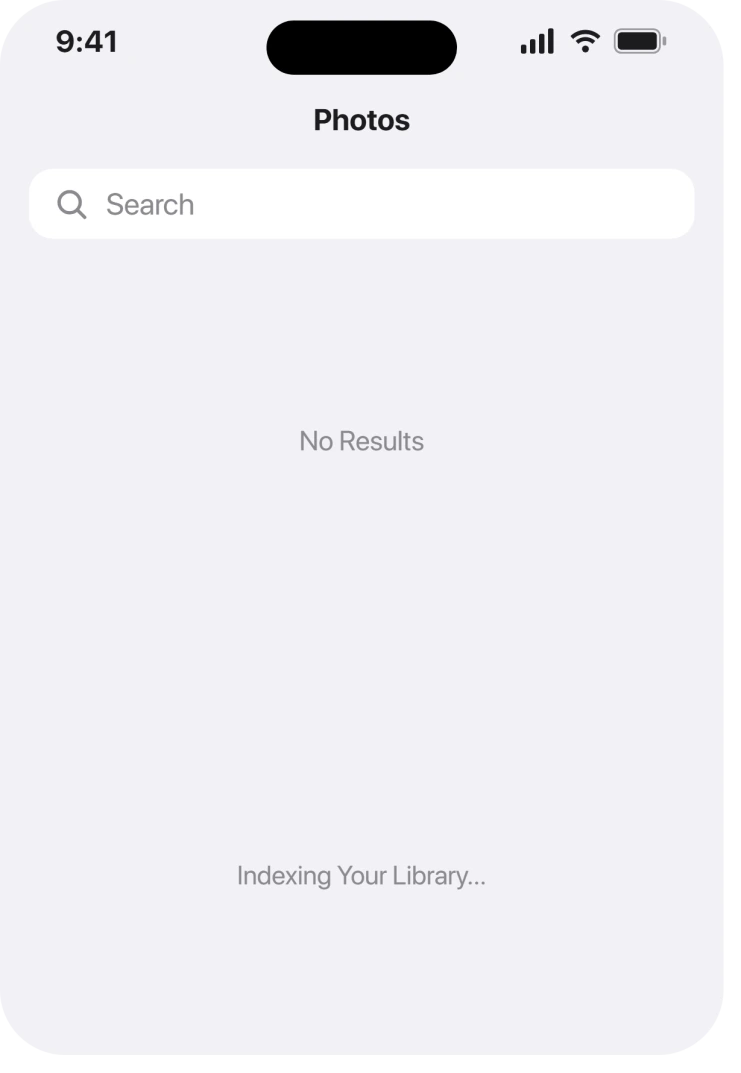
You search for a person or a beach or a receipt, something you know is in there, and Photos gives you a line at the bottom reading Indexing Your Library. Having your own photos stop being findable is genuinely worrying.
Let me explain what that line means and what makes it finish.
The short answer: indexing only runs while your iPhone is locked and plugged in, and on a big library it can take days. Leave it charging overnight, locked, and do not open Photos.
For most people that is the entire answer. Below: why it works that way, how long is too long, and what to do once waiting has clearly failed.
After the iOS 27 update
If Photos search went blank after iOS 27, the update is the likely reason. Apple's iOS 27 notes list "Improved search" that "provides more relevant and comprehensive results in Spotlight, Photos, and Mail".
My reading, and it is ours: a new search means Photos rebuilds its index, so everything on this page applies again from the start.
Owners report exactly that. One wrote: "I'm unable to search in my Photos App, search result 0." An adviser replied that Photos has to re-scan every image, which can take days on a large library.
Most people just need to wait. One owner was still waiting after more than a week: "Still broken for me. This is the longest time i've been waiting for it to finish."
If that is you, the section on when waiting has really failed is further down.
Where Apple actually documents this
This is the part that makes the problem so hard to solve. Apple does explain indexing, on exactly one page, and that page covers something else entirely.
It is the article about the Duplicates album being missing. Nothing about it says search. So nobody looking for a dead search bar ever lands on it.
Apple, on that page: "The detection process requires iPhone to be locked and connected to power. Depending on what tasks are running in the background and the size of your photo library, the process could happen quickly or take up to a few days to complete."
Two conditions and a duration. Locked, connected to power, and up to a few days.
Apple also confirms the message you are looking at: "If your iPhone is indexing your library, a status message appears at the bottom of the Photos app."
Why picking the phone up keeps resetting your progress
Now the bit that explains the loop people get stuck in.
The work pauses when the phone is unlocked. So the natural thing to do, which is to keep opening Photos to check on it, is the one thing guaranteed to stop it.
Same with unplugging. A phone that charges for an hour in the morning gets an hour of chances, and a large library needs far more than that.
So the instruction is an uncomfortable one. Plug it in at night, lock it, and leave it completely alone until the next day.
How long is genuinely too long
Apple says a few days. What owners describe is longer than that, so here is where you should set your own expectation.
On an Apple Community thread about an iPhone 13 mini stuck on this exact message, the person who raised it came back to report the ending: "looks like its starting t search now …. after 10 days, not sure if any of the suggestions (reset/turn off & on locations services / leave on power overnight etc etc) did anything or it just took that long?"
Ten days, and even they could not tell you what fixed it.
Ours, and marked as ours: we would give it a week of properly locked, properly charged nights before treating it as broken. That is our line, not Apple's. Apple publishes no threshold at all.
Two things that genuinely restart the clock
Narrower now, and these two catch people who followed every instruction.
A restore or a new phone. The index does not travel. Set up a new iPhone from a backup and it starts indexing from zero, however long the old one had been running.
A library still downloading. If iCloud Photos is still pulling originals down, there is nothing complete to index yet.
Check that first, because iCloud Photos stuck on Syncing Paused will hold this up indefinitely and looks nothing like an indexing problem.
Low Power Mode belongs in the same category. It exists to defer background work, and this is background work, so turn it off while you wait.
If the album is what is missing rather than the search
Worth separating, because the two share a cause and you need a different page for each.
Indexing feeds more than search. If your complaint is that the Duplicates album never appeared, why the Duplicates album is empty covers that symptom properly, including the two controls that can bury the row.
Same underlying process, different thing to check.
When waiting really has failed
Last, and it needs saying bluntly.
Some phones do not finish. Reports of the status line persisting for months exist, and no fix in any of them is confirmed.
On an Apple Community thread about photo albums not indexing on an iPhone 11, the owner tried the obvious thing and said so: "I've tried restarting the phone. Still have the problems." Two Community Specialists suggested a restart and then a software update.
The thread closed with nothing confirmed.
So if a fortnight of locked, charging nights has changed nothing, the fault is not in how you are waiting. Update iOS, because that is the only lever with any precedent behind it, and report it to Apple. Do not erase the phone over it.
What does not help
- Restarting. Tried and reported as no help on the community thread above. It does not resume anything faster.
- Turning Location Services off and on. Named among the things one owner tried across ten days, with no way to say it did anything.
- Opening Photos to check progress. Actively counterproductive, since the phone has to be locked.
- Buying more iCloud storage. Indexing happens on the device. Storage is a different problem.
- Signing out of iCloud and back in. Nothing Apple publishes connects this to indexing, and it risks a re-download that puts you further back.
Status: checked 24 September 2026 on iOS 27.0. Photos search went blank after the iOS 27 update for many owners, and one was still waiting after more than a week. Apple documents two conditions and a few days, and publishes no troubleshooting for indexing that never ends. Nothing beyond waiting is confirmed.
What does Indexing Your Library mean on iPhone?
It means Photos is still scanning your library so that searching for people, places and objects will work. Apple says the process needs the iPhone locked and connected to power, and that it can take up to a few days depending on library size.
How long should iPhone photo indexing take?
Apple's only published figure is up to a few days. In practice it depends on how many locked, charging hours the phone actually gets. One owner on an Apple Community thread reported search returning to life after ten days.
Why does my Photos search return nothing at all?
Because the index it searches is not finished. Until it is, the search field has nothing to match against, which is why a word you can see in a photo still returns an empty screen.
Can I make photo indexing go faster?
Not directly, and there is no control for it. All you can influence is how many uninterrupted hours it gets, so leave the iPhone locked and plugged in overnight and keep Low Power Mode off.
The Short Version
- Lock the phone and leave it on power. Both conditions are required.
- Unlocking pauses the work, so checking on it is what keeps stopping it.
- Apple's figure is up to a few days, and only on a page about the Duplicates album.
- A restore or a new iPhone starts the index again from nothing.
- A library still downloading from iCloud cannot be indexed yet.
- One owner reported it finishing after ten days and could not say why.
- Nothing beyond patience and an iOS update has ever been confirmed to fix it.
Where to Next
The reason I would rather you read this than another list of resets is that almost everything you can do here makes it worse. This is one of the rare iPhone problems where the correct action is to put the phone down.
Where whole ports have gone dead on a Mac after Tahoe rather than a search index, that is a firmware-level fault.
If search works again but Clean Up blurs a face you wanted gone, six workarounds for the Safety Filter are ranked here.
If yours has been indexing for weeks and something finally shifted it, tell me what and I will add it, because right now there is nothing confirmed to point anybody at.

Isaac Smith is the founder and editor of PC Glance, a website that covers computers, laptops, and technology. He is a tech enthusiast and a computer geek who loves to share his insights and help his readers make smart choices when buying tech gadgets or laptops. He is always curious and updated about the latest tech trends.