

Your Mac updated to Tahoe, and now the rear USB-C and Thunderbolt ports are dead. A keyboard, a drive, a whole dock, all ignored, while the front ports carry on as normal.
For years, the fix for dead Mac ports was an SMC reset. Apple silicon Macs have no SMC, and the NVRAM key combo does nothing either, so that route is closed.
The ports almost certainly did not fail. Tahoe stopped feeding them, usually after the Mac has slept, and a power cycle brings them back. So before you book a repair, try that with me.
Power cycle, since a restart is not enough
A normal restart often leaves the ports dead, because it does not fully drop power to them. A complete shutdown does.
Shut the Mac down fully, not Restart. On a Mac mini or Studio, unplug the power cord, wait about thirty seconds, plug it back in, and turn it on.
On a MacBook, shut down, then hold the power button for about ten seconds before starting up again.
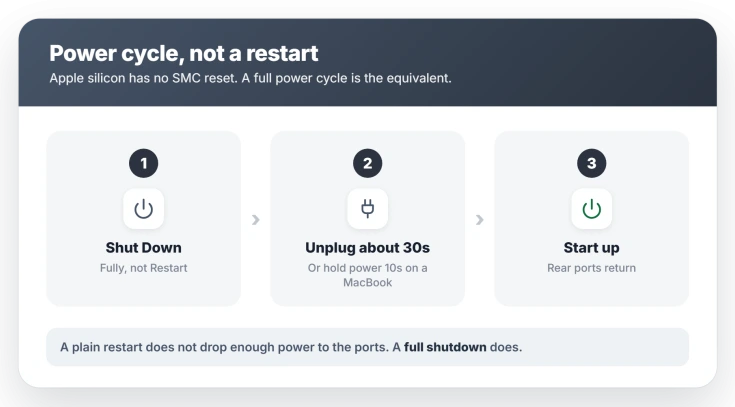
This is the closest thing an Apple silicon Mac has to the old reset.
If they return but die again the next time the Mac wakes from sleep, the cause is still attached. Keep going.
Take the dock or hub out of the loop
Tahoe is far less patient with USB hubs, docks, and switch boxes than Sequoia was, and one stuck in the middle is the most common reason a whole rear bank goes quiet.
First, power cycle the dock itself. Shut the Mac down, unplug the dock from power, plug it back in, then start the Mac. That alone clears a lot of dock cases.
If it does not, unplug the hub or switch box entirely and connect the device straight into the Mac's port. If it works directly, the hub was the part Tahoe rejected. Add it back last, once everything else is stable.
Try a shorter, better cable
Marginal cables and USB-A-to-USB-C adapters that were fine on Sequoia can be refused by Tahoe's stricter checks. A long extender with a couple of adapters in line is a common offender.
Swap in one short, high-quality USB-C cable straight to the Mac and test again. Cheap bundled cables and daisy-chained adapters are worth removing before you blame the port.
The same goes for target disk mode, where a charging cable passes power but not the Thunderbolt link the mode needs.
On a MacBook, check the accessory permission
This one is for laptops only. Apple silicon MacBooks ask permission before a new USB or Thunderbolt device can pass data, and a device stuck in that gate gets power but stays silent.
A Mac mini, Studio, or iMac has no such gate, so desktop users can skip it.
On a MacBook, open System Settings, Privacy and Security, then Accessories. Set it to Always Ask, reconnect the device to trigger the prompt, and allow it.
Apple explains the setting in Allow accessories to connect to your Mac.
Prove it is the bug, not a dead port
Before you book a repair, one test settles it. Move the exact cable and device to a front USB-C port.
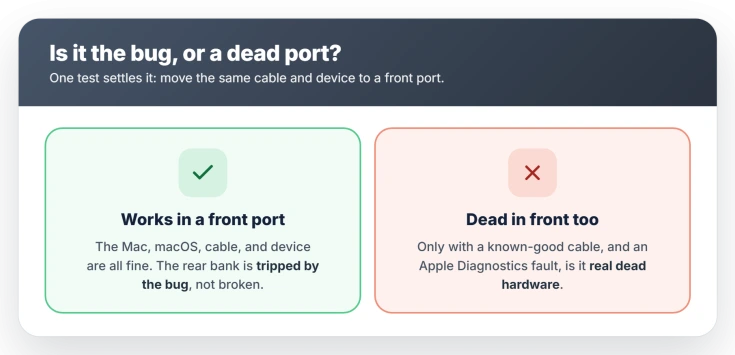
If it works up front, the Mac, macOS, the cable, and the device are all fine, and the rear bank is tripped by the bug rather than broken.
Only if a known-good cable and device also fail in the front ports, and Apple Diagnostics reports a fault, is it genuinely dead hardware.
For a drive that will not show up even on a working port, that is a separate external drive not mounting problem, and a display that stays black over USB-C is an external monitor Tahoe will not detect.
If the ports work but a two-drive enclosure shows only one drive after macOS 27, the enclosure page covers that case.
Status: Tahoe cutting power to rear USB and Thunderbolt ports is an unfixed bug through 26.x. 26.1 helped some, 26.2 hurt others. A full power cycle is the workaround, not a repair.
What will not fix it
A few instincts waste time here, because they target the wrong thing.
- An SMC reset. Apple silicon Macs do not have one, so there is nothing to reset. Guides that tell you to are written for older Intel Macs.
- The Option-Command-P-R key combo. That NVRAM reset does nothing on an M-series Mac, which clears it automatically at each boot.
- Booking a repair before the front-port test. If the front ports work, the hardware is fine, so a shop visit changes nothing.
- A plain restart on its own. It often does not drop enough power to the ports. Use a full shutdown and power cycle instead.
Why did my Mac's USB ports stop working after Tahoe?
Tahoe changed how the Mac powers its USB and Thunderbolt ports and is stricter about hubs and cables, so the rear or dock ports can go dead, most often after the Mac sleeps, and read as dead without having failed.
A full shutdown and power cycle usually revives them.
How do I reset the SMC on an Apple silicon Mac?
You cannot, because Apple silicon Macs have no SMC.
The equivalent is a full shutdown followed by a power cycle: unplug a desktop Mac for about thirty seconds, or hold a MacBook's power button for ten seconds, then start up.
Are my Mac ports broken, or is it a Tahoe bug?
Move the same cable and device to a front USB-C port. If they work up front, nothing is broken and the rear ports are tripped by the bug.
It is only hardware if a known-good cable and device also fail in the front ports and Apple Diagnostics finds a fault.
Did a macOS update fix the USB port bug?
Not reliably. Version 26.1 improved it for some, 26.2 made it worse for others, and reports continue. Check Software Update, but treat the power cycle and the hub check as the real fix for now.
The Short Version
- The ports did not die. Tahoe stopped feeding the rear and dock ports, usually after sleep, and a full power cycle brings them back.
- Shut the Mac down fully, not Restart, unplug the power for about thirty seconds, then start it. On a MacBook, hold the power button ten seconds.
- Pull any hub, dock, or switch box out of the middle and plug the device straight in. Power cycle a dock separately.
- Swap a long or cheap cable for one short, high-quality USB-C cable.
- To tell the bug from dead hardware, move the same cable and device to a front port. If it works up front, nothing is broken.
Where to Next
- A single drive that will not mount, even on a good port: External drive not mounting after Tahoe
- A display that stays black over USB-C: External monitor not detected after Tahoe
- The Mac not coming back after sleep: Mac won't wake from sleep on Tahoe

Isaac Smith is the founder and editor of PC Glance, a website that covers computers, laptops, and technology. He is a tech enthusiast and a computer geek who loves to share his insights and help his readers make smart choices when buying tech gadgets or laptops. He is always curious and updated about the latest tech trends.