
You put on a podcast to drift off to, and in the morning it was still playing, your AirPods flat and the episode long over. The iOS 26 feature meant to pause them once you fall asleep did nothing.
You can never quite watch it work. It pauses only once you are truly asleep, so the moment it acts, you are not there to see it. That is why it gets written off, when the fix is almost always setup.
Three things decide whether it can pause at all, and I would start with the switch.
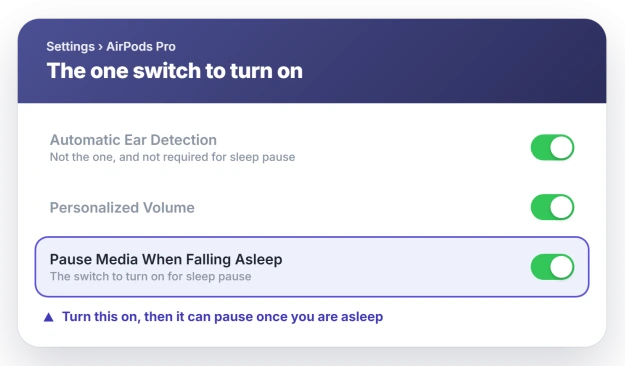
Turn the switch on first
Most people are stuck right here. The feature does not run until you switch it on, and plenty of people never do, so a setting nobody opened sits there doing exactly nothing.
Connect your AirPods, open Settings, and tap their name near the top, under your Apple Account. Scroll to the bottom and turn on Pause Media When Falling Asleep.
Apple lists it under Change settings for AirPods.
If you do not see your AirPods listed at the top, they are not connected. Put them in and try again, since that row only appears when they are paired and in range.
Check your AirPods are on the short list
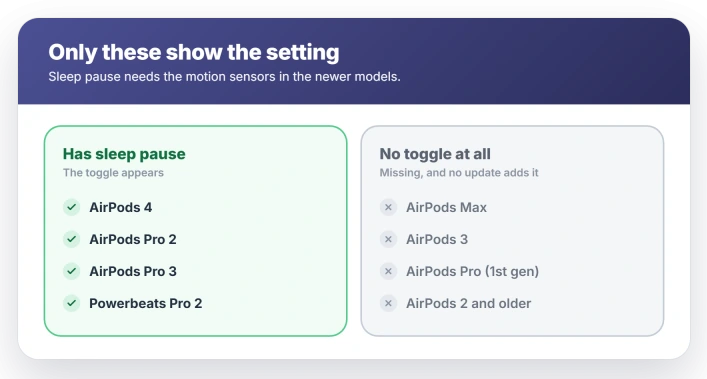
Only the newer motion-sensor models can do this, so on anything older the switch simply is not there. It works on AirPods 4, AirPods Pro 2, AirPods Pro 3, and Powerbeats Pro 2.
It is missing on AirPods Max, AirPods 3, the first AirPods Pro, and the older standard AirPods. No update adds it to those, because they lack the sensors it needs.
Update iOS, and let the AirPods update too
The toggle needs iOS 26 on the iPhone and current firmware on the AirPods. If it is missing or grayed out on a model that should have it, one of those is behind.
Update the iPhone in Settings, General, Software Update.
AirPods firmware updates on its own, but only while they are charging and near an unlocked iPhone on Wi-Fi, so leave them in the case on the charger for a while, then look again.
You cannot test it in a minute
This trips up even people who did switch it on. It waits for genuine sleep, not for you to hold still for a moment.
Apple describes it as reacting to inactivity, and has never said how long that takes.
So lying down with your eyes shut for a minute proves nothing. The audio keeps playing because, as far as your AirPods can tell, you are awake. The only real proof is waking up to find it already paused.
If instead your audio cuts out while you are wide awake, that is a different problem, the kind covered in AirPods cutting out on iOS 26, and AirPods quietly dropping their own volume is AirPods keep lowering the volume.
Skip the ear detection advice
A lot of guides tell you to toggle Automatic Ear Detection off and on to fix this. That is the wrong setting.
Sleep pause works whether ear detection is on or off, and whether you have one bud in or both.
Apple lists no ear-detection requirement for it, so flipping that switch does nothing for this, even though the two sound related.
Status: sleep pause is a standard iOS 26 feature. It runs only once you switch it on, and only on the four newer sensor-equipped AirPods, so if it did nothing, turn it on and confirm your model.
What will not fix it
When the feature is on, your AirPods support it, and everything is current, the standard AirPods reset routine is aimed at the wrong thing.
- Forgetting and re-pairing the AirPods. That clears connection glitches, not a setting you never enabled or a model that never had the feature.
- A factory reset of the AirPods. Same story. It will not add sleep pause to a model that lacks the sensors.
- Restarting the iPhone. There is no stuck process here to clear.
- Toggling Automatic Ear Detection. That is a different sensor, and it does not gate this feature.
Which AirPods pause media when you fall asleep?
AirPods 4, AirPods Pro 2, AirPods Pro 3, and Powerbeats Pro 2. It relies on motion sensors those models have, so AirPods Max, AirPods 3, the first AirPods Pro, and the older standard AirPods never show the setting.
How do I turn on AirPods sleep pause on iOS 26?
Connect the AirPods, open Settings, and tap their name near the top. Scroll to the bottom and turn on Pause Media When Falling Asleep. If the AirPods name is not there, they are not connected yet.
Why won't my AirPods pause when I fall asleep?
Usually it was simply never switched on. After that, check that your AirPods actually support it and are on current firmware.
And remember you cannot confirm it with a quick test, because it only acts once you are truly asleep.
Does AirPods sleep pause need Automatic Ear Detection?
No. It works whether ear detection is on or off and whether you wear one bud or both. Guides that tell you to toggle ear detection are chasing an unrelated setting.
The Short Version
- It only runs once you switch it on. Do that in Settings, tap your AirPods' name, then Pause Media When Falling Asleep.
- Only AirPods 4, AirPods Pro 2, AirPods Pro 3, and Powerbeats Pro 2 have it. AirPods Max, AirPods 3, and older never show the toggle.
- Update to iOS 26 and let the AirPods take the latest firmware, or the toggle can be missing or grayed out.
- You cannot confirm it by lying still for a minute. It waits for genuine sleep, so the only proof is waking up to paused audio.
- You do not need Automatic Ear Detection on for it, so ignore advice to toggle it.
Where to Next
- Audio cutting out while you are awake: AirPods cutting out on iOS 26
- AirPods dropping the volume on their own: AirPods keep lowering the volume
- The sound sliding to one side: AirPods balance shifting to one ear

Isaac Smith is the founder and editor of PC Glance, a website that covers computers, laptops, and technology. He is a tech enthusiast and a computer geek who loves to share his insights and help his readers make smart choices when buying tech gadgets or laptops. He is always curious and updated about the latest tech trends.