
You went to the Duplicates album to claw back some space and found it empty, or you cannot find the album at all.
Before you decide your library has no duplicates, there is one sentence from Apple that explains almost every empty collection.
Your iPhone only hunts for duplicates while it is locked and on a charger, and I would put money on that being what is happening to yours.
Photos, Collections, Utilities, Duplicates
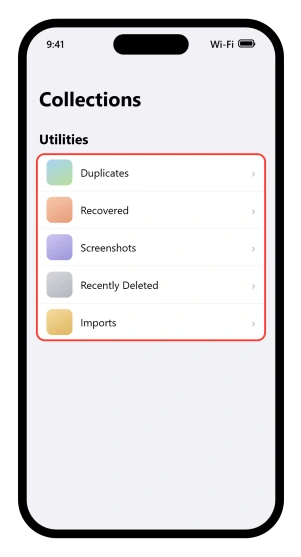
Open Photos, tap Collections, scroll to Utilities, then tap Duplicates.
Apple's merge page prints it as four steps and ends with "Tap Merge to combine a set of duplicates, then tap Merge [number] Items."
Do not tap that last step yet. Merging deletes photos, and what it takes and how to get it back are further down this page.
That route is new. It changed twice in three releases, so steps written even a year ago will not match your screen.
On iOS 16 and iOS 17 the same Apple page routed you through Albums first, with Utilities inside it. On iOS 18 the Albums step vanished. On iOS 26 it is Collections.
The word changed too. Apple called it the Duplicates album on iOS 16 and 17, and calls it the Duplicates collection on iOS 18 and iOS 26.
Both are still live Apple usage, because its own support article says album in the title and collection nowhere.
If Duplicates is not in the list at all
Apple's answer is blunt: "If you don't have any duplicate photos or videos in your library, the Duplicates collection doesn't appear."
It is not a hidden album you have failed to switch on. A missing row can mean three things though: no duplicates found, indexing not finished, or the row buried by one of the two controls on that screen.
Utilities is a list you are allowed to rearrange, so Duplicates may have been dragged out of sight.
That reorder lives inside Utilities itself, not on the button at the top: tap Collections, scroll down, tap Utilities, then tap Edit and drag the collection back.
Reset undoes every change you have made to that list.
Separately, the Layout and Reorder button at the top of Collections carries Collapse All, which hides the image tiles under each collection.
That makes the whole screen read as far shorter than it is, and it is easy to scroll straight past Utilities.
What you are looking at may not be your whole library
Two view filters change what Collections includes, and both are better settled before you merge anything.
If you use iCloud Shared Photo Library, the Collections screen offers Both Libraries, Personal Library and Shared Library.
Apple's shared library page says shared items "are separate from your personal library".
A different Apple page spells out the consequence: "When you move photos to your Shared Library, you no longer see them in your Personal Library."
Whether duplicate detection reaches across both is not something Apple documents, so if your duplicates are split between the two, you have no way to tell whether what you are seeing is the whole picture.
Photos added by plugging the phone into a computer are a separate category again, with a From My Mac switch inside Sort and Filter, then View Options, which our guide to photos landing in the wrong order walks through.
Apple notes those photos cannot be deleted on the phone at all: "If the Trash button is gray when you try to delete a photo from your iPhone or iPad, you might need to stop syncing photos from your computer."
If it is there and empty, or shorter than you expect
This is indexing, and Apple says so: "For the Duplicates album to appear, iPhone has to index your photo library and find duplicates."
Then the range, which is the part nothing else tells you: "Depending on what tasks are running in the background and the size of your photo library, the process could happen quickly or take up to a few days to complete."
A few days. Not minutes. And only while the phone is locked and on a charger, which in practice means overnight, several nights running.
So the fix is dull. Plug the phone in, lock it, leave it. Do that for two or three nights before deciding anything is broken.
Apple does say a status message appears while indexing runs, and its instruction is to open Photos, tap Library and scroll down.
Two newer Apple pages put library status somewhere else entirely: tap Collections, then the profile button in the corner, and read the status under your name.
Only that one step of the duplicates article is stale; the rest of it already uses the Collections route.
Apple itself dates the older instruction: "In iOS 17 or earlier, go to the Library tab, tap All Photos, and scroll to the bottom to see your library status." So check both places.
Apple never publishes the wording of that message either, and never says whether it updates live or reports the last pass. Read it as a sign that indexing has started rather than as a progress bar.
Note too that the newer status screen is documented for iCloud sync rather than for duplicate indexing, so it may not tell you about this at all.
If several nights have changed nothing
The likeliest answer is the dull one, that the phone looked and found nothing to group.
Before accepting that, confirm the library has finished downloading, because a library still arriving is a library not yet fully indexed.
Our guide to iCloud Photos stuck syncing covers the pauses Apple does document, including the battery and heat ones.
After that there is nothing further published. Apple offers no way to trigger detection by hand, and no way to see how far it has got.
What actually counts as a duplicate
Apple has published nothing on this. Not a definition, not an example, not a boundary.
We searched Apple's site for the phrases that would carry one, including "considered a duplicate" and "counts as a duplicate", and every pairing of Duplicates with resolution, edited, screenshot, burst, Live Photo, HEIC and saved from Messages.
Every one returned nothing about the Photos collection.
So the questions people actually have, whether an edited copy counts, whether a screenshot of a photo counts, whether the same picture saved twice from Messages counts, whether a HEIC and a JPEG of one shot count, have no documented answer.
One implication exists and only one. Apple says merging "combines the highest image quality", which suggests the phone can group copies that differ in quality. Apple never states that outright.
If your library is full of near-copies rather than exact ones, that gap is why the collection looks thin, and there is no setting to widen it.
So if you can see two photos that look identical and Apple will not pair them, that is why. I would leave them alone rather than delete by hand.
Merging, and where the other copies go
Stop here if you have not merged yet. This is the step that deletes photos.
Apple, in the one live page that still explains it: "When you merge duplicate photos, your phone combines the highest image quality and relevant data to keep one photo in your library. The other duplicate photos move to your Recently Deleted album."
Note where that sentence is. The User Guide carried the explanation on the merge page itself through iOS 17 and does not carry it on iOS 18 or iOS 26.
So the page you land on from Apple's own route tells you to merge and never says what merging does.
The copies are usually recoverable, on a clock: "Deleted photos and videos are kept in the Recently Deleted collection for 30 days before being permanently removed from all devices."
Check your iCloud storage before you merge anything, because that window is conditional.
Apple's iCloud storage page leaves no wriggle room: "If you exceed your iCloud storage limit, your device immediately removes any photos and videos you delete and they won't be available for recovery in your Recently Deleted album."
Apple states that about deleting photos rather than about merging specifically, but merging is how the copies get deleted.
Over the limit, merging is instant and final. Our guide to an iPhone that says storage is full while iCloud has room covers how to tell where you stand.
To find the copies afterwards: tap Collections, tap Recently Deleted underneath Utilities, then tap View Album.
That last tap matters, because the unlock prompt does not appear until you make it. In iOS 26 the row is locked. "The Recently Deleted and Hidden collections are locked by default. You can unlock these collections using Face ID, Touch ID, or your passcode." If you expected merged copies to be sitting there and found a locked row instead, that is why.
To bring one back, tap Select, tap the photos you want, then tap the More button and choose Recover.
To merge in bulk rather than pair by pair, tap Select, tap Select on each set, then Merge. Apple also documents a Select All, followed by Merge.
Look through the sets before you use it. Apple describes merging as combining the highest image quality and the relevant data into one photo, and never says you get to pick which copy is kept.
Three fixes that get suggested, and what Apple documents about them
Resetting network settings, a factory reset, and turning off Optimize iPhone Storage all get recommended for this. Apple documents no connection between any of them and duplicate detection, and we searched for each one.
Optimize iPhone Storage is the interesting one, because it does keep smaller versions on the phone while the originals live in iCloud. That sounds relevant. Apple has never said it is.
The charging condition is the one Apple does state, and testing it takes a night.
Status: Apple publishes the two detection conditions and a range of up to a few days, and has never published what its Photos app treats as a duplicate. Checked against iOS 26.6.
Why is my iPhone Duplicates album empty?
Either the phone has found no duplicates, or it has not finished looking. Detection only runs while the iPhone is locked and connected to power, and Apple says it can take up to a few days on a large library. Leave the phone charging and locked overnight, more than once.
Where is the Duplicates album on iOS 26?
Photos, then Collections, then scroll to Utilities, then Duplicates. It moved in iOS 18, when the Photos redesign dropped the Albums step and renamed the thing a collection. Any instruction that starts by telling you to tap Albums was written for iOS 17 or earlier and strands you at step one.
What happens to photos when I merge duplicates?
The phone keeps one copy, combining the highest image quality and the relevant data from the set. The others move to Recently Deleted for 30 days. One exception matters: if your iCloud storage is over its limit, Apple removes deleted photos immediately, with no recovery window at all.
How do I get a merged photo back?
Open Photos, tap Collections, tap Recently Deleted underneath Utilities, then tap View Album and unlock with Face ID, Touch ID or your passcode. Tap Select, tap the photos you want, then use the More button to recover them. After 30 days they are gone from every device.
Does the Duplicates album find every duplicate?
There is no way to know, because Apple has never published what its Photos app treats as a duplicate. Edited copies, screenshots of photos, and the same image in two formats may or may not be grouped. Apple's only hint is that merging combines the highest image quality, which implies copies of differing quality can be matched.
The Short Version
- Detection only runs while the iPhone is locked and on a charger. That one sentence explains most empty collections.
- It can take up to a few days, on Apple's own numbers, so give it several nights.
- The route on iOS 26 is Photos, Collections, Utilities, Duplicates. Anything that starts at Albums was written for iOS 17.
- A missing Duplicates row usually means none were found, but indexing may still be running, or the row may be buried.
- Utilities can be reordered and collapsed, which hides the row while duplicates exist.
- Check which library you are viewing before you trust the count, and settle the Shared Library filter first.
- Merging keeps the highest image quality and sends the rest to Recently Deleted for 30 days, unless your iCloud storage is over its limit, in which case they go immediately and for good.
- Recently Deleted is locked behind Face ID by default in iOS 26, so merged copies can look like they vanished.
- Apple publishes no definition of a duplicate, so there is no published reason why a near-copy was skipped.
Photos that look wrong rather than doubled up: If the color is off, our guide to photos that look washed out covers Photographic Styles and the display settings that mimic them.
Where to Next
Before you decide your library has no duplicates, give the phone the conditions it needs. Locked, on a charger, and left alone.
Overnight is the realistic answer, and there is nothing to tap in the meantime.
If it is still empty after several nights on charge, come back and tell me roughly how big your library is, because that changes how long this takes.

Isaac Smith is the founder and editor of PC Glance, a website that covers computers, laptops, and technology. He is a tech enthusiast and a computer geek who loves to share his insights and help his readers make smart choices when buying tech gadgets or laptops. He is always curious and updated about the latest tech trends.