
You set a medication schedule in Health, trusted it, and then realised at bedtime that nothing ever buzzed. Missing a dose because a phone stayed quiet is a genuinely worrying thing to discover.
I will walk you through the six causes in order, starting with the one that catches most people.
Worth saying once before we start: while you sort this out, keep whatever reminder you were using before. Do not rely on the phone until it has proved itself for a few days.
1. Follow Up Reminders is off, and it hides the switch that matters
Start here, because it explains two problems at once.
Open Health, tap Browse at the bottom right, then Medications. Tap Options at the bottom, and turn on Follow Up Reminders.
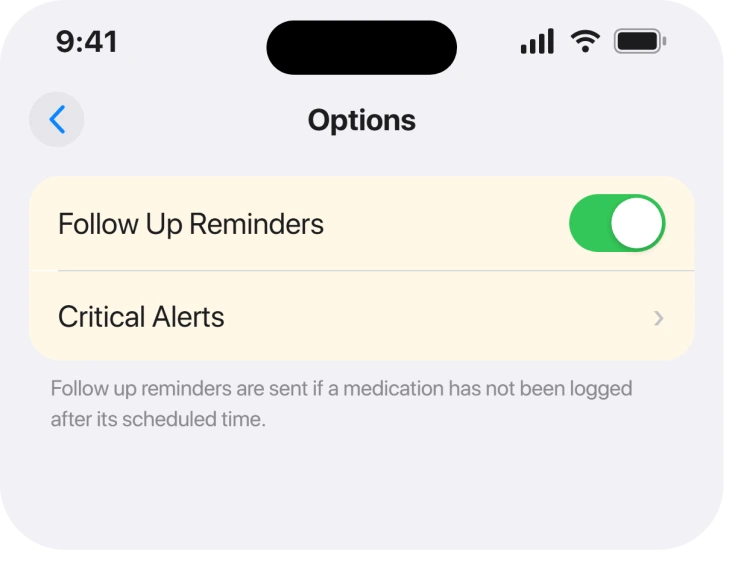
Apple, on the Medications page: "If you set a medication schedule, you receive notifications from the Health app reminding you to log the medication. You can receive follow-up reminders if a medication hasn't been logged 30 minutes after the scheduled time."
So that is a documented second chance, half an hour later, that most people never switch on.
The reason it matters more than it looks is what sits underneath it. Apple: "When you turn on Follow Up Reminders, you can also turn on Critical Alerts for each of your medications."
Critical Alerts does not appear until Follow Up Reminders is on. That is why searching for it turns up nothing.
2. Critical Alerts, which is the one that beats a Focus
Now the fix for the commonest real-world failure, which is a reminder that fires silently at exactly the wrong time.
Apple: "Critical Alerts appear on the Lock Screen and play a sound (even if a Focus is on or iPhone is muted)."
Read that carefully. Sleep Focus, Do Not Disturb, a muted phone: none of them silences a Critical Alert. For a bedtime or an early-morning dose, that single line is the difference between a reminder and a missed one.
Turn it on per medication. In Medications, tap Options, tap Critical Alerts, tap the button next to a medication, then tap Allow.
It is deliberately per drug rather than global, so adding a new medication later does not inherit it.
3. Health's notifications may be switched off at the system level
Quick to check and easy to have done by accident.
Everything above depends on Health being allowed to notify you at all. Apple names the route while explaining how to turn Critical Alerts back off: Settings, Apps, Health, then Notifications.
Go there and confirm Allow Notifications is on, that Lock Screen is ticked, and that Critical Alerts is on if you enabled it in Health.
If your notifications are arriving but hours after they should, that is a separate fault, and notifications arriving late on iOS 26 covers it properly.
If Health is quiet while everything else is fine, an iPhone that buzzes with no notification works through the same permission chain.
4. You archived the medication, and the schedule went with it
Narrower, and it produces a very confusing symptom, because the drug is still in the app.
Archiving is a swipe on the list, so it is easy to do without meaning to. Bringing it back does not restore what it had.
Apple is explicit about the cost: "Any schedule you previously set is not preserved."
So an unarchived medication sits there looking complete and reminds you of nothing. Tap it, scroll to Schedule, tap Edit, and set the times again.
5. Nothing is syncing between your devices
Worth a minute if you log doses on more than one device and the two disagree.
Apple: "For your Health app data to sync across devices, make sure they're signed in to the same Apple Account, are connected to the internet, and are updated to the latest OS version."
Three conditions, and the last one catches people who keep an older iPad on an old release.
A device that is out of date will not sync, and a log entered on it will not silence the reminder on the phone.
6. The Medications screen goes blank, which is a real bug and not your fault
Last, and this one has no proper fix. It deserves the space because people blame themselves for it.
Owners describe opening Medications to find it empty, or being asked to set up medications as though they had never entered any. A restart brings them back, and then it happens again.
On an Apple Community thread titled "Apple Health App / Medications Reminders STILL not working", the owner reported it running from iOS 18 through 18.3, across repeated troubleshooting and feedback sent to Apple.
Others confirmed it on an iPhone 13 Pro and an iPhone 16 Pro Max.
Two people on the same thread could not reproduce it at all. Worth knowing before you decide your phone is faulty.
One person offered a fix nobody would guess. jerrymc2 reported that turning off Automatic for appearance in Settings, Display & Brightness stopped it happening.
Owners report that and nothing else. No second person confirmed it, so treat it as a free thing to try rather than the answer. Nobody on the thread reported a documented cure, and Apple never addresses the fault anywhere we looked.
What does not help
- Deleting the medication and re-entering it. Offered on the community thread with no outcome reported afterwards. You also lose the logged history.
- Restarting the iPhone. It brings the list back and the problem returns, which owners describe repeatedly.
- Turning notifications off and on again. Not connected to the blank-screen fault by anything published or reported.
- Waiting for Critical Alerts to appear on its own. It stays hidden until Follow Up Reminders is on, so no amount of scrolling will find it.
Status: iOS 26.6.1, checked 19 August 2026. Reminders themselves are documented and configurable. The blank Medications screen has been reported since iOS 18 with no Apple acknowledgement and no confirmed fix.
Why is my iPhone not reminding me to take my medication?
Most often because Follow Up Reminders is off, or because a Focus is silencing the alert. Turning on Follow Up Reminders gives you a second prompt 30 minutes later and unlocks Critical Alerts, which Apple says sound even when a Focus is on or the iPhone is muted.
Where is Critical Alerts in the Health app?
Inside Medications, under Options, and it only appears once Follow Up Reminders is turned on. You then enable it for each medication separately rather than all at once.
Do medication reminders work when my iPhone is on silent?
Only if you have turned on Critical Alerts for that medication. Apple states Critical Alerts play a sound even when a Focus is active or the iPhone is muted. An ordinary medication notification does not.
Why did my medications disappear from the Health app?
Either the medication was archived, which removes it from the list and does not keep its schedule, or you have hit a bug reported since iOS 18 where the screen shows nothing. A restart brings the list back temporarily.
The Short Version
- Turn on Follow Up Reminders first. Critical Alerts is hidden until you do.
- Critical Alerts sound through a Focus and through a muted phone.
- Enable it per medication, because new ones do not inherit it.
- Check Settings, Apps, Health, Notifications as well.
- Unarchiving a medication does not bring its schedule back.
- Syncing needs the same Apple Account, internet and current software on every device.
- A blank Medications screen is a reported bug with one unconfirmed workaround.
Where to Next
This is one of the few things on a phone where getting it wrong actually matters, so I would rather you left with a second reminder somewhere else until the phone has behaved for a week.
If the blank screen is what brought you here, drop your model and iOS version in the comments. This has been running since iOS 18 with almost nothing written about it, and the only workaround going has exactly one person behind it.
If the reminders do arrive, but on the wrong days of an every-other-day schedule, the wrong day page covers the re-save that reset it for two owners.

Isaac Smith is the founder and editor of PC Glance, a website that covers computers, laptops, and technology. He is a tech enthusiast and a computer geek who loves to share his insights and help his readers make smart choices when buying tech gadgets or laptops. He is always curious and updated about the latest tech trends.