
You have two boxes blinking away. Or possibly one. Either way you have no real idea which is which, or why you need both. People usually ask me this when they are about to buy something and do not want to buy the wrong thing.
So I will give you the short answer first. Then the question that is usually hiding behind it, which is whether you should be renting any of this at all.
The short answer
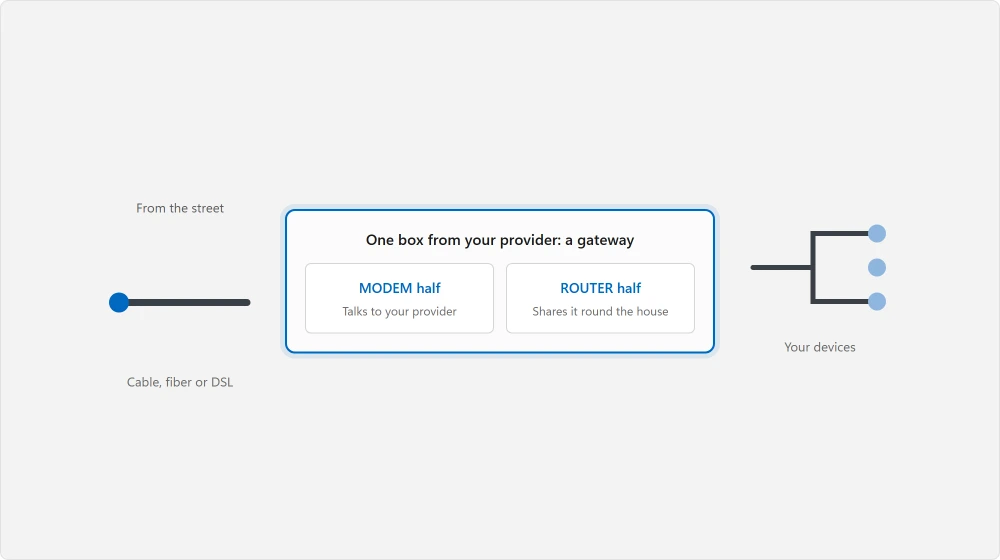
The modem connects your home to your internet provider. It speaks whatever language your line uses, whether cable, fiber or DSL, and turns it into ordinary network traffic.
The router takes that one connection and shares it around your house. It hands out addresses, runs your Wi-Fi, and lets your devices talk to each other.
One gets you online. The other spreads it around.
You probably have one box doing both
This is why the question confuses people in the first place. Most providers now supply a single unit that is a modem and a router in one, usually called a gateway.
The FCC uses all three words for this reason.
On the consumer broadband label it refers to "charges for a modem, gateway, or router" as a single category of equipment charge, because from a billing point of view they are one item on your bill.
So if you can only find one box, nothing is missing. That is a gateway.
How to tell what you have in thirty seconds
Turn the box round. Look at the back.
A modem only has one socket for the incoming line, one ethernet socket going out, and power. That is it. No aerials. Often no Wi-Fi light either.
A router only has one socket marked WAN or Internet, usually four more ethernet sockets, and power. It has Wi-Fi.
A gateway has the incoming line socket, several ethernet sockets, and Wi-Fi, all on one unit. That is also the box that goes offline and takes your printer with it when the network drops.
Got a coaxial screw connector, a phone socket, or a small fiber connector? That part is your modem.
The question you are actually asking
Almost nobody asks this out of curiosity. What you really want to know is whether to keep renting the provider's box or buy your own.
That is a money question. It has a real number attached. And you are entitled to see it.
Your provider has to tell you what the rental costs
This is the part almost nobody uses, and it is the strongest card you hold.
Documented by the FCC in its broadband label glossary: every provider must publish a consumer broadband label for each plan.
On it, "Provider Monthly Fees are fees that a service provider adds to a customer's bill every month such as a modem rental, online security services, wiring or device insurance, or other equipment related fees. Each fee must be listed out and described on the label."
The FCC is equally clear that the headline price hides it: "Monthly Price is the cost of the plan before additional charges and monthly fees such as modem rentals and taxes are added."
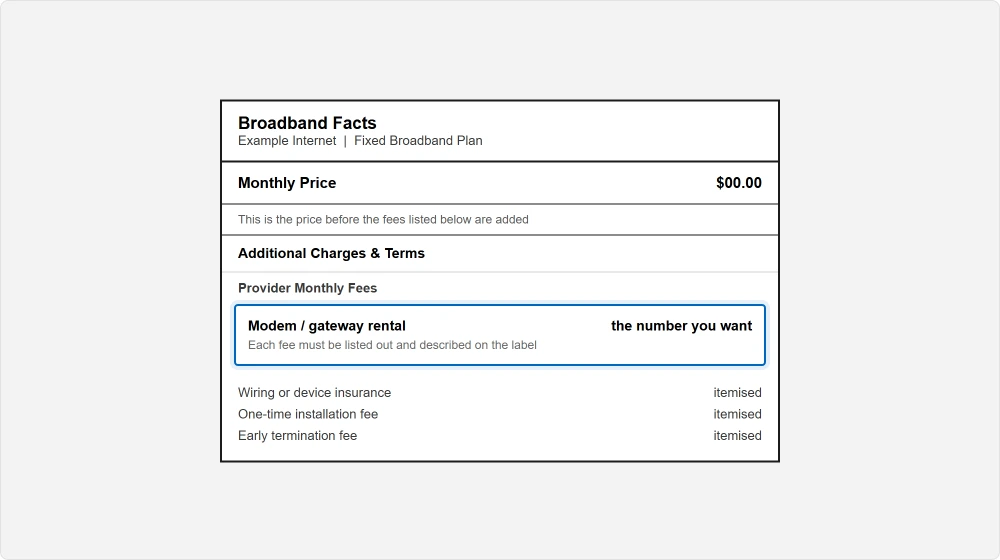
So the advertised price is not the price. The difference is itemised by law. Find your plan's label on your provider's website, or ask for it, then read the Provider Monthly Fees section.
Ours, and marked as ours: once you have that monthly figure, the sum is yours to do and it is not complicated. A rental keeps being charged while you keep the service. A box you buy is paid for once.
Where those two lines cross depends entirely on the numbers on your own bill. Which is precisely why you want your own label, not an average lifted from an article.
One-time charges must be shown too, including "the purchase of a modem or other equipment", so a provider selling you a box outright has to state that price.
When buying your own is not an option
Do not order anything before checking these, because two of them are absolute.
Fiber. If your service arrives on fiber, the box on your wall is usually provider-specific and often provider-owned. You generally cannot replace it. The router behind it is the only part you get to choose.
Some cable and DSL providers keep an approved list. A modem that is not on it will never be activated. Find that list first, not last.
Phone or TV service on the same line often requires the provider's own unit, because the extra services run through it.
Read the FCC's own list of what counts as fixed broadband against your own service: "These include cable, fiber optic, DSL, and fixed wireless internet services." The rules differ across those four.
What actually changes if you buy your own
Be honest about what you are buying here. It is not always speed.
You stop paying the rental. That is the real gain, and the only one anybody can guarantee you.
You usually get better Wi-Fi. Provider gateways are built to a price, and your own router can be chosen for the size of your house. If your complaint is dead spots at the far end of the hall, this is the part that helps.
You also take on the support. When something breaks, your provider will point at your equipment, and they are entitled to. Keep their original box in a cupboard rather than sending it straight back.
Then you can put it back and prove the line is fine.
Ours, and marked as ours: if you are renting a gateway and your only problem is Wi-Fi coverage, buying your own router and leaving the gateway in place is often the better move than replacing both.
You keep the provider's support for the connection and you fix the part that is actually annoying you.
The split that catches people out
One more thing, because it is the commonest mistake people make after deciding.
Buy a router, keep the provider's gateway, and you now have two devices both handing out addresses and running a network. That produces odd faults that look like a broken internet connection and are nothing of the sort.
If your Wi-Fi is already dropping, rule out a PC that keeps losing the connection before you blame the hardware.
Put the provider's box into what is usually called bridge or modem mode. That switches its router half off and leaves only the modem half working. The setting lives in the gateway's own admin page, and the name varies by maker.
Ask your provider to do it if you cannot find it. On some services they have to do it from their end anyway.
Status: written 21 August 2026. The FCC labels quoted here are required on every plan, and itemising the equipment fee is compulsory, not a courtesy.
Do I need both a modem and a router?
You need both functions, but usually not two boxes. Most providers supply a gateway that does both jobs in one unit. You only need separate boxes if you are supplying your own router, or if your provider gives you a modem alone.
Is it cheaper to buy my own modem than rent one?
That depends entirely on your provider's monthly rental, which they are required to itemise on your plan's broadband label. Read the Provider Monthly Fees section, then compare it against a one-off purchase price. The advertised monthly price does not include it.
Can I use any modem with my internet provider?
Not always. Many cable and DSL providers keep an approved equipment list and will not activate anything outside it. On fiber services the provider's unit is often required outright. Check the list before buying anything.
What is bridge mode and do I need it?
It turns off the router half of a provider gateway so it works as a modem only. You need it if you add your own router and keep the gateway, otherwise both devices try to run the network and you get faults that look like a broken connection.
The Short Version
- The modem connects your home to the provider. The router shares it around the house.
- One box doing both jobs is a gateway, and that is what you probably have.
- The socket for the incoming line tells you which part is the modem.
- Your provider must itemise the modem rental on your plan's broadband label.
- On fibre, and on approved-equipment lists, buying your own may not be possible.
- Adding your own router means putting the gateway into bridge mode.
Where to Next
The step I would take today, whatever you decide, is finding your plan's broadband label and reading the Provider Monthly Fees line.
Plenty of people are paying a rental on a box they assumed came free with the service, and it is itemised specifically so you can see it.
If you came here because the Wi-Fi keeps dropping rather than because of the bill, new hardware may not be the answer at all.
Rule out the settings first, and if the machine itself is struggling, the two numbers behind a slow PC is the faster check.
Say in the comments who your provider is, and whether you have one box or two. That pair decides how much choice you actually have here, and it is not the same for everyone.

Isaac Smith is the founder and editor of PC Glance, a website that covers computers, laptops, and technology. He is a tech enthusiast and a computer geek who loves to share his insights and help his readers make smart choices when buying tech gadgets or laptops. He is always curious and updated about the latest tech trends.