

You have the 2026 Studio Display, or you are about to, and you want your second monitor plugged into its spare port. It looks like it should work. Whether it does depends on the ports of your Mac, not the display.
The forum thread on it has passed 1,780 views, and I read it alongside Apple's own spec pages. Two owners tested it on different Macs, and between them they settle it.
What Apple says the display can do
Apple says the display has "One downstream Thunderbolt 5 port for connecting high-speed accessories or daisy-chaining additional displays". So the port on your display is there for exactly this.
Apple's launch notes add the fine print in a footnote. "Users can daisy-chain up to four Studio Display models with a MacBook Pro with M5 Max."
That footnote hints at the catch. Your Mac has to have enough bandwidth behind the chain.
What two owners found
The question came from a MacBook Air owner: "Can I daisy-chain a DisplayPort monitor to the new Studio Displays?" A Level 9 volunteer spotted the problem straight away: "that MacBook Air does not support Thunderbolt 5".
Owners report the reason in numbers, and it may apply to your Mac too. A Level 10 volunteer noted that one 5K display "uses essentially ALL of a ThunderBolt-3 or -4 port's bandwidth to get to 60 Hz refresh rate".
Then a MacBook Pro owner reported back in September: "Luckily, daisy-chaining to my Dell U2720Q works like a charm with my MacBook Pro M4 Pro!"
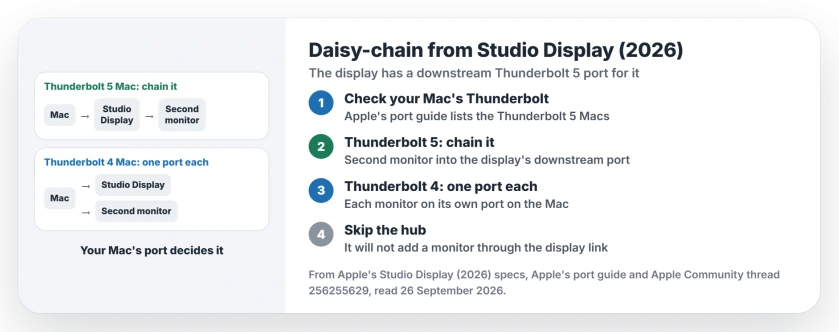
Status: Studio Display (2026), checked 26 September 2026. Its downstream port can chain a monitor from a Thunderbolt 5 Mac, an owner confirmed. On Thunderbolt 4, use one port per monitor.
1. Check which Thunderbolt your Mac has
Apple's port guide lists the Thunderbolt 5 Macs. They include the "14-inch MacBook Pro with Pro or Max chip introduced in 2024 or later" and the "16-inch MacBook Pro introduced in 2024 or later".
Also on the list: "Mac Studio introduced in 2025 or later" and "Mac mini with Pro chip introduced in 2024 or later". The same page puts "MacBook Air introduced in 2025 or later" among the Thunderbolt 4 Macs.
Not sure which Mac you have? Apple's tip is to "Choose Apple menu > About This Mac, double-click your model name, then press Command-C to copy it", then search it on the Tech Specs page.
2. On a Thunderbolt 5 Mac, use the display's spare port
Connect your Mac to the display as usual. Then plug the second monitor into the display's downstream Thunderbolt 5 port. That is all.
That is the setup the M4 Pro owner described, with a Dell 4K monitor on the end of the chain. Your second monitor needs a cable that fits a Thunderbolt or USB-C port, and that part depends on the monitor, in our reading.
3. On a Thunderbolt 4 Mac, give each monitor its own port
The Level 9 volunteer's advice was plain: "you will need to connect your two monitors via different host ports". Your Mac drives each screen separately that way.
The MacBook Air owner tried it and it worked: "I got this to work perfectly: new Studio Display and BenQ MA270U 27 inch 4K 3840×2160". Their setup: "Both monitors plugged into one port each on my MBA M4".
4. Do not buy a hub to get around it
A hub sounds like the easy answer. The same volunteer ruled it out: "Putting a hub between the MacBook Air and the Studio Display would not let you hook up your second display through that hub."
A longer cable is the better buy, so each monitor can reach its own port on your Mac. That advice is ours.
Other external display problems
If the Studio Display XDR restarts your Mac at 120Hz, the XDR kernel panic page has the refresh rate fix. If a monitor is not detected at all on Tahoe, see the external monitor page.
If your HDMI monitors stay dark on a dock's DisplayPort outputs, the active adapter page explains why a plain cable fails.
Can you daisy-chain a monitor to the 2026 Studio Display?
Yes, from a Mac with Thunderbolt 5. Apple's specs include a downstream Thunderbolt 5 port for daisy-chaining displays, and an owner with an M4 Pro MacBook Pro confirmed it works.
Why can't my MacBook Air daisy-chain from Studio Display?
MacBook Air models from 2025 on have Thunderbolt 4, according to Apple. Volunteers say one 5K display uses nearly all of a Thunderbolt 4 port's bandwidth, so plug the second monitor into its own port.
How many Studio Displays can I daisy-chain?
Apple says up to four, with a MacBook Pro with M5 Max. Other Macs may support fewer.
Will a Thunderbolt hub let me add a second monitor?
Not through the Studio Display's connection, according to a Level 9 volunteer. Give each monitor its own port on the Mac instead.
The Short Version
- The 2026 Studio Display has a daisy-chain port.
- It works from Thunderbolt 5 Macs, owners report.
- Check your Mac in Apple's port guide.
- On Thunderbolt 4, use one port per monitor.
- A hub between Mac and display will not help.
- Apple's own limit is four displays on M5 Max.
Where to Next
Check your Mac's ports before you buy a second display or a cable, so you know which setup you are building.
Did your chain work? Tell me your Mac and your second monitor in the comments. I will add each working pair to this page.

Isaac Smith is the founder and editor of PC Glance, a website that covers computers, laptops, and technology. He is a tech enthusiast and a computer geek who loves to share his insights and help his readers make smart choices when buying tech gadgets or laptops. He is always curious and updated about the latest tech trends.