
Your Mac restarts without warning while your Studio Display XDR runs at 5K and 120Hz. After the restart, a kernel panic report is waiting for you.
The forum thread about it has 47 Me too votes and 6,907 views. I read all seven pages and Apple's refresh rate page, and one setting change has stopped it for several owners.
What owners describe
The first report came from a 16-inch MacBook Pro with M2 Max: "The Mac reboots unexpectedly with no warning", and "The crash occurs every 1-2 days during normal use".
Games can bring it on quickly. One owner hit it "almost every time with Subnautica".
Your Mac model may not protect you either, since owners report it on M2 Ultra, M4 Pro and M4 Max machines too. As another owner put it, "the problem may not be limited to M2".
Apple Support gave the first owner a straight answer: "the internal team has acknowledged this is indeed a software issue and that they will look at fixing it but no ETA".
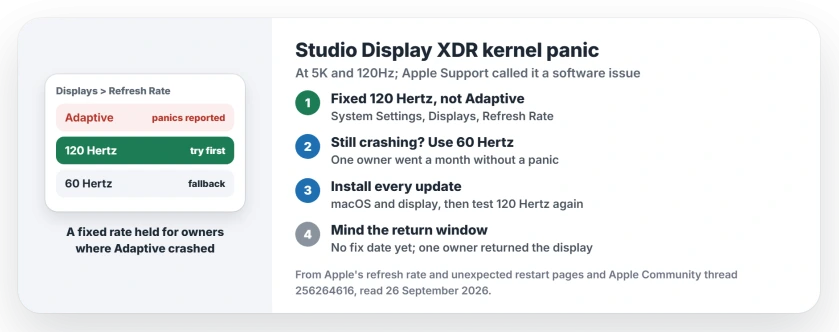
Status: Studio Display XDR at 5K and 120Hz, checked 26 September 2026. Owners report kernel panics on several Mac models. Apple Support called it a software issue, with no fix date.
1. Switch from Adaptive to a fixed 120Hz
Apple's refresh rate page recommends the Adaptive setting for this display, but if yours crashes, owners report that a fixed rate is steadier.
dorgers123 wrote: "I switched from adaptive to 120Hz fixed, and it weirdly hasn't crashed yet". RandomReptile, on an M4 Pro, said the same: "Switched to 120 Hz today and haven't had the kernel panic again".
You may even like the look. One owner found "it's noticeably smoother on locked 120hz".
To change it, open System Settings, click Displays, then open the Refresh Rate menu and pick 120 Hertz, not Adaptive.
2. If it still crashes, drop to 60Hz
Not everyone got away with 120Hz. At 60 Hertz, the reports go quiet. aslg wrote: "I am also using the refresh rate of 60 Hertz and I did not see any panics in the past month".
It is a real trade-off, and one owner called "running a display like this at 60Hz just to keep it stable isn't really acceptable". I agree, but a stable Mac beats a smooth one that restarts mid-work. That call is ours.
3. Keep macOS and the display updated
Apple says "Unexpected restarts are usually caused by software installed on your Mac, or by devices connected to your Mac". Its first step is to "Install all available software updates".
Updates alone had not fixed it by April, going by one owner on display firmware 26.4. Still, each macOS and display update is a chance, so install them and test at 120Hz again.
4. Confirm it is this crash, not another
Apple's own checklist for unexpected restarts starts with your connected devices. Disconnect them, "make sure that only a display, keyboard, and mouse or trackpad remain connected", and use the Mac as normal.
If the restarts stop when the refresh rate drops, you are looking at this bug. If they carry on at 60Hz, something else is to blame, and Apple's checklist continues with safe mode.
5. Keep the return window in mind
The first owner gave up on the wait and returned the display. With no fix date from Apple, that is a fair choice if you are still inside the return window and 60Hz is not good enough for you.
I would decide before your window closes. Report each crash to Apple Support too, so your case counts toward the fix.
Other Mac display problems
If your Mac panics with a fast third-party monitor instead, the 240Hz kernel panic page has its own fix. And if Safari scrolls roughly on a 60Hz screen, the Safari 27 scrolling page explains what helps.
Planning a second monitor on the 2026 Studio Display? The daisy-chain page shows which Macs can run one from its spare port.
If 120Hz vanished from the menu after an update instead, the XDR 60Hz page has the power cycle that brought it back.
What causes the Studio Display XDR kernel panic?
According to Apple Support, as one owner reported, it is a software issue. The crashes happen at 5K and 120Hz, on several Mac models, and the fix has no date yet.
Does a fixed 120Hz stop the XDR kernel panic?
It did for two owners who switched from Adaptive, and if that fails for you, 60Hz is the rate one owner ran for a month without a panic.
Is my Studio Display XDR faulty?
The reports point to software. Apple Support called it a software issue, and owners saw the same crash on different Macs and displays.
Has Apple fixed the Studio Display XDR crash?
Not as of 26 September 2026. Apple Support acknowledged it to one owner but gave no date.
The Short Version
- XDR at 5K and 120Hz can crash some Macs.
- Apple Support called it a software issue.
- Switch from Adaptive to a fixed 120Hz first.
- Still crashing? Use 60Hz for now.
- Install every macOS and display update.
- Decide before your return window closes.
Where to Next
Switch to a fixed 120Hz today, and note the date. If a week passes without a panic, you have your answer.
Which Mac do you run the XDR on, and did a fixed rate hold? Tell me in the comments. Each report shows which setups are safe.

Isaac Smith is the founder and editor of PC Glance, a website that covers computers, laptops, and technology. He is a tech enthusiast and a computer geek who loves to share his insights and help his readers make smart choices when buying tech gadgets or laptops. He is always curious and updated about the latest tech trends.