
Your Mac kernel panics and restarts at random on macOS Tahoe, sometimes with half the screen going black, and the box says it restarted because of a problem.
It is tempting to suspect a faulty Mac and start planning a return or a Genius Bar trip.
It is neither the Mac nor the monitor. It is a Tahoe display bug that fires when your external screen runs at 240Hz, and dropping that to 120Hz stops the crashes.
Let me help you read the panic report, because it names what died and that is the fastest route to an answer.
Drop the refresh rate to 120Hz
This is the fix that holds, and it takes about thirty seconds. Setting the monitor to 120Hz keeps it well clear of the mode that crashes, and users report days and weeks of stability after making the change.
Open the Apple menu, choose System Settings, then Displays, and select your external monitor at the top. Click Scaled, then hold the Option key, which reveals every resolution and every refresh rate the display can do.
In the Refresh Rate list, choose 120 Hertz. If you would rather be certain, 60 Hertz is safer still.
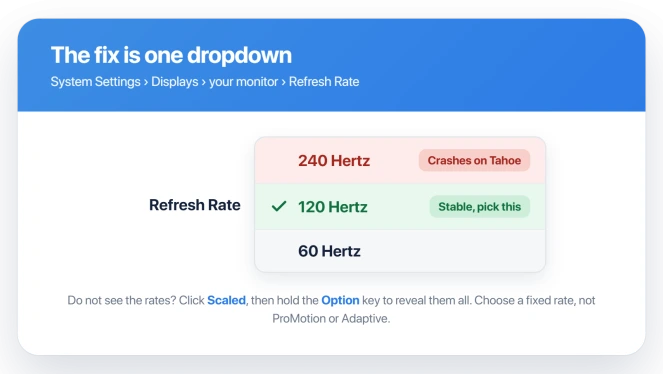
One detail matters here. If the display is set to a variable rate, shown as ProMotion or Adaptive, switch it to a fixed 120 Hertz instead. The variable mode is part of what pushes the Mac into the setting that crashes.
You give up the extra smoothness of 240Hz, but the random restarts end, which is the trade most people take gladly.
Confirm it is this bug, not another
Before you settle on the fix, it is worth proving this is the display bug and not a different panic, because the panic report names the culprit outright.
After a restart, click Report in the box that appears, or open the panic files yourself. They sit in /Library/Logs/DiagnosticReports and end in .panic or .ips.
You can also read them in the Console app under Crash Reports.
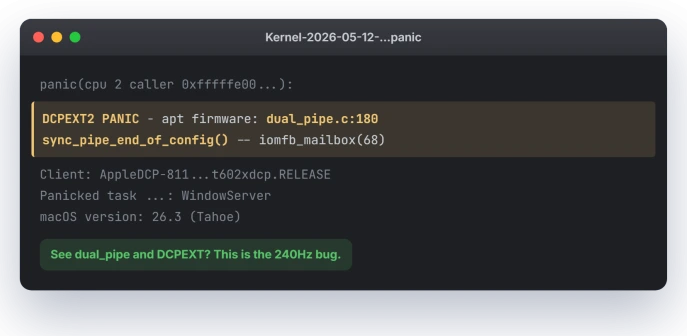
Look for a line like this one:
DCPEXT2 PANIC - apt firmware: dual_pipe.c:180 sync_pipe_end_of_config()The words dual_pipe and DCPEXT are the giveaway. That panic comes from the Mac's display coprocessor, so if you see it, you are looking at the high-refresh bug and the 120Hz fix applies.
If instead the log points at power or sleep, with wording about a display power controller timing out, that is a different Tahoe fault covered in Mac keeps restarting after sleep.
And if the external screen is not crashing the Mac but simply will not appear, that is External monitor not detected on macOS Tahoe, a connection problem rather than a panic.
Apple lays out the general restart steps in If your Mac restarts and a message appears.
Why 240Hz is the trigger
To push a picture at 4K and 240Hz, the display coprocessor splits the work across two pipes that have to stay in step.
The crash happens at the moment it tries to sync those two pipes, which is the dual_pipe line in the log. Drop to 120Hz and the Mac uses a single pipe, so the buggy step never runs.
That rules out the cable and the monitor. The same panic shows up over DisplayPort, HDMI, and Thunderbolt, and the same screen was steady before Tahoe. It is a bug in Apple's display firmware.
That reading comes from the crash reports rather than an Apple statement, so treat the mechanism as the likely cause, not an official one.
It also explains why some Macs escape it. The M2 generation leans on the two-pipe path and panics, while the M4 drives the same displays a different way and mostly dodges it.
Status: on macOS Tahoe through 26.3, a 240Hz external display kernel-panics Apple silicon Macs via a display-firmware bug, and no release has fixed it. Set the display to 120Hz to stop it.
If 120Hz alone is not enough
For most people the refresh-rate change is the whole fix. If panics continue, work through these.
- Update everything. Open System Settings, then General, then Software Update, and install all of it. A later Tahoe update paired with a display firmware update cleared the panics for some users, though it has not fixed it for everyone, so treat 120Hz as your safety net.
- Force a fixed rate and turn off HDR. If you left the display on ProMotion or Adaptive, set a plain fixed rate, and switch HDR off for that display while you test. Both push the Mac toward the high-bandwidth mode.
- Prove it is the display. Unplug the external monitor and run on the built-in screen for a day. If the panics stop, the display path is confirmed as the cause. Booting into Safe Mode is another clean way to test and to install updates.
- Rule out a bad cable or hub. A firmware bug will not be cured by a new cable, but a marginal cable, adapter, or KVM can add its own instability, so try a certified cable straight into the Mac.
What will not fix it
These come up often and waste your time here.
- Reinstalling macOS. You land back on the same firmware, so the panic returns.
- Resetting the SMC or NVRAM. Apple silicon Macs have no SMC or NVRAM reset. A normal restart handles what those old steps used to, so any guide telling you to reset them is written for Intel Macs.
- Cleaner or speed-up apps. None of them touch display firmware.
- Blaming a display utility. Tools like BetterDisplay do not cause this. The panic happens with nothing extra installed, and their own developers trace it to Apple's firmware.
Why does my Mac kernel panic with a 240Hz monitor?
On macOS Tahoe, running a 4K display at 240Hz pushes Apple's display coprocessor into a two-pipe mode whose firmware fails to sync the pipes, so it panics at random, even when the Mac is idle.
The log shows a dual_pipe error. It is a Tahoe software bug, not your hardware, and 120Hz stops it.
How do I change the refresh rate on macOS Tahoe?
Open System Settings, go to Displays, and select your external monitor. Click Scaled, then hold the Option key to reveal every resolution and refresh rate.
Pick 120 Hertz, or 60 Hertz, in the Refresh Rate list. Choose a fixed rate rather than the variable ProMotion or Adaptive option.
Does 120Hz fix the Tahoe kernel panic?
Yes. Users with 240Hz monitors report that setting the display to 120Hz, or 60Hz, ends the random restarts, often after weeks of stability.
It is the most reliable fix until Apple ships a firmware update. You lose the 240Hz smoothness, but the crashes stop, which is the point.
Is the 240Hz Mac crash hardware or software?
Software. The panic starts in Apple's display-coprocessor firmware, named in the log as a dual_pipe error, not in a faulty monitor or cable.
The same setup was stable before Tahoe, and the crash appears over every connection type, which rules out the wire. A firmware update is the real cure.
The Short Version
- It is a macOS Tahoe bug, not a broken Mac. An external display at 240Hz makes the display coprocessor panic while syncing its two pipes.
- The fix that holds: System Settings, Displays, select the monitor, click Scaled, hold Option, and set Refresh Rate to 120 Hertz. Pick a fixed rate, not ProMotion or Adaptive.
- Confirm it by reading the panic log in /Library/Logs/DiagnosticReports and finding the words dual_pipe and DCPEXT.
- It is not the cable. The panic shows over DisplayPort, HDMI, and Thunderbolt, so a new cable alone will not fix it.
- Skip the dead ends: no macOS reinstall, and Apple silicon has no SMC or NVRAM reset to perform.
Where to Next
A cursor that stutters rather than a Mac that panics is a different trail. Frozen cursor and mouse lag on Tahoe starts with Bluetooth rather than the display.
- Restarts that happen in sleep, not at 240Hz: Mac keeps restarting after sleep on macOS Tahoe
- The external screen is not detected at all: External monitor not detected on macOS Tahoe
- A Mac that freezes and restarts more generally: M4 Mac mini freezing and restarting
- Panics with Apple's own Studio Display XDR at 120Hz: Studio Display XDR kernel panic

Isaac Smith is the founder and editor of PC Glance, a website that covers computers, laptops, and technology. He is a tech enthusiast and a computer geek who loves to share his insights and help his readers make smart choices when buying tech gadgets or laptops. He is always curious and updated about the latest tech trends.