
Your Apple Watch records Blood Oxygen overnight, yet Vitals shows No Data for it on watchOS 26. Before any fix, one detail decides whether it can ever appear there: the part number in your Watch settings.
On US models sold since January 2024, Apple moved the Blood Oxygen calculation to your iPhone, and by its own rules those readings never reach the Watch Vitals app.
On every other Watch, No Data is a bug you can usually clear.
Let me take you through that detail first, because it changes whether there is anything to fix at all.
Check your part number first
This one check saves you hours of chasing a fix that may not exist for your Watch.
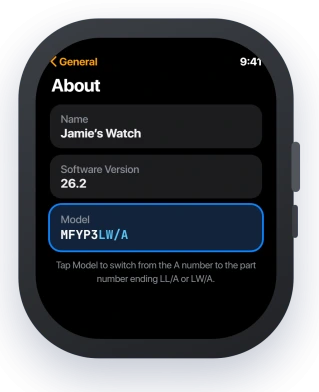
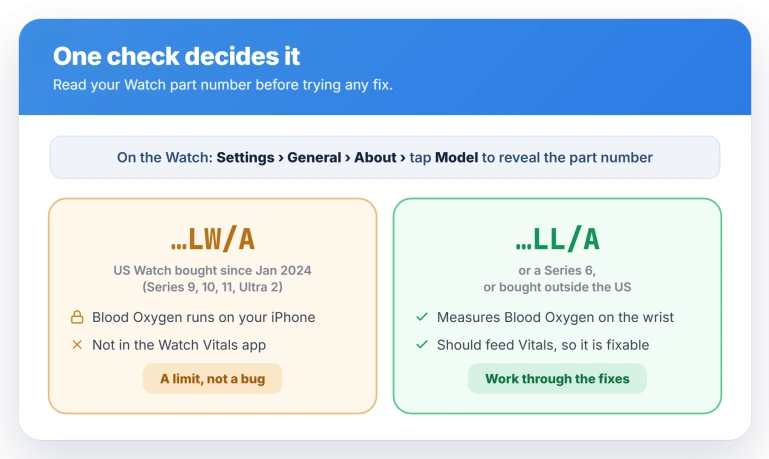
On the Watch, open Settings, tap General, then About, and find the Model row.
Tap the model line once and it flips from the model number, which starts with an A, to the part number, which starts with an M and ends in either LL/A or LW/A.
You can also read it on your iPhone in the Watch app under General, then About.
- Ends in LW/A. This is a US Watch bought on or after 18 January 2024, a Series 9, 10, 11, or Ultra 2. Blood Oxygen runs on your iPhone for these, and it does not show in the Watch Vitals app at all. That is a design limit, not a fault, so the fixes will not help.
- Ends in LL/A, or it is a Series 6, or you bought it outside the US. Your Watch measures Blood Oxygen itself and it should feed Vitals. When it reads No Data, that is the fixable version.
If your part number ends in LW/A
Apple states this in writing on its own Apple Watch Vitals support page: for US models with LW/A part numbers, Blood Oxygen is not available in the Vitals app.
Nothing you toggle changes that.
The reason is the patent case that pulled Blood Oxygen from US Watches in early 2024.
Apple brought it back in a redesigned form, where the Watch sensor takes the reading but your iPhone does the calculation. The result lands on the phone, not the wrist.
So your readings are not lost. Open the Health app on your iPhone, tap Browse, then Respiratory, then Blood Oxygen, and your overnight numbers are there.
iOS 26.4 went a step further and put Blood Oxygen back into the Vitals graph inside the iPhone Health app, so it sits alongside your other overnight metrics again. Update your iPhone to pick that up.
The Watch Vitals app still stays empty for these models, and no US Watch shows a Blood Oxygen result on the wrist yet.
If your part number ends in LL/A
Your Watch does generate Blood Oxygen on its own, so a No Data reading in Vitals is worth working through. Start at the top and stop once it fills in.
First, wake the sensor by hand. Open the Blood Oxygen app on the Watch and take a reading, rest your arm and hold still for fifteen seconds.
Then open the Heart Rate app for a reading, and if your model supports it, run a full ECG. Users report that this sequence gets a stalled sensor logging again and Vitals flowing.
Next, turn Low Power Mode off. It pauses background Heart Rate and Blood Oxygen, including overnight, so Vitals has nothing to show.
Swipe to Control Center, tap the battery percentage, and switch Low Power Mode off, or find it in Settings under Battery.
Then give Vitals time to build a baseline. It only shows metrics gathered while you sleep, and it needs about seven nights of overnight wear before it will display a range.
Users say Blood Oxygen often fills in without the building-baseline notice you get for Wrist Temperature, so a new or freshly reset Watch can read No Data until those nights add up.
Make sure sleep tracking is running, which is the same setup behind Apple Watch not tracking sleep.
If it is still blank, confirm background readings are on. In the iPhone Watch app, open Blood Oxygen and check the feature and its sleep measurements are enabled.
One quirk to expect on timing: even when it works, the Vitals Blood Oxygen trend can run a couple of days behind the readings in Health, so give it a beat before deciding it failed.
Status: on watchOS 26, US LW/A Watches still cannot show Blood Oxygen in Vitals. iOS 26.4 restored it to the iPhone Health graph only, not the Watch. LL/A units can once the baseline builds.
Is it the sensor or the model limit?
These two causes leave different fingerprints.
If your Heart Rate also reads blank or jumps around in the Heart Rate app, the problem is the optical sensor, not Blood Oxygen alone, and that is Apple Watch heart rate not reading.
Overnight vitals also feed the Readiness score on a Series 12 or Ultra 4. If that score stays blank, the Readiness page covers why.
If your watch came back from battery service as a US LW/A model, Blood Oxygen works differently. The battery service page explains what one owner saw.
If every Vitals metric shows No Data, not just Blood Oxygen, you are almost certainly still building the seven-night baseline, or not wearing the Watch to sleep.
When only Blood Oxygen is missing and the rest are fine, you are looking at the model limit or the sync lag covered here.
What will not fix it
For an LW/A Watch, these burn time for nothing.
- Restarting or re-pairing. It does not bring Blood Oxygen to the Vitals app, and re-pairing wipes your seven-night baseline, so it sets you back.
- A Genius Bar visit. Diagnostics come back clean, because nothing is broken. The feature is switched off by policy.
- Waiting for a watchOS update. No watchOS 26 release restores wrist Blood Oxygen in the US. The only movement so far is the iPhone Health app graph in iOS 26.4.
- Toggling Blood Oxygen off and on. These models have no Vitals feed to switch back on.
Why does my Apple Watch Vitals show No Data for blood oxygen?
Two reasons.
If your US Watch part number ends in LW/A, a Series 9, 10, 11, or Ultra 2 bought since January 2024, Apple runs the reading on your iPhone and it does not appear in the Watch Vitals app by design.
Otherwise it is usually Low Power Mode, sleep tracking being off, or the seven-night baseline not built yet.
How do I get blood oxygen to show in Vitals?
First check Settings, General, About, and tap Model.
If it ends in LL/A, turn Low Power Mode off, keep sleep tracking on, wear the Watch to sleep for seven nights, and take a manual Blood Oxygen, Heart Rate, and ECG reading to wake the sensor.
If it ends in LW/A, it cannot populate the Watch Vitals app.
Does Apple Watch Series 11 have blood oxygen in the US?
Yes, but not on the wrist. A US Series 11 takes the reading with its sensor and calculates it on your paired iPhone, so results show in the iPhone Health app under Respiratory.
iOS 26.4 also returns it to the Health app Vitals graph. You still cannot see a Blood Oxygen result on the Watch itself in the US.
Does Low Power Mode stop blood oxygen readings?
Yes. Low Power Mode pauses background Heart Rate and background Blood Oxygen, including overnight while you sleep, to stretch the battery. That leaves Vitals with no overnight reading to display.
Turn it off from the Control Center battery button, or in Settings under Battery, for continuous background readings.
The Short Version
- One check settles it: Settings, General, About, tap Model. A part number ending LW/A is a US model with no Blood Oxygen in the Watch Vitals app, by Apple's rule. LL/A is fixable.
- LW/A readings still exist on your iPhone, in Health, Browse, Respiratory, Blood Oxygen. iOS 26.4 also put them back on the Health app Vitals graph.
- For LL/A models, take a manual Blood Oxygen, Heart Rate, and ECG reading to wake the sensor, and turn Low Power Mode off.
- Vitals needs about seven nights of sleep wear to build a baseline, and gives no notice while it does, so new Watches read No Data for a week.
- If every metric is blank, it is the baseline, not Blood Oxygen. If Heart Rate is also erratic, it is the sensor.
Where to Next
- Heart rate reading blank or wrong: Apple Watch heart rate not reading on watchOS 26
- Sleep not logging, which starves Vitals: Apple Watch not tracking sleep
- Battery falling fast after the update: Apple Watch battery draining fast on watchOS 26

Isaac Smith is the founder and editor of PC Glance, a website that covers computers, laptops, and technology. He is a tech enthusiast and a computer geek who loves to share his insights and help his readers make smart choices when buying tech gadgets or laptops. He is always curious and updated about the latest tech trends.