

You select text on your Mac, choose Translate, and the result comes out in French. You never set French anywhere, and you have to change it every single time.
Owners on Apple's forum found ways to make the Mac remember your choice. I checked them against Apple's own Translate guide, and none needs a reinstall.
How it shows up
The opening post said: "When you highlight txt and right click to use translate, why does it always default to French, I've tried to change settings".
It is not only French. Another owner wrote: "Same for me, alweys translate to Spanish…" The thread has 13 Me too clicks.
A Level 10 volunteer explained part of it: the Translate menu does not always follow your Preferred Languages list the way you would expect.
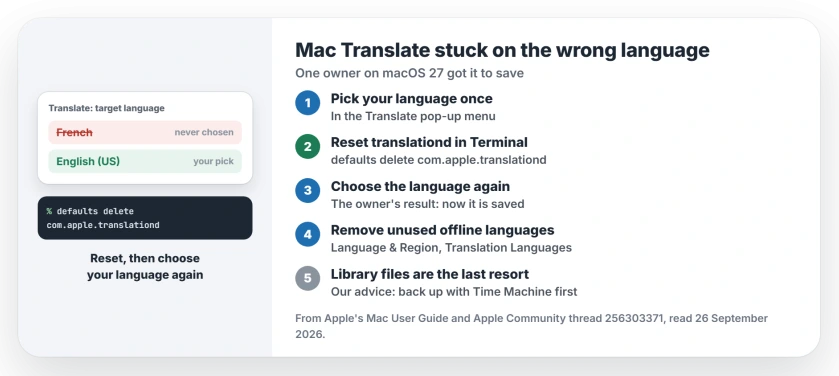
Status: macOS Tahoe and macOS 27, checked 26 September 2026. Translate can stick to a language you never chose. A Terminal reset of its saved settings fixed it for one owner on macOS 27.
1. Pick the language once in the Translate window
Apple's Translate guide says that after you choose Translate, "From the language pop-up menus, choose the language of the text you're translating and the language you want to translate it into."
The volunteer's advice was to do exactly that once, since "The translation function tends to use the Lasted Use Language". If your Mac then keeps it, you are done.
For the owner it did not stick, which hurts "when you're copy and translating a bunch of files". So move on to the reset.
2. Reset Translate's saved settings in Terminal
This fixed it for one owner on macOS 27: "For me on macOS GG, this worked: defaults delete com.apple.translationd and re-selecting the language during translation."
Open Terminal, type defaults delete com.apple.translationd, and press Return. Then translate something and pick your language in the pop-up menu. The owner's result: "Now the selected language is saved."
The volunteer also gave a command for the Translate app itself, defaults delete com.apple.Translate, then a restart. In their words: "This resets saved translation preferences and cached target languages."
3. Remove downloaded languages you never use
Apple says you can download languages for offline use. They live in System Settings: click General, then Language & Region, then Translation Languages.
Apple's own step reads: "To remove a language you downloaded, click Remove." The volunteer's list included dropping an unwanted offline language, so take French out if it sits there unused. Then test Translate again.
4. Last resort: clear Translate's files from your Library
One owner went further: "i solved cancelled all the folders and files about translation in my user Library folder". They did not say which files.
That route is riskier, so try the Terminal reset first. If you go ahead, back up your Mac with Time Machine before you delete anything. That advice is ours.
Other Mac problems
Writing Tools misbehaving since macOS 27? The Writing Tools page explains why. And if Command-Space now opens a box to type into, the Command-Space page shows how to talk to Siri again.
Why does Translate on my Mac keep choosing French?
A volunteer explained that the Translate menu does not always follow your preferred languages list. Resetting its saved settings clears the language it holds on to.
Can I set a default Translate language on a Mac?
Choose the language in the Translate pop-up menu. If it does not stick, run defaults delete com.apple.translationd in Terminal and choose again.
Is the defaults delete command safe?
It removes Translate's saved settings, which a volunteer described as translation preferences and cached target languages. Your documents are not part of it, in our reading.
Can I translate offline on a Mac?
Yes. Apple lets you download languages in Language & Region, under Translation Languages.
The Short Version
- Translate can stick to a language you never set.
- Pick your language once in the pop-up menu.
- If it slips back, reset translationd in Terminal.
- Then choose your language again.
- Remove offline languages you never use.
- Clearing Library files is the last resort.
Where to Next
Run the Terminal reset now, then translate one sentence and pick your language. Try it again after a restart to check it stuck.
Which language did your Mac keep choosing? Say so in a comment, and add which macOS you run. I will note whether the reset holds for you.

Isaac Smith is the founder and editor of PC Glance, a website that covers computers, laptops, and technology. He is a tech enthusiast and a computer geek who loves to share his insights and help his readers make smart choices when buying tech gadgets or laptops. He is always curious and updated about the latest tech trends.