

You search Notes for a word you wrote last week, and nothing comes up. The note is there, but search just cannot see it.
Since iOS 27 this has hit iPhones and iPads alike. In the forum thread I went through, 22 owners pressed Me too, and one got a straight answer from Apple Support. The workarounds here come from that thread and from Apple's Notes guides.
What the owners found
The thread's first poster uses an iPhone 17 Pro. They wrote: "it has been two days since I installed iOS 27, but my notes app cannot do searches".
A new phone did not escape it either. Another owner reported: "After setting up my new iPhone 18 pro - my notes search results are not working either".
A later reply counted: "About 30 people experiencing the same problem in the same post-iOS27 timeframe".
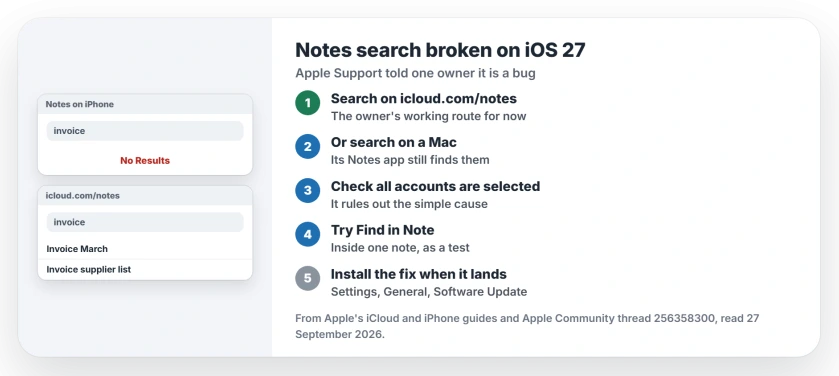
Status: iOS 27 and iPadOS 27, checked 27 September 2026. One owner says Apple Support called it a bug and promised a fix. Search on iCloud.com or a Mac works meanwhile.
1. Search on iCloud.com meanwhile
This is the workaround the first owner relies on: "I can search my Notes on iCloud.com but not in the Notes app".
Apple says in its iCloud guide: "Search Notes on iCloud.com to find the exact note you're looking for". Go to icloud.com/notes, sign in, and type in the search box at the head of the notes list, a route that works right now.
One catch, in Apple's words: "Locked notes don't appear in the search results". Open a locked note with your Notes password first, and the rest unlock with it.
2. Or search from a Mac
If your Mac uses the same Apple Account, its Notes app still searches. One owner put it plainly: "Am still able to search on my Mac so seems to be the phone / iOS 27".
The first owner reported the same, and now uses a MacBook and iCloud.com while they wait.
3. Check that search covers all your accounts
A Level 10 volunteer replied first, wanting to know if the search was set to all accounts or only the current one. That matters when notes live in more than one account.
The first owner already had all accounts selected, so this was not their problem. Check it anyway. It rules out the simple cause first.
4. Try Find in Note inside a single note
Apple offers a second search for a note you can already open: "You can also search for text within a note". Open the note, tap the More button, then tap Find in Note.
Nobody in the thread reported on this search, so try it on your own notes as an experiment, not a cure. That suggestion is ours.
5. Watch for the iOS 27 update that fixes it
The first owner called Apple Support twice. On the second call, support described it to them as a bug in iOS and iPadOS 27, adding that "a fix is coming whenever".
Restarts and switching the search settings off and on changed nothing for the owners in the thread, so I would not spend your evening on them.
Check Settings, General, Software Update every few days, and install the first iOS 27 update that appears.
Other Notes problems
If your notes seem to be missing altogether rather than just unsearchable, the missing notes page starts with the folder list. And if the iPhone's own search finds nothing anywhere, the Spotlight page covers that.
Why is Notes search not working on my iPhone?
Since iOS 27, Notes search returns nothing for owners in the thread, even though the notes exist. One owner says Apple Support described it as a bug in iOS and iPadOS 27.
Is Notes search broken in iOS 27?
Owners report the fault on the iPhone 17 Pro, the iPhone 18 Pro and several iPads. You can still search on a Mac and on iCloud.com.
How can I search my notes while search is broken?
Go to icloud.com/notes and search there, or use Notes on a Mac that uses the same Apple Account.
Does restarting fix Notes search?
No. Owners restarted and switched search settings off and on without any change, so save your time for the update.
The Short Version
- Notes search broke with iOS 27.
- Apple Support calls it a bug.
- Search on icloud.com/notes for now.
- A Mac's Notes app still searches.
- Check all accounts are selected.
- Update iOS when the fix lands.
Where to Next
Open icloud.com/notes in Safari now and search for the note you need. Keep that tab bookmarked until the fix lands.
Has an update fixed Notes search for you? Say in a comment which version did it, so the others waiting know to update.

Isaac Smith is the founder and editor of PC Glance, a website that covers computers, laptops, and technology. He is a tech enthusiast and a computer geek who loves to share his insights and help his readers make smart choices when buying tech gadgets or laptops. He is always curious and updated about the latest tech trends.