
Your shared library no longer appears on the Apple TV, or it appears and nothing plays. Owners have hit both since macOS Tahoe. Before anything else, count the computers your Apple Account has authorized.
The main thread has 27 Me too votes and has run for almost a year. I sorted what fixed it for owners from what is still broken, and held each step up to Apple's Home Sharing pages.
The library that stopped showing up
The thread opened with one line: "Home sharing not working after upgrade to Tahoe". Replies filled in the rest over the following months.
One owner's Apple TV 4K showed a spinning wheel, then a message that it could not connect to the library. On another Mac, "Music unexpectedly quits every time I attempt to access the shared library."
Status: macOS Tahoe and macOS 27, checked 28 September 2026. Deauthorizing every computer fixed Home Sharing for one owner. Playing a shared library on another Mac still fails for several.
1. Count your authorized computers
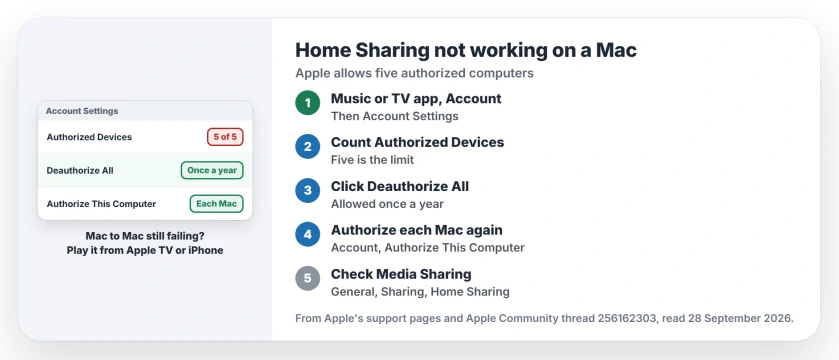
Apple says: "You can authorize up to five computers at a time to play your Apple Account purchases." Home Sharing depends on that. With five already authorized, "you can't turn on Home Sharing for another Mac".
The top-ranked reply in the thread says the same: "You cannot have more than 5, and your mac has to be authorized in order to do home sharing."
To check, open the Music app or the TV app. Apple's authorization page says: "From the Account menu in the menu bar, choose Account Settings." Your count sits next to Authorized Devices.
2. Deauthorize all, then authorize again
An owner solved it like this in April. "Finally fixed this problem", they wrote. "I had to 'deauthorize all Macs'". Their reason: "I've been a Mac user for well over 30 years!"
After that, and after authorizing their main Mac again, the library showed up on their Apple TV 4K. That result is user-reported, from one owner.
In the same Account Settings screen, Apple's step is: "Click Deauthorize All." Use it with care: "You can deauthorize all computers only once a year."
Then, on each Mac you still use, open Music or TV and choose Authorize This Computer from the Account menu. Apple's wording is to "Authorize each computer that you use again".
3. Check the Home Sharing switch
Apple's setup starts in System Settings, then General, then Sharing. Turn on Media Sharing, click the Info button, and select Home Sharing with your Apple Account.
Apple documents one detail that matters here: "Media sharing is turned on when you select either Home Sharing or the option to share media with guests."
On macOS 27, one owner found the switch would only stay on with "Share media with guests" ticked too. Even then, the TV app showed a Public Sharing library, not theirs.
Their verdict: "Home Sharing and Media Sharing appears to still be broken in the release version of macOS 27.0".
4. Update, then play from another device
Updates have helped some owners. One wrote: "Tahoe 26.2 update fixed my home sharing last night. Works like it used to."
Others were less lucky. "Using 26.2, Mac-to-Mac home sharing continues to fail in the same way." In May, another tried the next update: "Just installed the Tahoe 26.5 update on my M1 with high hopes, but the issue persists."
One detail points to a way round it. "Playing remote content hosted on Mac works fine on tvOS and iOS but not to Tahoe TV app client." So I would play the library from an Apple TV or iPhone for now.
Wherever you play it, Apple says your Mac must be "powered on, awake, and have the Music app or iTunes for Windows open."
Other Mac sharing and Music problems
Sharing files between Macs broke in a similar way for some owners, and the file sharing page covers what still works with macOS 27. Star ratings also went missing in Music on some Macs; the ratings page gets the column back.
Why is Home Sharing not working after macOS Tahoe?
For one owner, too many old authorizations. Deauthorizing every computer and authorizing the main Mac again brought the library back on their Apple TV.
How many computers can use Home Sharing?
Apple says Home Sharing works with up to five computers on your home network. Each must be authorized with the same Apple Account.
How often can I deauthorize all computers?
Once a year, according to Apple. Deauthorizing one Mac at a time has no such limit in Apple's wording.
Is Home Sharing fixed in macOS 27?
No, going by the owner who tried the release version on 23 September 2026. They still could not see their Home Sharing library.
The Short Version
- Count your authorized computers first.
- Five is the limit for Home Sharing.
- Deauthorize All, then authorize again.
- That works once a year.
- Mac-to-Mac playback still fails for some.
- Play from an Apple TV or iPhone meanwhile.
Where to Next
Open Music on your Mac, then Account, then Account Settings, and look at Authorized Devices. If it says five, start with section 2.
If your count is low and the library still will not play, name the devices involved when you comment, and I will fold that into what owners have found.

Isaac Smith is the founder and editor of PC Glance, a website that covers computers, laptops, and technology. He is a tech enthusiast and a computer geek who loves to share his insights and help his readers make smart choices when buying tech gadgets or laptops. He is always curious and updated about the latest tech trends.