
You unbox your iPhone 18 Pro, start Face ID setup, and it refuses. A restart does nothing, and the thought of a faulty new phone creeps in. That is a worrying start, but most owners who hit this got through setup without a repair.
I read Apple's Face ID help page, which now has a section just for the iPhone 18 Pro, plus a MacRumors thread in which owners compared what worked. This page covers what gets it set up, and when to take the phone in.
A new phone that will not learn your face
The first poster saw the message on every attempt. They had "Restarted the phone, fully wiped and restored from iCloud twice and still happening", with no screen protector on. That thread drew about 2,000 views in under two weeks.
Owners say the iPhone 18 Pro's Face ID camera now sits under the screen, and several suspect it is fussier at setup. One who got through wrote that "Once you get it set up, it will work normally even in low light conditions".
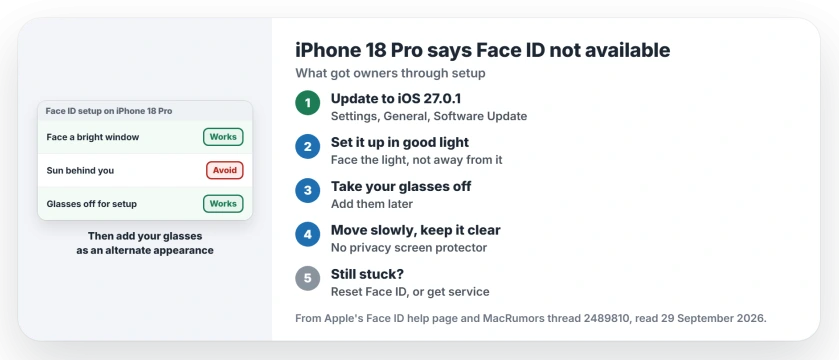
Status: checked on 29 September 2026 on iOS 27.0.1. Apple lists five things to try with the new TrueDepth camera on iPhone 18 Pro. Owners got through with better light, slow moves, no glasses.
1. Update to iOS 27.0.1
Apple's Face ID page starts with updates. iOS 27.0.1 also fixes a fault on these phones where a failed Face ID scan could restart the iPhone.
Open Settings, then General, then Software Update. Install 27.0.1 before your next attempt. Then a failed scan cannot restart the phone on you.
2. Set it up in good light, facing it
This fix is reported by owners more than any other. One wrote: "Went outside in the sun and it worked". The first poster did the same a day later: "I went out in the morning sun and the setup worked perfectly."
Face the light, though, and do not stand with it behind you. For the iPhone 18 Pro, Apple's list includes "Avoiding extreme backlight from the sun". A bright window in front of you works as well as the garden.
Once set up, the first poster said it "has been working in all lighting conditions". So you only need the good light once.
3. Take your glasses off for setup
Glasses came up again and again in the thread. Documented by Apple, the iPhone 18 Pro list includes "Removing your glasses or adjusting your mask if you are wearing both in low light".
Set up without them, then teach Face ID your glasses afterward. Apple says that if it will not work with your glasses on the iPhone 18 Pro, "try to add an alternate appearance while wearing your glasses."
One owner found the order mattered: setting up "without my glasses is not an issue as once set up, it works fine with my glasses on."
4. Move slowly, and keep the camera clear
Rushing the head circle seems to fail on this camera, as confirmed by an owner who got through indoors: "I had to be very slow and deliberate with my head movements and I finally got a good scan."
Check what covers the camera too. Apple says that on the iPhone 18 Pro "the TrueDepth camera is at the top of the device towards the left corner", and its list includes "Removing privacy screen protectors".
5. Reset Face ID, then get service
If a setup half worked, start clean. Apple's route is Settings, then Face ID & Passcode, then Reset Face ID, then Set up Face ID again.
If it still stalls, Apple is clear: when Face ID "repeatedly asks you to position your face within the frame without continuing the set up process", you "might need service". One owner's store swapped their phone on the spot.
Other Face ID problems
If Face ID worked before and stopped, the Face ID page for iOS 26 covers the older causes. And if your Pro Max restarts by itself, the restart page shows how to read the log.
What does Face ID Not Available mean on an iPhone 18 Pro?
Setup is failing to get a clean scan with the new under-screen camera. Better light, no glasses and slow head movements got owners through.
Should I set up Face ID outside?
Good light on your face helps, and owners succeeded outdoors. Keep the sun in front of you, since Apple warns against extreme backlight.
Can I use Face ID with glasses on an iPhone 18 Pro?
Yes. Set it up without them, then add an alternate appearance while wearing them, as Apple suggests.
Is my iPhone 18 Pro faulty?
Not usually. If setup keeps asking you to position your face and never finishes, Apple says the phone might need service.
The Short Version
- Setup fails with a new camera.
- Update to iOS 27.0.1 first.
- Set it up facing good light.
- Keep the sun off your back.
- Take your glasses off for setup.
- Add them later as an alternate appearance.
- Still stuck? Reset Face ID or get service.
Where to Next
Update to iOS 27.0.1, take your glasses off and try setup facing a bright window. It should take one or two slow passes.
If it still says Face ID is not available, tell me what you tried in the comments. I read every one, and I keep this page current with what works.

Isaac Smith is the founder and editor of PC Glance, a website that covers computers, laptops, and technology. He is a tech enthusiast and a computer geek who loves to share his insights and help his readers make smart choices when buying tech gadgets or laptops. He is always curious and updated about the latest tech trends.