
Your iPhone 17 is about a year old, and the Battery Health number has started to slip. You want to know if your figure is normal, and whether a charge limit would have kept it higher.
That is worrying if you plan to keep the phone for another year or two. I read Apple's battery pages and the MacRumors battery mega-thread, where owners have posted their numbers since launch.
What owners report after one year
The thread has about 108,000 views and more than 350 replies, and in September owners of launch day phones posted their one-year readings, most with the cycle count.
- A launch day iPhone 17 Pro: "98% @ 222 cycles".
- Three iPhone 17 Pro Max owners: 97 percent at 266, 272 and 276 cycles.
- An iPhone 17 Pro Max with no charge limit: 100 percent at 180 cycles.
- An iPhone 17 Pro at 381 cycles: 94 percent.
- An iPhone 17 Pro Max at 326 cycles: 92 percent, the lowest in this batch.
- A plain iPhone 17: 99 percent at 122 cycles.
So most sit between 96 and 100 percent. The phones with more cycles sit lower, which is what you would expect.
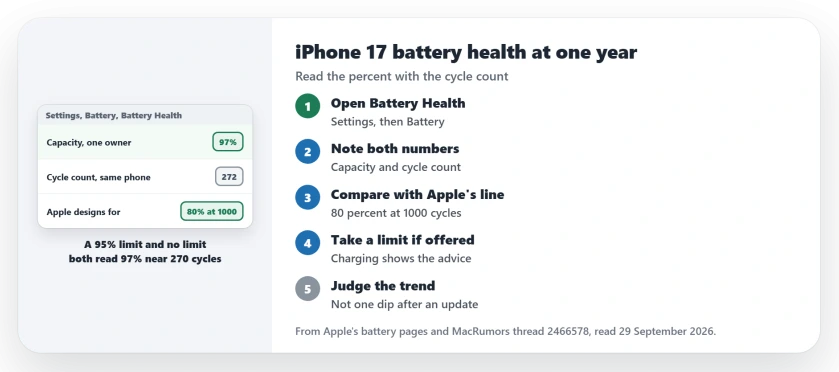
Status: checked 29 September 2026. Apple says iPhone 15 models and later are designed to keep 80 percent at 1000 complete cycles. Owners at one year mostly read 96 to 100 percent.
1. Read two numbers, not one
On iPhone 15 models and later, Apple says you can see the battery's maximum capacity and the cycle count. The steps are short: "Open the Settings app, then tap Battery." Then "Tap Battery Health."
Write down Maximum Capacity and Cycle Count together. A percent on its own tells you little. 97 percent at 150 cycles and 97 percent at 300 cycles are different stories.
2. Compare them with Apple's line
Apple's battery and performance page sets the target for your model. Apple designs iPhone 15 models and later to hold 80 percent of original capacity after 1000 complete cycles, in ideal conditions.
A complete cycle is not one night on the charger. Apple counts a cycle each time your use adds up to one full battery, however many charges that takes.
At about 270 cycles, the owners reading 97 percent have used roughly a quarter of those 1000. Apple adds that "the exact capacity percentage depends on how the devices are regularly used and charged."
3. Does the charge limit help?
On iPhone 15 models and later, the limit sits under Settings, Battery, Charging. Apple lets you pick any limit from 80 to 100 percent, in steps of 5.
Apple offers it to improve battery lifespan. After one year, the thread shows no gap yet: one owner with a 95 percent limit reads 97 percent at 276 cycles. Two owners with no limit read 97 percent at 266 and 272 cycles.
That is three phones, not a study. Heat, charging speed and how low each owner runs the battery all differ.
I would follow your iPhone's own advice here. Apple says that if iOS decides a limit will help, "you'll see a recommendation" in the Charging screen.
4. Do not panic at a drop after an update
One owner watched the number fall during the iOS 27 install. In their words: "It just dropped to 96% 15 mins ago when I updated to IOS 27. My phone got a little warm during the installation process."
Apple lists temperature history and charging pattern among the factors behind a battery's chemical age. A warm phone during a long install is part of that history.
Check again in a week rather than the same evening, because one dip on update day tells you less than the trend.
5. Know when service makes sense
Battery Health also tells you when Apple recommends a replacement, and none of the one-year owners in the thread were near that point.
If your iPhone 17 already reads far lower than the phones listed here at a similar cycle count, contact Apple Support.
Battery draining fast instead?
A health number can be fine while the day still runs short, and our iPhone battery drain page covers the settings that eat power. If the Battery Health screen itself is missing rows, the battery health page explains why.
Is 97 percent battery health normal for an iPhone 17 after a year?
In the MacRumors thread it is typical. Owners of launch day phones report 96 to 100 percent at 143 to 276 cycles.
Should I set a charge limit on my iPhone 17?
Apple offers limits from 80 to 100 percent to improve lifespan, and shows a recommendation when it thinks one will help. In the thread, a limit and no limit read the same at about 270 cycles.
How many charge cycles is an iPhone 17 battery designed for?
Apple's design target, from iPhone 15 models on, is 80 percent of original capacity after 1000 complete cycles, in ideal conditions.
The Short Version
- Open Settings, Battery, Battery Health.
- Read Maximum Capacity and Cycle Count together.
- Apple designs for 80 percent at 1000 complete cycles.
- One-year owners mostly read 96 to 100 percent.
- A charge limit shows no gap yet in the thread.
- Take the limit if your iPhone recommends one.
- Judge the trend, not one dip after an update.
Where to Next
Open Battery Health now and note both numbers. If yours is far lower than the phones listed here, contact Apple Support.
If you use a charge limit, post your percent, cycles and limit in a comment. More readings would make the comparison stronger.

Isaac Smith is the founder and editor of PC Glance, a website that covers computers, laptops, and technology. He is a tech enthusiast and a computer geek who loves to share his insights and help his readers make smart choices when buying tech gadgets or laptops. He is always curious and updated about the latest tech trends.