

Your Apple Watch no longer lasts the day, and the Battery Health number keeps falling. You want to know when it is time to get it serviced, and what you will get back.
That is annoying on a watch you still like. Before you book, it helps to know the rules. I read Apple's battery health page and its AppleCare+ terms, plus a MacRumors thread where an owner went through battery service this month.
The number owners wait for
The thread asks the question in its title: how long should you wait? It has about 8,000 views, and one owner waited for a specific mark.
In their words: "My Apple Watch Series 6 battery health finally dropped to 79%". That number matters. It comes from how Apple's cover is written.
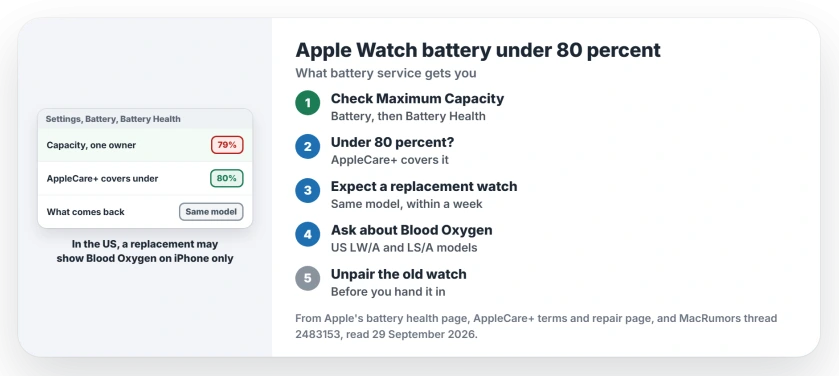
Status: checked 29 September 2026. Apple's AppleCare+ terms cover a battery under 80 percent of its original capacity. An owner at 79 percent got a replacement watch of the same model.
1. Check your maximum capacity
On the watch, Apple's steps are to "Tap Battery, then tap Battery Health." Then "Scroll down to see the maximum capacity."
You may not need to watch it closely. Apple says the watch warns you itself once capacity drops a lot, and points you to your service options.
2. Know where the 80 percent line comes from
Apple's AppleCare+ terms cover the battery when its capacity "is less than eighty percent (80%) of its original specifications". At 80 percent or higher, it does not qualify under that clause.
No AppleCare+? You can still pay for service. Apple's repair page gives estimates, and notes that "Estimated fees are for out-of-warranty service from Apple and may be subject to tax."
3. Expect a whole watch, not a new battery
Apple's terms allow either a repair or an exchange for "a replacement product that is new or equivalent to new in performance and reliability." For this owner, it was an exchange.
The Genius "ordered a replacement unit for my watch", and it was ready within a few days. Then: "The box held a new Series 6, as the label confirmed."
So do not expect a newer model for yours. Another owner asked about exactly that before a swap in New Zealand, and this one came back as the same series.
4. In the US, check how Blood Oxygen will work
I would ask about this before you hand the watch over.
The owner was told about it at the first visit. Their replacement "is an LW/A model, so blood oxygen readings appear only on the iPhone." They signed an agreement about it at the Genius Bar.
Apple's guide explains why. US watches sold from mid-January 2024 with part numbers ending in LW/A or LS/A leave Blood Oxygen out of the Vitals app. The same change was reported by an owner with two refurbished replacements.
5. Unpair the old watch
At pickup, the owner "unpaired my old one there" before setting up the replacement. Do the same with yours. Apple says unpairing "erases the contents and removes Activation Lock", which clears it for the hand-in.
Your Health history stays on your iPhone, so nothing is lost when the old watch goes.
Watch draining faster than it should?
When the battery drains quickly while capacity is still high, the cause may be software. Our battery drain page goes through the settings. And if you have a spare watch to wear during service, the two watches page shows how to switch.
When should I replace my Apple Watch battery?
Apple alerts you when capacity is significantly reduced. AppleCare+ covers the battery once it is under 80 percent of its original capacity.
Does Apple replace the battery or the whole watch?
Apple's terms allow a repair or an exchange. The owner in the thread received a whole replacement watch of the same model.
Does a replacement watch keep Blood Oxygen?
In the US, maybe not in the usual way. Apple says LW/A and LS/A models leave it out of the Vitals app, and the owner saw readings only on the iPhone.
The Short Version
- Check Maximum Capacity under Battery Health.
- AppleCare+ covers a battery under 80 percent.
- Without it, Apple charges a service fee.
- Expect a replacement watch of the same model.
- One owner had it back within a week.
- In the US, check how Blood Oxygen will work.
- Unpair the old watch before you hand it in.
Where to Next
Check your watch's Maximum Capacity now. If it is under 80 percent and you have AppleCare+, book the service.
If your replacement came back as a newer model, post both model names in a comment. That would be new information.

Isaac Smith is the founder and editor of PC Glance, a website that covers computers, laptops, and technology. He is a tech enthusiast and a computer geek who loves to share his insights and help his readers make smart choices when buying tech gadgets or laptops. He is always curious and updated about the latest tech trends.