

You bought a new Apple Watch and want to keep the old one too, maybe a slim one for bed and a big one for the day. You are not sure one iPhone can handle both.
Good news, then: one iPhone can, with no workaround. I read Apple's guide on pairing a second watch and its page on Health data, plus a MacRumors thread from owners who wear two.
Owners already do this
One owner has worn two watches for three years, now an Ultra 4 and a Series 12.
In their words: "I love the flexibility of having two different styles of watch to wear depending on my activity and always having one that's charged is nice too."
Owners report other splits too: "I have used the Ultra 3 for workout and day use, series 10 for sleep tracking." The poster who asked plans the same, with a Series 12 for sleep "to cut down the bulk".
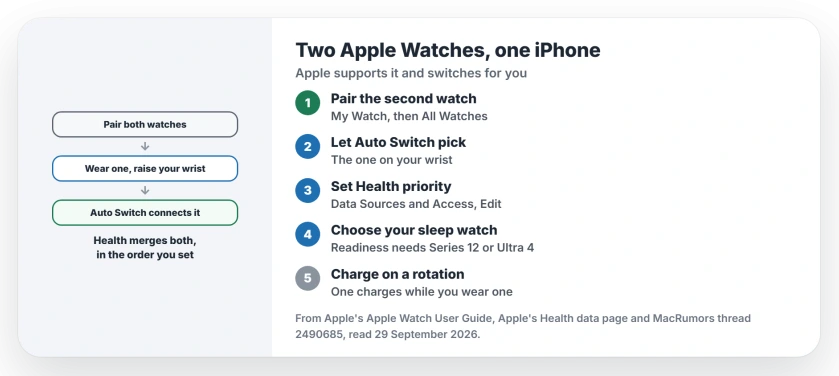
Status: watchOS 27, checked 29 September 2026. Apple says one iPhone can pair more than one Apple Watch and connects to the one you are wearing. Health merges data from both.
1. Pair the second watch
Apple says it directly on its pairing page: "You can pair more than one Apple Watch with your iPhone and easily switch from one watch to another."
In your iPhone's Apple Watch app, Apple's steps are to "Tap My Watch, then tap All Watches" at the top. Then tap Add Watch. It works just like pairing your first one.
2. Let Auto Switch pick the watch you wear
No manual swap is needed. In Apple's words: "Your iPhone detects the paired Apple Watch you're wearing and automatically connects to it."
Take one off, put the other on and raise your wrist. If you would rather choose, Apple says to "Turn off Auto Switch, then choose a different watch" on that same All Watches screen.
To check which watch is live, open Control Center on it. Apple says to look for the Connected status icon at the top.
3. Tell Health which watch to trust first
Both watches send data to the Health app, and Apple's Health data page explains how it copes: "The Health app takes similar data from different sources and organizes it based on where it comes from."
When two sources record the same thing, "the data source at the top will take priority over others." You can change that order for each category.
In Health, open a category, tap Data Sources & Access, then Edit, and drag the watch you trust most to the top. I would put the newer watch first.
The same list can fix a bad count. If flights climbed look far too high, the flights climbed page shows how to find the device that wrote them.
4. Choose your sleep watch with care
Some features only work on the newest models. Our Readiness page covers one: Apple runs that score only on this year's Series 12 and Ultra 4, once you have worn it to bed for a week.
One owner raised another catch: "Series 12 and Ultra are the only watches that calculate resting HRV during sleep." That is their reading. For Readiness, though, the new watch must be on your wrist at night.
5. Charge on a rotation
Two watches means one can charge while you wear the other. The three-year owner names that as a perk.
A simple pattern works well. Charge the night watch in the morning, and the day watch while you get ready for bed.
If notifications stop arriving
Notifications go to the watch you are wearing. If none arrive on either one, our notifications page covers Wrist Detection, Focus and the other usual blocks.
Can one iPhone have two Apple Watches?
Yes. Apple says you can pair more than one, and the iPhone connects to whichever watch you are wearing.
How do I switch between two Apple Watches?
Put the other one on and raise your wrist, and Auto Switch connects it. You can also choose one by hand under All Watches in the Apple Watch app.
Which Apple Watch should I wear to sleep?
The one with the features you want at night. Readiness, for example, only works on the two newest models.
The Short Version
- One iPhone can pair two or more watches.
- Add the second under My Watch, then All Watches.
- Auto Switch connects the watch you wear.
- Health merges both, with a set priority.
- Drag your preferred watch to the top in Health.
- Sleep in the watch with the features you want.
- Charge one while you wear the other.
Where to Next
Open the Apple Watch app now and tap All Watches to add the second one. Then set your Health priority once, so the data you trust comes first.
If Auto Switch keeps picking the wrong watch, leave a comment with both models. I will look into what decides it.

Isaac Smith is the founder and editor of PC Glance, a website that covers computers, laptops, and technology. He is a tech enthusiast and a computer geek who loves to share his insights and help his readers make smart choices when buying tech gadgets or laptops. He is always curious and updated about the latest tech trends.