
You got a new Apple Watch partly for the Readiness score, and it shows nothing yet. Or you cannot even find the Readiness app on the watch.
That is annoying after paying for the new model. The good news is that Apple lists exactly what Readiness needs. I read Apple's two Readiness pages and the MacRumors thread where new owners compared scores in the first week.
What Readiness needs before it shows a score
Apple's list is short, and its readiness page says to make sure you have "Set up Activity" and "worn your watch while sleeping for at least 7 nights".
It also wants your height, weight and age filled in, overnight vitals set up, and Sleep turned on. Miss one of those, and the score stays blank.
Seven nights is the part that catches owners. Apple's guide explains why: your vitals are compared with "your recent baseline, which requires you to sleep with your watch at least 7 of the past 49 nights."
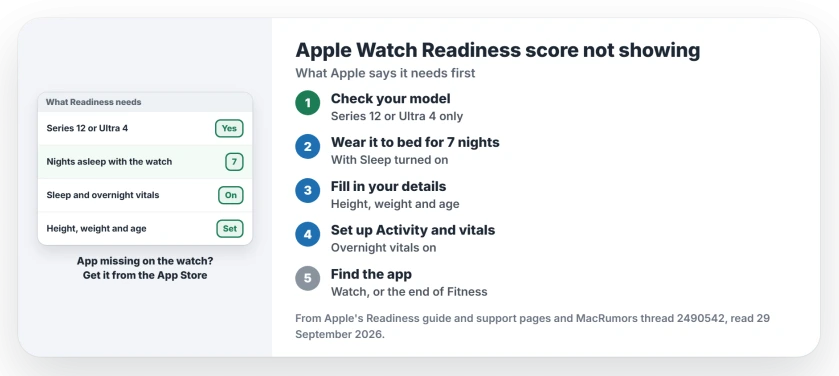
Status: watchOS 27, checked 29 September 2026. Apple says Readiness needs 7 nights of sleep with the watch, plus Sleep, Activity and overnight vitals. It runs on Series 12 and Ultra 4 only.
1. Check that your watch has Readiness
Apple is clear about the models: "The Readiness app is available on Apple Watch Series 12 and Apple Watch Ultra 4 for ages 13 and older."
So a Series 11 or an Ultra 3 on watchOS 27 will not show it at all. Owners in the thread were not happy about that, but it is Apple's rule. Your watch is fine.
The same rule covers the new Steps complication, and the Steps complication page shows where older watches still show your steps.
2. Wear the watch to bed for seven nights
Sleep has to be set up and turned on, and Apple adds that you should have "slept with your watch last night." I would charge it in the evening so it lasts the night.
Until then, the app counts down. An owner explained it: "If readiness doesn't show a score, it should tell you how many days left until it shows up in readiness or vitals."
If your watch never logs sleep at all, our sleep tracking page goes through the settings that block it.
3. Fill in your details and set up vitals
Apple's watch guide says to "Set up your height, weight, and age in the Fitness app on iPhone." Then set up Activity if you skipped it when you paired the watch.
Overnight vitals matter too, because Readiness reads your overnight heart rate, breathing rate and wrist temperature. If the Vitals app shows gaps, our Vitals page covers the usual blank readings.
If you wear two watches, sleep in the one that has Readiness. The two watches page shows how one iPhone switches between them.
4. Find the Readiness app, or get it back
On the iPhone, Apple's route is the Fitness app, where Readiness can sit at the very end of the screen. One owner found it right there after a short search.
The watch app should already be installed, yet a missing app is reported by owners. In their words: "The Readiness app wasn't on my AWU4, just downloaded it."
If yours is missing, search for Readiness in the App Store on your watch. Check that Apple is the developer, because one owner first worried it was a fake.
5. Expect the number to move during the day
Your score is not fixed at wake-up. Apple says it "updates throughout the day based on calories burned, naps, and your daytime heart rate."
That explains one owner's surprise: they woke up at 7, and "oddly without really doing anything except make breakfast it went down to 6". Another owner's watch said 6 while the phone said 7 at the same moment.
Apple's bands run from 0 to 10:
- 8 to 10: Go for it.
- 5 to 7: Ready.
- 2 to 4: Pace Yourself.
- 0 to 1: Recover.
Why is there no Readiness score on my Apple Watch?
It needs a Series 12 or Ultra 4, seven nights of sleep with the watch, and Sleep, Activity and overnight vitals set up. Until then, the app shows how many days are left.
Why did my Readiness score drop in the morning?
Apple says the score changes with calories burned, naps and your daytime heart rate. Apple adds that it can go down after a workout or activity.
Can Readiness tell me if it is safe to exercise?
No. In Apple's words, "Readiness is a general wellness feature", so a doctor's judgment still comes first.
The Short Version
- Readiness only runs on a Series 12 or an Ultra 4 watch.
- Wear the watch to bed for 7 nights.
- Turn on Sleep and set up overnight vitals.
- Fill in height, weight and age in Fitness.
- Set up Activity in Fitness if you skipped it at pairing.
- Missing app? Get Readiness from the App Store.
- The score changes during the day.
Where to Next
Open the Readiness app tonight and read how many days it says are left. Then charge the watch before bed, so it can log the night.
If your watch still shows no score after seven nights with everything set up, leave a comment. I will look at what yours is missing.

Isaac Smith is the founder and editor of PC Glance, a website that covers computers, laptops, and technology. He is a tech enthusiast and a computer geek who loves to share his insights and help his readers make smart choices when buying tech gadgets or laptops. He is always curious and updated about the latest tech trends.