
You updated to watchOS 27 and went looking for the new Steps complication, but it is not in the list for your watch face. You want to know if a setting is hiding it.
That is annoying when a live step count was one reason to update. I read Apple's watchOS 27 notes, then two days of argument from owners of older watches on MacRumors.
Why it is not in your list
Apple ties the complication to its two newest watches. Its watchOS 27 notes say the new complication lets you "track your steps in real time, right from your watch face," and name just two models: Series 12 and Ultra 4.
Apple's launch news gives the reason: "The S11 chip also enables the brand-new Steps complication". So on a Series 11, an Ultra 3 or anything older, it will not appear.
The thread has about 290 views and 16 replies. One owner put the difference simply: "Older watches still count steps."
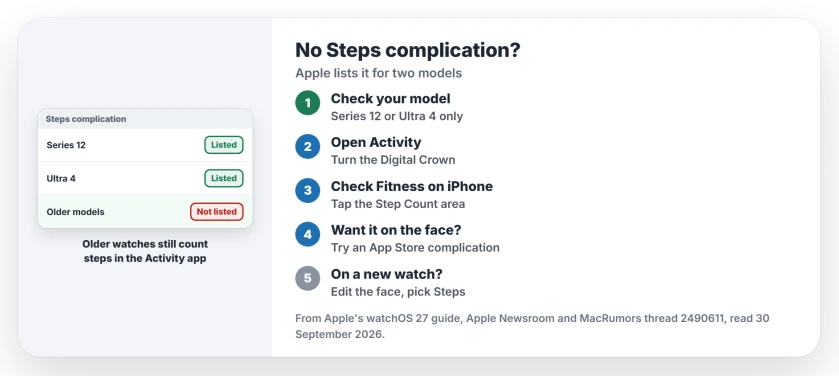
Status: checked 30 September 2026. Apple lists the Steps complication only for Apple Watch Series 12 and Ultra 4, and credits the S11 chip. Older watches still count steps.
1. Check which watch you have
If you own one of the two new models, the complication should be there, and step 5 shows where. On other models, it is simply not offered.
The same owner explained the line they see between models. In their words, an older Ultra "counts steps, but it doesn't maintain a real-time step count."
2. See your steps in the Activity app
Your older watch still shows the day's total: open the Activity app and turn the Digital Crown.
Apple says to "keep scrolling to see your progress for each of your rings, your total steps, total distance, flights climbed, and activity history."
3. Check Fitness on your iPhone
On the iPhone, the Fitness app has the same count. Apple's steps: "Tap Summary". Then, in Apple's words: "See your steps metrics: Tap the Step Count or Step Distance area."
It takes a few taps, but it shows the whole day.
4. Try a complication from an app
Apple notes that "Some apps you get from the App Store also include complications." Owners report that third-party apps can do this. One put steps on the faces of their Ultra 3 and earlier watches.
Check what data an app asks for before you install it.
5. On the newest watches, add it to your face
Apple's steps start the same way for every complication: "With the watch face showing, touch and hold the display, then tap Edit." Then swipe left until you reach the last screen.
Tap a complication slot, turn the Digital Crown until Steps shows, then press the Digital Crown once to keep the change.
Other features only on the new watches
Readiness is in the same position, and the Readiness page covers which watches get it. And for a feature that went the other way, the Handwashing page shows the stand-in on the new watches.
Which watches get the Steps complication?
Only two models so far, Series 12 and Ultra 4, and Apple says the S11 chip enables it.
Does my older Apple Watch still count steps?
Yes. Open the Activity app and turn the Digital Crown to see your total steps. The Fitness app on iPhone shows them too.
Can I get a steps complication on an older Apple Watch?
Not Apple's new one. Some App Store apps offer their own complications, and one owner used one on older watches.
The Short Version
- Apple lists the Steps complication for Series 12 and Ultra 4.
- Apple credits the S11 chip.
- Older watches still count steps.
- See the total in the Activity app.
- Fitness on iPhone shows it too.
- Some App Store apps add a steps complication.
- On a new watch, add it in face edit mode.
Where to Next
Open the Activity app on your watch now and turn the Digital Crown to your step total. If you want it on the face, look at App Store complications.
If a newer watch still does not show Steps in the list, tell me your model in a comment. I will update this page.

Isaac Smith is the founder and editor of PC Glance, a website that covers computers, laptops, and technology. He is a tech enthusiast and a computer geek who loves to share his insights and help his readers make smart choices when buying tech gadgets or laptops. He is always curious and updated about the latest tech trends.