
Links stop lighting up when your pointer passes over them. Finder buttons lose their labels, and a shortcut you use every hour does nothing. Click another app and back, and it returns for a while, which is annoying.
I followed a MacRumors thread about it that has run since February 2025 and passed 22,000 views. The fix that finally held for several owners came from an unlikely place: Apple's own iPhone Mirroring app.
What the bug looks like
The opening post describes hover effects that stop working "particularly in applications like Finder, Safari, and other daily-use apps". The poster hit it up to 30 times a day on a new MacBook Pro.
They also found a trigger: right-click a window that is not active, then close the menu by clicking outside it. Hover then stays broken in that app until you click away and come back.
Shortcuts can go with it. In Finder, commands like Show Preview and Hide Sidebar stopped responding for the poster at random.
Owners on macOS 26.2 joined in January. On 30 September, a member running macOS 27.0.1 listed "the window focus loss" among their biggest problems. The new version has not cleared it.
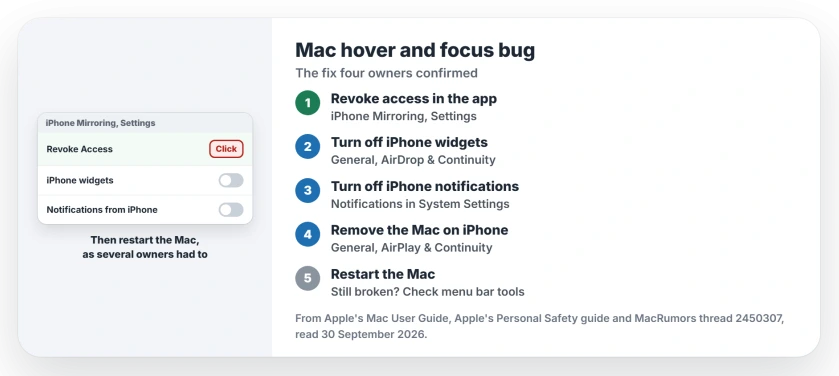
Status: checked 30 September 2026. Turning off iPhone Mirroring and restarting fixed hover for four owners in the thread. For one owner, window and menu bar tools caused it instead.
1. Turn off iPhone Mirroring on the Mac
The member who found it spent "30+hrs of troubleshooting" and named the culprit: "Apple's iPhone Mirroring app". In their words: "The tell was seeing it flicker in the menu bar".
Start in the iPhone Mirroring app, where Apple's route is iPhone Mirroring, then Settings in the menu bar, then Revoke Access to your iPhone.
Then open System Settings, General, then AirDrop & Continuity, where the poster turned off iPhone widgets.
Next, open Notifications in System Settings. Turn off Allow notifications from iPhone, and Live Activities from iPhone too.
That step matters more than it looks. Apple says that when it is connected, "your Mac automatically receives your iPhone notifications and Live Activities", even when you are not mirroring. So it can run unseen.
2. Remove the Mac on your iPhone, then restart
The poster's last step was on the phone. Apple's Mac guide gives it: open Settings, then General, then AirPlay & Continuity, then iPhone Mirroring. "Tap Edit in the top right, then select a Mac to remove."
Then restart the Mac, and do not skip it. One owner who confirmed the fix wrote "I had to reboot", and after that "the issue was completely gone".
Another owner "turned off iPhone Mirroring on my devices and restarted my Mac, and hover started working again". The poster suspected a "residual system level hook" that only a restart clears.
3. Never used it? Turn it on, then off
One owner was doubtful at first. They had never used iPhone Mirroring on that Mac. They advised: "try turning it on and then follow this procedure." Setting it up and then removing it cleared the bug for them.
On a Mac where the app was never opened, I would still try this, because the whole round takes a few minutes.
4. Watch for AirPlay afterward
The same owner later sent their MacBook's screen to a TV with AirPlay, and "the hover bug came back again". Turning mirroring on and off cleared it once more.
The poster saw that too. They restarted, and had no trouble for about five weeks after. So if hover breaks right after AirPlay, restart before you redo everything.
5. Still happening? Check your menu bar tools
For one member, the cause was a menu bar app. They wrote: "It was Glace (similar to Bartender)." They added two more that caused it for them: "Rectangle / Rectangle Pro" and "Raycast (v2, idk about earlier versions)".
Their clue was the one the poster gave, a quick flicker in the menu bar. Quit such tools one at a time for a day each, and see when your hover problem stops.
The owner whose bug kept coming back after AirPlay now suspects Bartender. That one is not confirmed yet.
Quick resets while you work
Owners found three ways to get hover back for a while. None of them lasts, but they save you a restart.
- Hover over the menu bar. One owner on macOS 26.2 got it back "simply by moving my mouse cursor over the menu bar" for a second.
- Swipe into Mission Control and back. The poster used a three-finger swipe up, or moved the pointer to the desktop.
- Click another app, then the first one. The opening post's own reset.
What did not fix it
The poster uninstalled browsers and Bartender, cleaned out Library folders and unplugged an external monitor. None of it helped, so you can skip those. The opening post tried reinstalling macOS, safe mode and even a replacement Mac.
It is also not the only cause. One owner on macOS Sonoma, which has no iPhone Mirroring app, has the same bug. Another wrote that none of the fixes they had seen "actually work for me in all cases."
If your clicks do nothing at all, often after sleep, that is a different fault. The frozen cursor page covers that one, and its WindowServer fix.
What turning it off costs you
Apple is clear that you lose the setup: "Revoking access resets iPhone Mirroring, so you need to go through the setup process again if you want to use it."
If you want it back later, you can set it up again once hover has held for a while. If mirroring will not reconnect, the iPhone Mirroring page covers the timeouts.
Why does hover stop working on my Mac?
Owners report it after right-clicking a window that is not active. For several of them the cause was iPhone Mirroring running in the background, and turning it off with a restart fixed it.
Does macOS 27 fix the hover and focus bug?
Not yet, going by the reports. A macOS 27.0.1 owner still listed focus loss on 30 September 2026.
Can a menu bar app cause Mac hover problems?
Yes, for some owners. One found Glace, Rectangle and Raycast each caused it on their Mac.
The Short Version
- Hover and shortcuts stop working in one app.
- A right-click on an inactive window can trigger it.
- Revoke access in the iPhone Mirroring app.
- Turn off iPhone widgets and iPhone notifications.
- Remove the Mac on your iPhone.
- Restart the Mac, which several owners needed.
- If it returns, check menu bar and window tools.
Where to Next
Turn off iPhone Mirroring on both devices tonight and restart your Mac. Then work normally for a day with one eye on the menu bar.
If hover still breaks, leave a comment naming what runs in your menu bar and which macOS you are on. I add every new cause owners confirm to this page.

Isaac Smith is the founder and editor of PC Glance, a website that covers computers, laptops, and technology. He is a tech enthusiast and a computer geek who loves to share his insights and help his readers make smart choices when buying tech gadgets or laptops. He is always curious and updated about the latest tech trends.