
You open the Watch app to add a card to your Apple Watch, and Wallet & Apple Pay is not in the list. That is worrying when the cards sit right there on your iPhone.
I read Apple's Apple Pay setup page. One owner in a MacRumors thread, posted on 30 September, got the option back in two steps, and I give them first.
What one owner saw
The owner wrote: "after upgrading to 27 on both the phone and watch, I can't find the Wallet option within the Watch app."
They had tried the obvious things. In their words: "I turned off Screen Time restrictions and iCloud sync is on." The cards they wanted were already on the phone.
So the watch was paired, the cards existed, and the option was still gone.
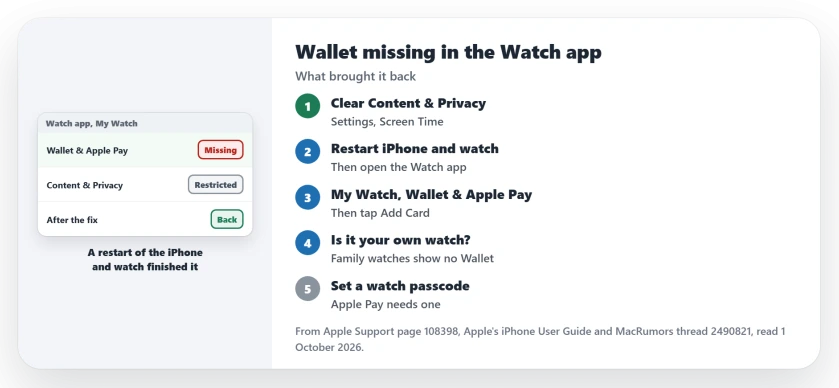
Status: checked 1 October 2026. One owner lost Wallet & Apple Pay in the Watch app after moving to iOS 27 and watchOS 27. Removing Content & Privacy Restrictions and restarting both brought it back.
1. Turn off Content & Privacy Restrictions
The owner's fix had two parts. The first, in their words: "removed content & privacy restrictions".
If you only turned off Screen Time limits, note this: the owner had done that too. That alone did not help, but clearing Content & Privacy Restrictions did.
Apple's route for those controls on iOS 27: "Tap Screen Time, tap Content & Privacy Restrictions, tap Other Features, then allow or block any of the settings shown, like AirDrop, Camera, and more."
If the restrictions refuse to switch off, the restrictions page covers that problem on iOS 27.
2. Restart the iPhone and the watch
The second part was a restart of both. The owner listed it as "Rebooted phone & watch". After that, Wallet showed up again. That outcome was confirmed by an owner who had tried everything else.
Restart both your phone and your watch, then open the Watch app fresh.
3. Look in the right place
Apple puts the option in one spot. Its steps: "On your paired iPhone, open the Apple Watch app." Then: "In the My Watch tab, tap Wallet & Apple Pay."
From there, Apple says "Tap Add Card." Your existing cards can be offered again, so you may not need to type them in.
4. Make sure it is your own watch
A forum regular pointed out a common catch. They wrote that "Wallet is an app on the watch, as long as the watch is actually paired to your iPhone."
Look in the Watch app under All Watches. A watch set up for a family member sits in its own section, and they said that missing Wallet there is normal: "If it is, what you're seeing is expected behavior."
Age plays a part for family watches too. Apple sets a minimum age of 13 for Apple Pay in most countries and regions.
5. Give the watch a passcode
Apple Pay needs a watch passcode. Apple's rule: "On your Apple Watch, you need to set up a passcode."
Removing the passcode also clears the cards. Apple warns that if you "remove your passcode, all credit, debit, prepaid, transit, and student ID card will be removed from that device."
If a card then fails to add, the Wallet add card page has the bank side. And for payments that fail at the till, see the Apple Pay page.
Why is Wallet & Apple Pay missing from my Watch app?
For one owner on iOS 27, removing Content & Privacy Restrictions and restarting the phone and watch brought it back.
How do I add a card to my Apple Watch?
In your iPhone's Watch app, go to My Watch, then Wallet & Apple Pay, and tap Add Card.
Does Apple Pay on Apple Watch need a passcode?
Yes. Apple says you need a passcode on the watch, and removing it removes your cards.
The Short Version
- Wallet & Apple Pay vanished from the Watch app.
- Turn off Content & Privacy Restrictions, not only Screen Time limits.
- Restart the iPhone, then the watch.
- Watch app, My Watch, Wallet & Apple Pay, Add Card.
- A family member's watch shows no Wallet there.
- Apple Pay needs a passcode on the watch.
- Most regions need you to be 13 or older.
Where to Next
Check Content & Privacy Restrictions on your iPhone now, then restart both devices. Open the Watch app and look for Wallet & Apple Pay again.
If it is still missing, comment with the iOS and watchOS versions you run. I add every fix owners confirm to this page.

Isaac Smith is the founder and editor of PC Glance, a website that covers computers, laptops, and technology. He is a tech enthusiast and a computer geek who loves to share his insights and help his readers make smart choices when buying tech gadgets or laptops. He is always curious and updated about the latest tech trends.