
Your Apple Watch sits on its charger for half an hour and still looks far from full. That is annoying when Apple promises 80 percent in about 30 minutes. I would check the puck first, since Apple ties fast charging to one cable.
A family buyer on MacRumors asked which plug to get for two new watches, and that thread still draws readers. Apple's fast charge page answers it, with a few catches the box never mentions.
What fast charging needs
Not every watch can do it. Apple says: "Fast charging is supported on Apple Watch Series 7 and later, Apple Watch SE 3, and Apple Watch Ultra and later".
The speed depends on the model. Apple says: "Apple Watch Series 10 and later charge from 0 percent to 80 percent in about 30 minutes". Series 7 to 9, SE 3 and Ultra 3 or later take about 45 minutes.
The first two Ultras take about an hour, so an older watch is not broken for being slower. A Series 6 is missing from Apple's list.
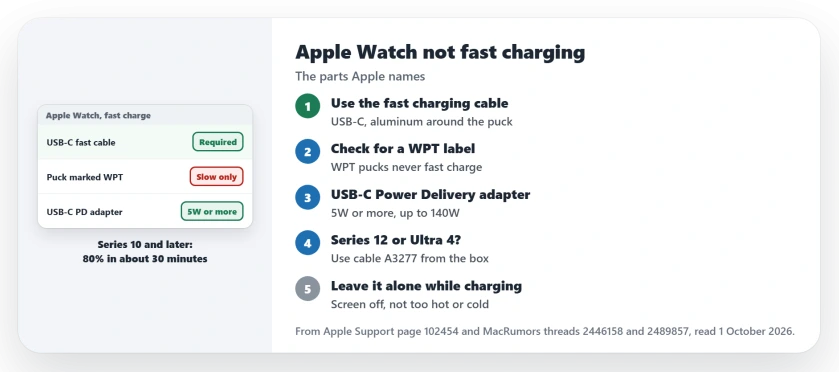
Status: checked 1 October 2026. The cable, the adapters and the conditions are documented by Apple, on a page updated 17 September 2026. A charger marked WPT never fast charges.
1. Use the fast charging cable
Apple is plain about it: "Fast charging requires an Apple USB-C Magnetic Fast Charging Cable". A puck on an older USB-A cable still charges the watch, just at the slow rate.
You can tell them apart at a glance. Apple says the fast one has "the USB-C connector and the aluminum around the magnetic charger".
2. Look for WPT on the puck
Apple says a puck with a WPT label on the aluminum is WPT-compliant, and "WPT-compliant chargers don't support fast charging".
In countries that regulate wireless power, Apple says the watch "is sold with a WPT-compliant charging cable when required". So check yours, because a WPT puck charges at the slow rate every time.
3. Pair it with a USB-C Power Delivery adapter
The opening poster wanted their family "to benefit from the fast charging feature of the Series 10". They also worried about "a charger that's too powerful or incompatible".
Apple's fast charge page is generous here. It accepts the "Apple 18W, 20W, 29W, 30W, 35W, 61W, 87W, 96W, or 140W USB-C Power Adapter".
It also takes "A comparable third-party USB-C power adapter that supports USB Power Delivery (USB-PD) of 5W or greater". Without USB-C and Power Delivery, an adapter falls outside Apple's list.
A member put the worry to rest: "USB-C devices will only draw the power that they need". So a big adapter is fine.
A third-party adapter is reported by an owner as fine: "I own an Anker 30W fast charger and I'm very happy with it".
4. Newest watch? Use the cable from its box
Apple says to use the charger from your watch's own box. That one is "guaranteed to provide the fastest charging speeds for your particular Apple Watch model".
This matters most on the newest watches. Apple says the cable that comes with Series 12 and Ultra 4 "charges those models faster than older chargers". To spot it, "look for model number A3277 printed on the part of the USB-C plug".
Third-party pucks have not caught up yet. A member asked Belkin, Nomad and Anker about a faster one, and they "got nothing noteworthy about if they are working on one".
5. Leave it alone while it charges
A few habits slow it down. Apple says: "Charging takes longer if you keep the display on, install software updates, or transfer media when charging".
Temperature counts too, and Apple says "Fast charging might not work in conditions that are too cold or too hot". A sunny windowsill is a poor test.
The first charge after setup can lag as well. Apple says charging "can also take longer if it's the first time you fast charge Apple Watch after pairing with iPhone".
With a cellular watch, keep your phone nearby. Apple asks you to "keep your paired iPhone within range of your Apple Watch when charging".
If your watch also drains fast, the watchOS battery drain page covers that side. And if the screen starts to lift, read the Apple Watch screen lifting page before you charge it again.
What stops an Apple Watch from fast charging?
Check the three things Apple names: its USB-C fast charging cable, no WPT label on the puck, and a USB-C Power Delivery adapter. Heat, cold and using the watch also slow it.
What adapter do I need to fast charge an Apple Watch?
Apple lists its own USB-C power adapters, from the 18W model up to the 140W one. A third-party USB-C adapter with USB Power Delivery of 5W or greater works too.
Can a WPT charger fast charge an Apple Watch?
No. Apple says WPT-compliant chargers do not support fast charging, so they charge at the slow rate.
The Short Version
- Fast charging needs Series 7 or later, SE 3 or an Ultra.
- Use Apple's USB-C fast charging cable.
- A WPT label on the puck means no fast charging.
- Use a USB-C Power Delivery adapter of 5W or more.
- Series 12 and Ultra 4 charge fastest on cable A3277.
- Keep the screen off while it charges.
- Avoid very hot or cold rooms.
Where to Next
Turn the puck over and look for USB-C and any WPT label printed on the aluminum. Then check that your adapter says USB-C. Swap whichever part fails, then time a charge from a low battery to 80 percent.
Still slow with the right cable and adapter? Tell me your watch model and charger in a comment. I add every cause owners find to this page.

Isaac Smith is the founder and editor of PC Glance, a website that covers computers, laptops, and technology. He is a tech enthusiast and a computer geek who loves to share his insights and help his readers make smart choices when buying tech gadgets or laptops. He is always curious and updated about the latest tech trends.