
A game wants Secure Boot, and your Intel Mac runs Windows through Boot Camp. There is no BIOS menu to open, so it is worrying to think the game is out of reach. I would look at one Apple setting before writing the game off.
The question has run on MacRumors for over a year, with about 8,000 views. In April an owner tested it, and the answer turned out to be yes on the right Mac.
Two kinds of Secure Boot
The opening poster hit it with a beta: "I've got some games that require secure boot, BF6 beta being one of them". They also found no "UEFI settings section to enable it".
Microsoft describes its version plainly. In its words, Secure Boot "works by allowing only trusted, digitally signed software to run during the boot process".
Macs with a T2 chip have their own Secure Boot. One member warned that "Apple Secure Boot and Microsoft/UEFI SecureBoot are not the same thing". So the real question is what Windows sees.
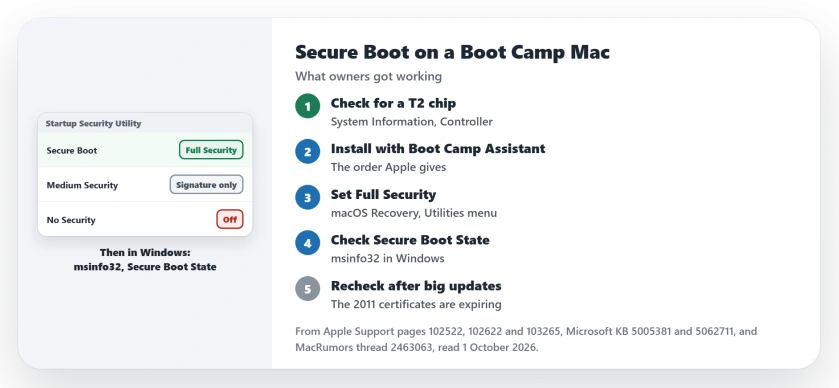
Status: checked 1 October 2026. On a T2 Mac with Full Security set, owners report that Windows sees Secure Boot as on. One owner played Battlefield 6 online that way in April.
1. Check that your Mac has a T2 chip
Among Intel Macs, Apple's Secure Boot settings belong to those with the T2 chip. Apple calls it "custom silicon for Intel-based Mac computers".
Its list covers the MacBook Pro and MacBook Air from 2018 to 2020, the 2018 Mac mini, the 2019 Mac Pro, the iMac Pro and the 2020 27-inch iMac. The M1 models from 2020 are not on it.
Not sure which you have? Hold Option and choose System Information from the Apple menu. Then select Controller or iBridge and look for Apple T2 chip.
2. Install Windows with Boot Camp Assistant
Apple's Boot Camp guide has the order. If you set No Security earlier, Apple says to "change it back to Full Security before installing Windows".
The owner who tested it kept things simple. They "Used bootcamp assistant to install windows on my mac pro 2019" and "did not do anything with SIP, left everything on, didn't boot into recovery".
Then they installed the game, and it worked. In their words: "ran bf6 and joined an online game".
They added a fair caveat: "I don't believe this is full secure boot as per the TPM2.0 incompatibility, but it works for now at least!" So treat it as working today, with no promise from the game.
3. Set Full Security in Startup Security Utility
Start your Mac from macOS Recovery. Apple's steps then say to "choose Startup Security Utility from the Utilities menu in the menu bar".
Sign in with an administrator account when asked. Apple says: "Full Security is the default setting, offering the highest level of security."
Another owner gave the same advice: "Just make sure you have secureboot on and set to full in mac os recovery, Windows can see it". A third set Full Security after installing, and wrote that Windows "Works as normal".
Apple backs that order up when it says: "After installing Windows, you can use any Secure Boot setting without affecting your ability to start up from Windows."
4. Check Secure Boot State in Windows
Start up in Windows and check before you launch the game. Microsoft's steps are to press Windows and R together, type msinfo32 and press Enter.
Then "look for Secure Boot State" in the window that opens. If it says On, Microsoft says "you're good to go".
5. If Windows stops starting
The opening poster changed the Mac setting from Recovery, and it "stops windows 11 from booting". Apple's page explains the likely alert.
Under Full Security, a Windows that fails the check brings up a message. Apple says: "Windows: An alert informs you that you need to install Windows with Boot Camp Assistant."
Apple's middle option is gentler. Under Medium Security, Apple says the Mac only checks that the system "has been properly signed by Apple (macOS) or Microsoft (Windows)". No owner in the thread tested a game on that setting.
Windows 11 is the harder case, since Apple's Boot Camp guide is written for Windows 10. One owner reported that the Windows 11 installer "keeps saying my computer doesn't have TPM 2.0 and won't let it upgrade".
6. Keep an eye on the 2011 certificates
Microsoft has a certificate deadline too. It says it "is updating Secure Boot certificates that were originally issued in 2011 and are set to expire starting in June 2026."
On most PCs that arrives through Windows Update. A member doubted the Mac side, though: "I don't think Apple has updated its UEFI to include the 2023 certificates."
The thread has no report yet of a game refusing a Mac over it. If you play online, I would check Secure Boot State again after big Windows updates.
For what the expiry means on any PC, the Secure Boot certificate page covers it. And if you are weighing Windows 11 on older hardware, see the unsupported PC page first.
Can a Boot Camp Mac use Secure Boot?
On a Mac with the T2 chip, yes. Set Full Security in Startup Security Utility, and owners report that Windows then sees Secure Boot as on.
Why does Windows on my Mac say Secure Boot is off?
Your Mac may have no T2 chip, or the security setting may be lowered. Set Full Security from macOS Recovery, then check Secure Boot State in System Information.
Does Boot Camp support Windows 11?
Apple's Boot Camp guide covers Windows 10. Owners running Windows 11 upgraded from 10, and one could not get past the installer's TPM 2.0 check.
The Short Version
- Only Intel Macs with a T2 chip have these settings.
- Install Windows with Boot Camp Assistant.
- Set Full Security in Startup Security Utility.
- Check Secure Boot State with msinfo32.
- One owner played Battlefield 6 online this way.
- Windows 11 on Boot Camp is the harder path.
- Recheck after big Windows updates.
Where to Next
Restart into macOS Recovery and open Startup Security Utility today. If it already says Full Security, check Secure Boot State in Windows next.
If a game still refuses with Secure Boot on, name the game and the Mac you play on in a comment. I will add every result owners send to this page.

Isaac Smith is the founder and editor of PC Glance, a website that covers computers, laptops, and technology. He is a tech enthusiast and a computer geek who loves to share his insights and help his readers make smart choices when buying tech gadgets or laptops. He is always curious and updated about the latest tech trends.