
Your Apple Watch screen has lifted away from the case, or come out on one side. The display may still work, and that makes it tempting to press it back and carry on. Please do not.
In one Apple Community thread about this, two Level 10 volunteers pointed to the same cause: a swelling battery. I went through Apple's own safety pages for you, and they leave three ways out.
What happened to one owner
Mu-iOS has a first-generation Apple Watch SE. The screen came out of the case, and battery health reads 68 percent. In their words: "Display works fine, no issues at all except for the battery".
The watch was already off: "It's currently powered off and kept in a safe place". The question was simple. "Is it unsafe to wear it?"
Why the screen lifts
Ingo2711, a Level 10 volunteer, explained: "If your battery has reached the end of the useable lifetime, it may expand and cause more damage", and then came the key line: "The display being lifted is one of those signs".
Rudegar, also Level 10, has seen it often. Displays come loose "in just about all cases we have heard about here" from "pressure of an expanding battery".
Apple's battery page gives the design limit. An Apple Watch battery "is designed to retain up to 80% of its original capacity at 1000 complete charge cycles". That watch is well under it.
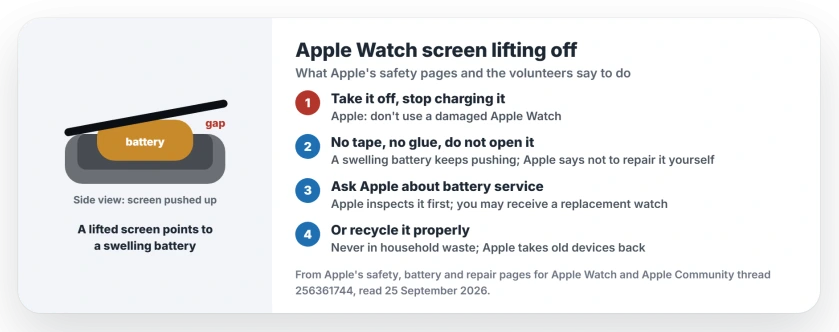
Status: Apple Watch, any model, checked 25 September 2026. Apple says not to use a damaged Apple Watch or repair it yourself. Volunteers link a lifted screen to a swelling battery.
1. Take it off, and stop charging it
Apple's safety page is plain: "Don't use a damaged Apple Watch, such as one with a cracked screen or case". A screen that has come away counts, in our reading.
Zurarczurx, a Level 5 volunteer, put the practical part in one line. "Stop using it and don't charge it". Ingo2711 agreed that "charging a defective battery might indeed be a potential fire hazard".
So take it off your wrist and off the charger. Zurarczurx also wrote: "Put it somewhere to discharge where it can't do any damage if it bursts into flames". Our suggestion is a tile floor or a metal tray, away from anything that burns.
2. Do not tape or glue the screen back
The owner asked about exactly that. "Using tape or something adhesive or will it pose a fire hazard?"
Rudegar's answer shows why tape will not hold: "if the batt is expanding, then it will continue to do so", and Ingo2711 was blunter: "I would not want to wear an Apple Watch having a defective battery or a display held together by tape".
Apple agrees. Its safety page says "Don't open Apple Watch and don't attempt to repair Apple Watch yourself". On the battery, it warns that "you may damage the battery, which could cause overheating and injury".
3. Ask Apple what the repair costs
Apple offers a battery service, and its safety page adds a detail you should know. "You may receive a replacement Apple Watch (in place of your original device) when ordering battery service".
Ingo2711 read the price from Apple's service page: "battery service for the Apple Watch SE is $99". I could not confirm it.
The price tool on Apple's Apple Watch repair page would not load for me. The page does say "We'll need to inspect your product to provide a personalized estimate".
Expect more with the screen off. IdrisSeabright, a Level 10 volunteer, warned: "once it gets to the point that the screen has been pushed off, that repair is more costly".
Have AppleCare? The same page says Apple replaces the battery "for no extra charge" once capacity falls under 80 percent.
4. Or recycle it, the right way
Mu-iOS weighed the price against the watch's age and decided: "I think I'll go with disposing it".
Do the same? Then keep it out of the bin. Apple says "Batteries must be recycled or disposed of separately from household waste". Also: "Don't incinerate the battery".
Apple takes old devices back, and your device "may even qualify for a credit towards a new Apple product". With a swollen battery, I would carry it into an Apple Store rather than post it. That part is ours, not an Apple rule.
5. Check the battery on your next watch
Apple shows battery health on the watch itself. Open Settings, tap Battery, then Battery Health, and scroll to the maximum capacity. Apple adds that the watch "alerts you when battery capacity is significantly reduced".
A low number is not a swelling warning by itself. In our view, it tells you a battery service is due before anything lifts.
A flat screen that simply stays dark on the charger is a different case, and the Apple Watch won't turn on page reads its screen symbols.
When the screen is flat but the battery drains
If the battery drains fast but the screen sits flat, the watchOS 26 battery drain fixes go through the settings first. Closing apps will not help there, as our page on quitting apps in watchOS 27 explains.
Is it safe to wear an Apple Watch with a lifted screen?
No. Apple says not to use a damaged Apple Watch, and volunteers link a lifted screen to a swelling battery. Take it off and stop charging it.
Why did my Apple Watch screen pop off?
The likely cause is the battery swelling as it ages and pushing the display out. Two Level 10 volunteers in the Apple Community thread pointed to that.
Can I glue my Apple Watch screen back on?
Apple says not to open or repair Apple Watch yourself. A swelling battery keeps pushing, so glue or tape will not fix the cause.
How much does Apple charge to fix it?
Apple gives an estimate after it inspects the watch, though one volunteer read the SE battery service price as $99, and a pushed-off screen can cost more.
The Short Version
- A lifted Apple Watch screen points to a swelling battery.
- Take it off, and stop charging it.
- Do not tape, glue or open it.
- Ask Apple about battery service, which may mean a replacement watch.
- Or recycle it, never in household waste.
- Check battery health in Settings, Battery, Battery Health.
Where to Next
If your watch is lifting right now, put it somewhere safe before anything else.
If Apple gave you a price for the repair, share the model and the figure in the comments. I will add real prices to this page.

Isaac Smith is the founder and editor of PC Glance, a website that covers computers, laptops, and technology. He is a tech enthusiast and a computer geek who loves to share his insights and help his readers make smart choices when buying tech gadgets or laptops. He is always curious and updated about the latest tech trends.