
An Apple Watch that stays dark is almost always flat, too hot, or stuck partway through starting up. Each of those leaves a different symbol on the screen. A red lightning bolt means the battery is too low to start.
A blank screen can need up to half an hour of charging before anything shows. After that comes a forced restart using both buttons. Look at the screen before pressing anything. The symbol picks the step.
What the screen is telling you
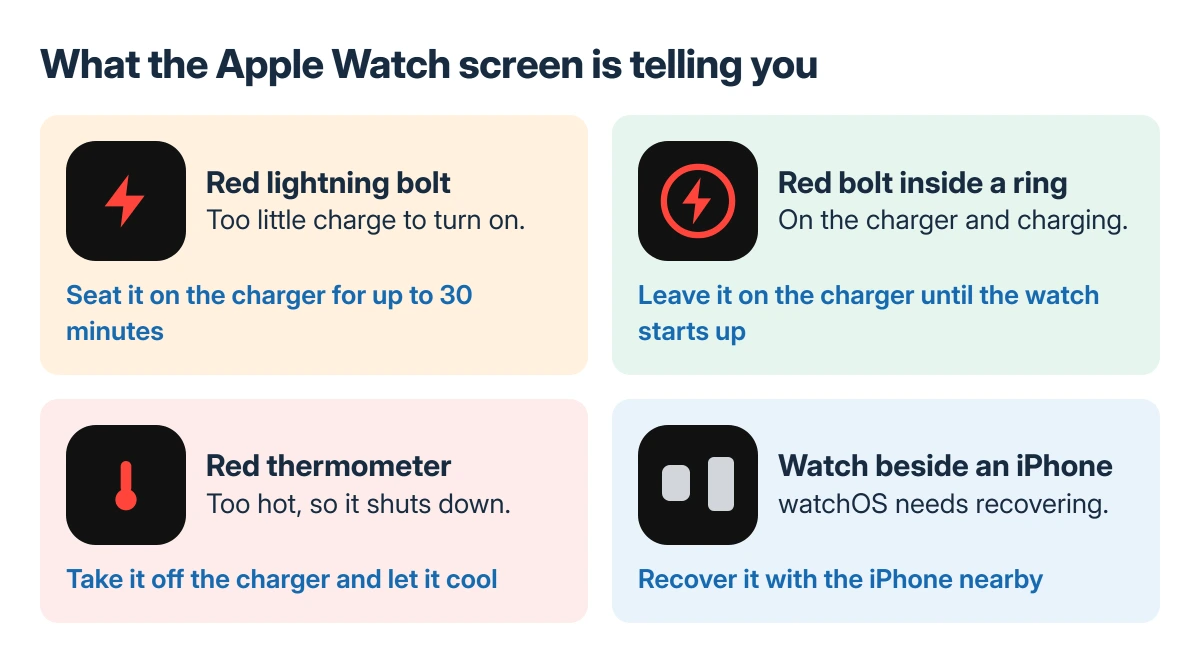
Apple says a red lightning bolt means the watch "doesn't have enough battery power to turn on." Once it sits correctly on the charger, the bolt changes to a red bolt inside a ring. That ring is the sign power is going in.
Status: Apple's charging, temperature, restart and recovery pages for Apple Watch checked 23 October 2026, Ultra included. Apple's steps; no watch was opened or repaired here.
A screen that stays empty even when the button is pressed is usually the same flat battery, one stage further down. A red thermometer with the time is heat. A watch beside an iPhone means recovery.
Charge it properly for 30 minutes
Apple documents that a watch with a blank screen, or one showing a charging cable icon, may need as long as 30 minutes on power before it turns on. Set it on the charger and do not touch it for the whole half hour.
The charger has to snap into place. Apple's checklist for a watch that will not charge:
- Use the Apple magnetic charging cable or USB-C fast charging cable that came with the watch.
- Push the cable fully into the power adapter, and the adapter fully into the outlet.
- Shift the watch on the puck until the magnets align and a lightning bolt appears.
- Clean the back of the watch and the charger, and peel any plastic film off both sides.
- Swap in another cable, then another power adapter.
That film catches people out on a new watch or a new charger. It covers both faces of the puck and stops the magnets seating, so a brand new watch that never charged is often just that.
The full list, with the larger docks, is on Apple's Apple Watch won't turn on or won't charge page.
Force a restart
Still dark after the half hour? Apple's answer is a forced restart. Press the Digital Crown and the side button at once and keep both down for a full 10 seconds. Release both once Apple's logo shows.
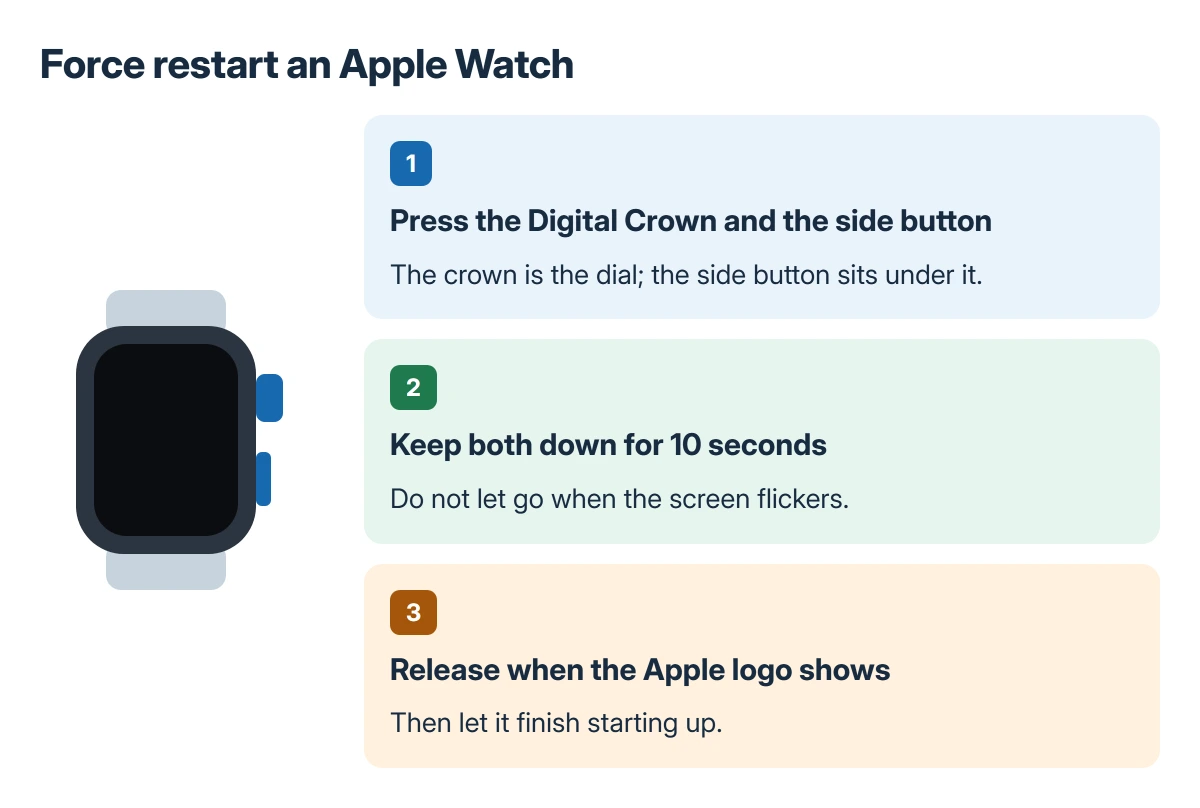
Apple's watch guide keeps this for when a normal restart is not possible. A dark screen is exactly that case. Try it once on the charger and once off it, since a watch that just reached enough charge can still need it.
If the display blanks a few seconds after every wrist raise, that is a setting instead. Our guide to the Apple Watch screen turning off after 5 seconds covers the wake time.
Larger watches and charging docks
Apple notes that the Magnetic Charging Dock and the MagSafe Duo can miss the magnets on the larger cases, 44mm, 45mm and 49mm. Tilt the dock to another angle, or lay it flat, until the bolt appears.
Apple Watch Ultra on those docks can need its band taken off before it connects reliably, even lying flat. A thick band holds the back of the watch just off the puck.
A red thermometer means heat
A watch that got too hot shows only a red thermometer and the time, then switches itself off. Apple states that it stays on if left on the charger, and that the thermometer comes straight back if you try to start it hot.
Take it off the charger and move it somewhere cooler. It turns itself back on once it has cooled down.
Apple's charging range for Apple Watch Ultra is 32 to 95 degrees F (0 to 35 C). The Series and SE models are designed to work best in that same band, so a watch charged on a sunny windowsill can stop charging and look dead.
A watch and an iPhone on the screen
An animation of a watch and an iPhone being brought together, or a red exclamation mark, means watchOS needs recovering. The iPhone does the work. It needs iOS 15.4 or later, Wi-Fi, Bluetooth on, and it must be unlocked.
Hold the iPhone close to the watch, double-click the side button on the watch, then follow the steps on the iPhone. Keep both near each other and on power until it finishes.
When nothing works
Apple's page ends with service for a watch that still will not work. Book it after a full half hour on a charger you trust, a second cable and adapter, and a forced restart. Warranty and AppleCare+ cover a failed battery.
Stop charging and book a repair at once if the screen has lifted at one edge. A swelling battery pushes the display out, and our page on an Apple Watch screen lifting off explains why it must stay off the charger.
The same patience applies to the phone: in our iPhone won't turn on guide, Apple wants a full hour on the charger.
The Short Version
Read the symbol. A red bolt or a blank screen: charge for 30 minutes with the film off and the magnets seated, then hold Crown plus side button for 10 seconds. A thermometer means cool it down. A watch and an iPhone means recovery.
Where to Next
Seeing a symbol missing from this list, or a bolt that never gains its ring? Note the model and what the screen does on the charger, then post it in the comments. I will say whether the charger or the watch is the likelier culprit.

Isaac Smith is the founder and editor of PC Glance, a website that covers computers, laptops, and technology. He is a tech enthusiast and a computer geek who loves to share his insights and help his readers make smart choices when buying tech gadgets or laptops. He is always curious and updated about the latest tech trends.