
You ask Siri for your messages, and it says you have unread ones from someone, every single time. Then it cannot read them, and Messages shows nothing new. That is annoying when you have already read everything.
I followed one iPhone owner's MacRumors thread on 1 October, from first post to fix, and read Apple's pages on resetting and restoring an iPhone. The cheap steps failed for them, and the last one worked.
What the owner saw
It started on a late iOS 27 developer beta. In their words: "whenever I ask Siri for my messages it tells me I have two unread messages from my niece."
The messages did not exist anywhere else. "If I say to read them, it can't." And on their Mac: "These do not show on my Mac."
Only the new Siri saw them. They wrote: "I switched back to regular Siri (no unread messages) then turned Siri AI back on (unread messages are back)".
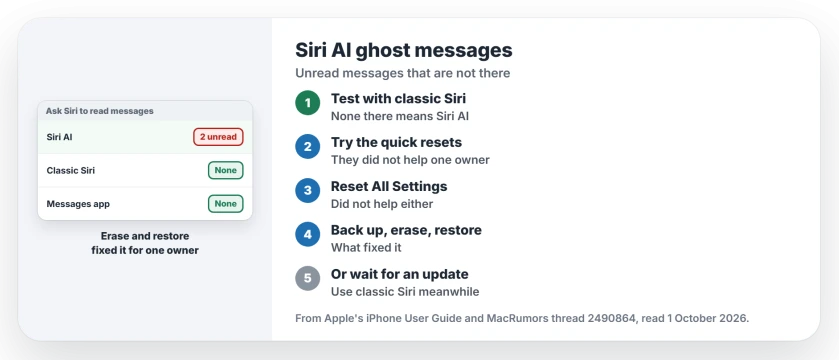
Status: checked 1 October 2026. One owner's Siri AI kept announcing two unread messages that did not exist. Quick resets and Reset All Settings failed. A full erase and a backup restore fixed it.
1. Check that only Siri AI sees them
Apple's Screen Time page shows the two versions side by side: Siri AI, and "Siri (Classic Version)", which it describes as Siri "without AI capabilities".
If classic Siri reports no unread messages and Siri AI does, you have the same fault. The owner called it "Definitely Ai related". Note that Apple says "Siri AI is available in beta on iOS 27 or later".
2. Try the quick resets first
These cost nothing, so start here. The owner tried each one, and none of them cleared it. In their words:
- "I deleted all message thread with her in the group as well as her individual messages"
- "I turned off Messages and turned it back on."
- "I turned Siri AI off and back on."
- "Obviously hard booted the phone."
They even moved to the 27.2 beta, and it did not help. Your case may differ, so give these a try before the bigger steps.
3. Reset All Settings, without high hopes
The next step keeps your data. Apple's reset page says: "You can return your iPhone settings to their defaults without erasing your content."
Apple adds that settings "are removed or reset to their defaults. No data or media are deleted." You will need to set up Wi-Fi, privacy choices and Apple Pay cards again.
For the owner, it did nothing. They wrote: "Amazingly a Reset All Settings didn't work."
4. Back up, erase, and restore
This is what finally worked, reported by an owner after every cheaper step failed. In their words: "Completely erasing the phone and reloading a backup resolved it for me."
Make the backup first, and confirm it completed. Apple warns: "To restore your iPhone, you must have a backup to restore from."
Erasing is serious, and Apple's reset page says: "If you choose the Erase All Content and Settings option, all your content is removed." So only erase after the backup is safe.
Then restore. Apple says: "If you already set up your device, you need to erase all of its content before you can use these steps to restore from your backup."
On the Hello screen, Apple's route is: "Tap Set Up Manually, tap Restore from iCloud Backup, then follow the onscreen instructions." Expect your apps and photos to keep arriving for a while afterward.
5. Or wait for a fix
Erasing a phone takes an evening. If the ghost messages only annoy you, living with them until an update is a fair choice.
You can also use classic Siri for messages meanwhile, since it sees the real state. I would report the fault to Apple either way.
If Siri AI fails in other ways, the Siri AI page covers the common faults. And if one person's messages stop alerting you, see the one contact notifications page.
Why does Siri AI say I have unread messages?
For one owner, Siri AI kept a record of two unread messages that no longer existed. Classic Siri showed none.
Does Reset All Settings fix Siri AI ghost messages?
No. The owner who tried it saw no change, while a full erase and restore cleared it.
Will erasing my iPhone delete my messages?
Apple says erasing removes all your content, so back up first. Restoring the backup brings your content back.
The Short Version
- Siri AI announces unread messages that do not exist.
- Classic Siri shows none, so the fault is in Siri AI.
- Deleting threads and toggling Siri did not help.
- Reset All Settings did not help either.
- Back up, erase and restore fixed it for one owner.
- Or live with it and use classic Siri meanwhile.
- Report it to Apple.
Where to Next
Ask classic Siri for your messages first, so you know the fault is in Siri AI. Then decide whether the fix deserves an evening.
If a smaller step clears it for you, share it in a comment. Smaller fixes owners find go onto this page.

Isaac Smith is the founder and editor of PC Glance, a website that covers computers, laptops, and technology. He is a tech enthusiast and a computer geek who loves to share his insights and help his readers make smart choices when buying tech gadgets or laptops. He is always curious and updated about the latest tech trends.