
You joined the Siri AI beta, waited your turn, and Siri still tells you the time just fine. Ask it anything real, though, and you get "Sorry, something's gone wrong. Please try again".
It is annoying to sit through a waitlist and then get an error. I read the owner reports alongside Apple's pages, and Siri AI fails in three different ways. Each one has its own fix, so start with the message you actually see.
First, which one is yours?
- You see no "Try Siri AI (Beta)" option at all. Go to step 1.
- Your Siri settings say "Adding support for Siri is in progress". Go to step 2.
- Siri AI is on, but says "Sorry, something's gone wrong" or "I'm having trouble with the connection". Go to step 3.
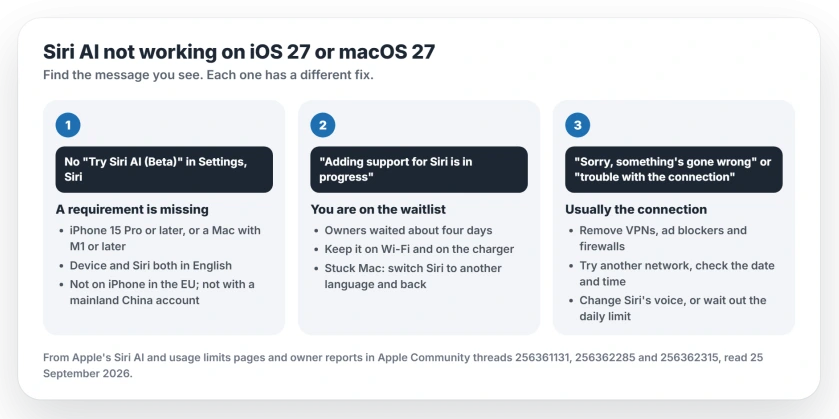
Status: iOS 27 and macOS 27, checked 25 September 2026. Siri AI is a beta with a waitlist. Apple documents the requirements and limits; owners fixed the rest with a network or language change.
1. No "Try Siri AI (Beta)" option
Apple's steps are short: "go to Settings, tap or click Siri, then tap or click Try Siri AI (Beta)". If that option is missing, one of the requirements is not met.
Your device comes first. On iPhone, Apple lists "iOS 27 on iPhone 15 Pro models and later, iPhone 16 models or later, and iPhone Air", while a Mac needs M1 or later.
Language is next. Apple wants the language of your device and the language of Siri to match, and both must be supported. For now that means English.
Then your region. Apple says "Siri AI is not available for iOS, iPadOS, or watchOS in the EU". A Mac in the EU can still use it in English. It "will not currently work" with an Apple Account region in mainland China.
When a Mac owner saw no option, a Level 10 volunteer's first question was about exactly this: "What is your Apple Account's region set to?"
2. "Adding support for Siri is in progress"
This one means you are in the queue. Apple says joining "will add you to a waitlist, and wait times can vary". Siri AI then downloads by itself when your turn comes.
Owners report waits of several days, so do not expect yours overnight. One wrote, "It took four days for me".
A Mac can lag behind the iPhone on the same account: "Siri was approved for my iPhone over a week ago, but going on six days, my Mac is still waiting".
My advice, and it is ours: keep your device on Wi-Fi and on its charger overnight, so the download is not held back.
If the wait drags on for you, one owner found a shortcut on the Mac. "Apparently, what worked was changing the setting to a different language first". They then switched Siri back to English (United States), and Siri AI was ready.
That worked for one person, so try it once, and if nothing moves after a week, a Level 7 volunteer's advice was to call Apple Support.
3. "Something's gone wrong" or "trouble with the connection"
This is the frustrating one, because Siri AI is on and half works for you. One owner found that only simple prompts, like asking the time, got an answer.
Bigger questions need Apple's servers, so when those fail and simple ones work, I would look at your connection first.
a. Remove anything that filters your connection
A Level 10 volunteer put it plainly: "Remove any VPN, Firewall, Antivirus, or other network altering app". Ad blockers count too. The first iPhone owner had AdGuard installed.
Turn them off, restart, and ask Siri a real question again.
b. Try a different network
One Mac owner reported that "changing my network seemed to help". Another said "no matter which Wi-Fi I connect to, it just doesn't work on my Mac", so it will not fix every case. Still, a phone hotspot is a quick test.
c. Check the date and time
Another volunteer's first suggestion was: "Check the date and time on your device". A clock that is off can break secure connections. On iPhone, open Settings, General, Date & Time, and turn on Set Automatically.
d. Make Siri download its voice again
A Level 9 volunteer suggested you "Switch it to a different dialect or voice option", which forces a fresh download of Siri's files.
Apple's route is Settings, Siri, Voice, then pick another option under Variations or Voices. Wait for it to download, then switch back.
e. You may have hit the daily limit
Apple lists Siri AI among the features with daily usage limits. If it worked well earlier and failed after heavy use, wait a few hours, since the limit resets after a time out. The same limits explain the photo Extend error.
What did not help
The first iPhone owner tried a lot before posting. Restarts, Reset Network Settings, a US region, no AdGuard, Wi-Fi and cellular data, and even reinstalling iOS 27 from a computer. None of it fixed Siri AI.
So I would not reinstall anything for this. Report it through Apple's Feedback app instead, as one owner did.
Other Siri AI changes
If Writing Tools stopped proofreading on your Mac since the update, Siri AI is behind that too. And if you would rather not use it at all, turning off Apple Intelligence on iOS 27 starts with the Siri AI switch.
Command-Space opening a box to type into is part of the same change on a Mac. The Command-Space page lists the ways to speak to Siri again.
If Siri AI keeps announcing unread messages that are not there, the ghost messages page covers what finally cleared them.
Why does Siri AI say something's gone wrong?
Usually because its request to Apple's servers failed, and a VPN or ad blocker, a bad network, a wrong clock or the daily limit can all cause that. Simple on-device requests keep working, which makes it look half broken.
How long does the Siri AI waitlist take?
Apple says wait times vary and gives no number. Owners report around four days, and one Mac was still waiting after six days while the same owner's iPhone was approved.
Why can't I see Try Siri AI (Beta)?
Your device, language or region does not meet Apple's requirements. You need at least an iPhone 15 Pro, or a Mac with M1 or later, with the device and Siri both set to English.
Does Siri AI work in the EU?
Not on your iPhone, iPad or Apple Watch. On a Mac it does, as long as the Mac and Siri both use English.
The Short Version
- No Try Siri AI option: check the device, the language and the region.
- "Adding support for Siri is in progress": you are on the waitlist. Owners waited about four days.
- If your Mac is stuck, switch Siri to another language and back; it helped one owner.
- "Something's gone wrong": remove VPNs and ad blockers, try another network and check the clock.
- Changing your Siri voice forces a fresh download.
- Heavy use can hit your daily limit.
Where to Next
Switch off your VPN or ad blocker first, since that takes a minute. Then try Siri from a phone hotspot.
Still stuck? Post the exact message in the comments, and say whether it is an iPhone or a Mac. I will add what works for you here.

Isaac Smith is the founder and editor of PC Glance, a website that covers computers, laptops, and technology. He is a tech enthusiast and a computer geek who loves to share his insights and help his readers make smart choices when buying tech gadgets or laptops. He is always curious and updated about the latest tech trends.