
You tried Extend on a few photos and it worked. Then every photo started failing with the same line: "There was an error extending this photo".
When a feature you only just found stops working the same day, it is easy to blame the update. Good news, though: your iPhone is almost certainly fine.
I will explain what the message means, how to get the edit done anyway, and when to report it.
What the message usually means
Extend is one of the new Apple Intelligence tools in the iOS 27 Photos app, next to Clean Up and Reframe, and the hard work happens on Apple's servers rather than on your phone.
Apple's page on Apple Intelligence usage limits names "Intelligent Photo Editing Tools including Clean Up, Extend, and Spatial Reframing" among the features with limits.
It also says when they come back: "If you reach a limit in a particular feature, that feature will become available again after a time out period".
Apple does not publish the numbers. Its iPhone guide only says "Daily limits may vary by feature, request complexity, system demand, system policies, and other factors".
The error never mentions a limit, so it reads like a fault. My reading, and it is ours: if Extend worked for you earlier the same day, a used-up allowance is the likeliest cause.
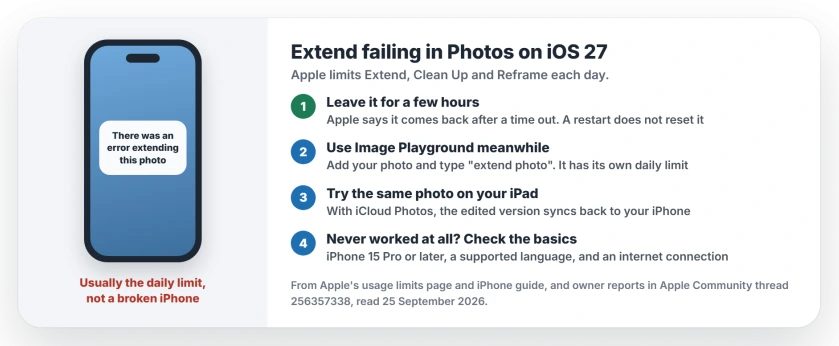
Status: iOS 27, checked 25 September 2026. Apple documents daily limits on Extend, Clean Up and Reframe, without numbers. Owners saw Extend work again hours later.
What owners saw
The forum thread has 146 people saying Me too. The person who started it got Extend back the same day: "FYI I just tried it again for probably the 100th time today, and it worked!"
Another owner described the pattern exactly. First "a few hours later I tried it again and it worked", then it failed again after six photos. Their verdict: "I therefore suspect it is a limitation thing".
Reframe kept working for the first owner while Extend failed. That fits Apple's wording, since each feature has its own limit. If Reframe still works for you, it points the same way.
1. Leave it for a few hours
Waiting is the answer here, even if you hoped for a setting. Apple promises the feature comes back after a time out. It gives no time frame.
Restarting will not speed it up. One owner restarted and saw no change. I would leave the photo for now and try again later in the day, or tomorrow morning.
2. Use Image Playground in the meantime
One owner found a way to get a result straight away: "if you want to use extend just go to image playground and type extend photo this works".
Apple's Image Playground guide confirms you can start from "photos, and people from your Photos library". Open Image Playground, add your photo, then type what you want.
Two things to know first. The result is a new Image Playground picture based on your photo. Check it closely before you use it. And Image Playground has a daily limit of its own.
3. Try the same photo on another device
Another owner hit the error on their iPhone and not on their iPad: "it happens with my iphone and i updated on my ipad and it works".
If you use iCloud Photos, the picture is already on your iPad. Extend it there. The edited version syncs back to your phone.
That is one owner's report, so I count it as a maybe, not a promise.
4. If Extend has never worked at all
Then you have not hit a limit. You never got a single edit through. Check the requirements instead.
Apple says Apple Intelligence on iOS 27 "is available on an Apple Intelligence-enabled iPhone 15 Pro, iPhone 15 Pro Max, or iPhone 16 model or later". Other models cannot use it.
Your Siri language and your device language both need to be a supported one, such as English.
You also need a working internet connection, since the edit runs on Apple's servers, so try another Wi-Fi network or cellular data before you give up.
5. Still failing after two days? Report it
One owner went "48+ hours" without a single successful Extend. A restart did nothing. That is longer than a daily limit should last.
If yours is past two days, tell Apple through the iPhone feedback page. Say that Extend fails on every photo, that Reframe still works or does not, and roughly when it last worked.
Clean Up failing too?
The same limits cover Clean Up. If Clean Up blurs a face into blocks, that is a separate feature, and the Safety Filter page explains it.
If you would rather switch these features off completely, turning off Apple Intelligence on iOS 27 takes several separate switches.
Why does my iPhone say there was an error extending this photo?
Most often because the daily limit for Extend has run out. Apple lists Extend among the features with usage limits, and owners saw it work again a few hours later.
Is there a daily limit on Extend in Photos?
Yes. Apple's iPhone guide says photo editing tools that rely on its servers "are subject to daily usage limits". It does not say how many edits you get.
How long until I can use Extend again?
Apple only says the feature comes back "after a time out period". Owners got it back after a few hours, though one was still waiting after two days.
Does paying for Apple One remove the limit?
Not today. One owner with an Apple One subscription still hit the limit. Apple says increased access "will be available for a fee", but it has not launched that yet.
The Short Version
- The error usually means Extend's daily limit has run out.
- Apple documents the limits but not the numbers.
- Wait a few hours; a restart will not reset it.
- Image Playground or your iPad can do the job meanwhile.
- Never worked at all? Check the iPhone model, the language and the connection.
- Past two days, report it to Apple.
Where to Next
Put the photo aside and try Extend again this evening. The odds are good it will work.
If it is still failing tomorrow, leave a comment with your iPhone model and how many photos you extended before it stopped. I am collecting those numbers, since Apple will not share them.

Isaac Smith is the founder and editor of PC Glance, a website that covers computers, laptops, and technology. He is a tech enthusiast and a computer geek who loves to share his insights and help his readers make smart choices when buying tech gadgets or laptops. He is always curious and updated about the latest tech trends.