
Your wrist buzzes with a Blink motion alert. Then it buzzes again, and again, for ten minutes straight. When you finally check the times, the clips are from last night, or from two days ago.
With a security camera that is worrying, because any one of those buzzes could be real.
I will start with how to tell old alerts from new ones, then the step that stopped the beeping for one owner, and how to keep Blink off your wrist until it gets fixed.
Old clips, not new motion
The owner who started the forum thread put it clearly: their watch gets "notifications for events that have already happened that are hours, sometimes even days old".
It is not one alert, either: "My watch will go off continuously for 10-15 minutes with the notifications coming in, sometimes the same ones over and over". That was in February, and 274 people have clicked Me too since.
For them it began with iOS 26.2, and it has not stopped. One owner wrote in September: "It continues with 27 and clearly is a Blink issue as I don't have this random problem with other apps".
So before you run to the door, open the Blink app and look at the clip's time. If it is hours old, nothing new has happened at your house.
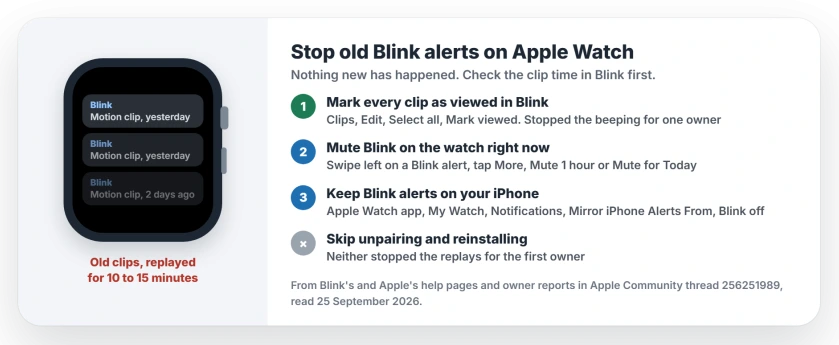
Status: iOS 27 and watchOS 27, checked 25 September 2026. No fix from Apple or Blink yet. Marking every clip as viewed in Blink stopped the beeping for one owner.
Skip the unpairing
The first owner tried nearly everything before asking for help. Dismissing and snoozing the alerts did nothing. Neither did restarting the phone and watch together.
Turning notifications off and on failed too, and so did turning mirroring off and on. They unpaired the watch and paired it again. They deleted Blink and installed it again.
The old alerts still came back. So I would not lose an evening to a re-pair.
1. Mark every clip as viewed in Blink
This is the one that worked. In September, one owner reported that "it stops beeping" once every clip is marked as seen in the Blink app.
Blink's help page gives the steps, starting from the Home Screen: tap Clips at the bottom. Tap Edit at the top right, then Select all, then Mark viewed.
Two details can trip you up. With large text on your phone, Mark viewed hides under the (…) menu instead.
And Blink notes that "Only the first 1,000 unviewed selected items will be marked as viewed". If you have more than that, scroll to the end of the list to load the rest, and repeat.
Unwatched clips carry an orange dot next to their time, so once the dots are gone, the backlog is clear.
Why would this help? My reading, and it is ours alone: the replays look tied to clips Blink still counts as new. Clear that backlog and there is nothing left to resend.
2. Mute Blink on your watch for an hour
If your wrist is buzzing right now, this stops it fastest. Hold a finger on the top of the watch display, then swipe down to open Notification Center. Swipe left on a Blink alert and tap the More button.
Apple's steps stop there, since the choices depend on the app. For Blink, pick Mute 1 hour while a burst plays out, or Mute for Today if it keeps going.
Nothing is lost when you mute. In its watch guide, Apple says muted alerts "are sent directly to Notification Center without Apple Watch making a sound or displaying the notification". You can scroll back through them later.
3. Keep Blink alerts on your iPhone
Blink has no Apple Watch app. The alerts on your wrist are your iPhone's alerts, passed across, so you can turn them off for the watch alone.
Pick up your iPhone and open its Apple Watch app, then tap My Watch and Notifications. Apple's instruction for apps like this is short.
"Scroll down to the Mirror iPhone Alerts From section and turn off the setting next to the app". Find Blink in that list and switch it off.
Be clear about the cost. Your watch stays quiet for real motion too, so do this only if your phone is usually with you.
The first owner only switched mirroring off and back on, as a test, but leaving it off is what keeps the replays away from your wrist.
4. Update Blink, then report it to both
People hoped watchOS 26.5 would cure it, but owners report that neither it nor watchOS 27 has.
Keep Blink current anyway, and keep your watch up to date. If yours refuses the update, start with these update fixes.
An app update blocked by device compatibility or account access needs the Blink installation and login checks before watch alert settings can help.
Then tell both companies. When the first owner contacted Blink, they came back with this: "Blink is blaming the issue on iOS 26 updates". Owners blame Blink instead, since no other app does it.
Report it through Blink's support, then tell Apple through its Apple Watch feedback page, so both sides have your case.
Other Apple Watch notification problems
Getting no alerts on the watch is a separate fault, and the missing notification checks cover that one.
If messages you already read stay unread on the watch, that is a watchOS 26 change with its own workaround.
Why does my Apple Watch keep showing old Blink notifications?
Since iOS 26.2, some owners get Blink alerts for events that are hours or days old, in bursts of 10 to 15 minutes. Blink blames iOS 26, and owners say no other app does it. Neither company has published a fix.
How do I stop Blink notifications on my Apple Watch?
On your iPhone, open the Apple Watch app and tap My Watch, then Notifications. Under Mirror iPhone Alerts From, switch Blink off. Your iPhone keeps getting the alerts.
Does marking clips as viewed stop Blink notifications?
For one owner, yes. The beeping stopped after they marked every clip as seen. In the Blink app, tap Clips, then Edit, Select all and Mark viewed.
Will unpairing my Apple Watch fix Blink alerts?
No. The first owner in the thread unpaired and re-paired the watch, then reinstalled Blink, and the old alerts still returned.
The Short Version
- Replayed Blink alerts are old events, not new motion. Check the clip time first.
- In Blink, tap Clips, Edit, Select all, then Mark viewed.
- Mute Blink from any alert for an hour or for the day.
- Or switch Blink off under Mirror iPhone Alerts From, and keep alerts on the phone.
- Unpairing and reinstalling did not help the first owner.
- Report it to Blink and to Apple.
Where to Next
Mark your clips viewed tonight, before the next burst.
If the old alerts come back after a day or two, leave your watch model in the comments. I want to know whether the fix lasts.

Isaac Smith is the founder and editor of PC Glance, a website that covers computers, laptops, and technology. He is a tech enthusiast and a computer geek who loves to share his insights and help his readers make smart choices when buying tech gadgets or laptops. He is always curious and updated about the latest tech trends.