
You set your iPhone to stop at 80 percent, clip on a MagSafe battery, and find it at 100. That is worrying when the limit is there to protect the battery. I would check your iOS version first, since one update broke this.
A later update fixed it for the iPhone Air owner who raised it on MacRumors in April, in a thread with about 6,000 views. Apple's own support pages explain the rest, including when a full charge to 100 percent is planned.
What owners saw on iOS 26.4
The opening poster wrote: "Since updating to 26.4, the MagSafe Battery Pack no longer respects the 90% charge limit and now goes all the way up to 100%".
A second owner had set a lower limit. In their words: "I set my iPhone's max charge to 80%. Up till now the Air MagSafe Battery respected that charge limit". They added: "It did not do this before 26.4".
The next two point releases did not help either. The poster wrote: "Bug still present even with the latest 26.4.2 update". Another owner called Apple and was told "the engineers are already investigating and they are aware of this problem".
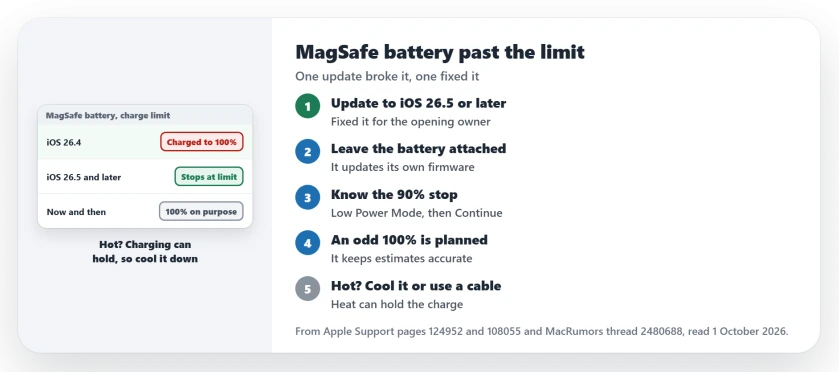
Status: checked 1 October 2026. The opening poster confirmed on 11 May 2026 that iOS 26.5 fixed it. Apple also documents a planned charge to 100 percent now and then, and a heat limit.
1. Update to iOS 26.5 or later
The fix came with an update. On 11 May the poster wrote: "With iOS 26.5 just released, the issue seems to have been resolved". They added: "Now the charge stays fixed at 90%".
The second owner was "glad to use this nice battery again" once the update landed. So open Settings, then General, then Software Update, and install whatever update is waiting for your iPhone.
The battery looks after itself. Apple's MagSafe Battery page says it "will update its firmware automatically while it is attached to iPhone".
2. Know the 90 percent stop
Apple documents a 90 percent stop for the iPhone Air battery on its own page. It says you "might get a notification that says your iPhone will charge only up to 90%".
You can override it. Apple's route: "To charge past 90%, open Control Center, press and hold the Low Power Mode icon, then tap Continue".
So if you tapped Continue, a charge past 90 percent is what you asked for, not the bug.
One more note from Apple. The Air battery "was designed to pair only with iPhone Air", and the second owner uses theirs on a Pro Max.
3. A full charge now and then is planned
Apple's Charge Limit page explains the odd 100 percent. It says: "If you have Charge Limit set to less than 100 percent, your iPhone will occasionally charge to 100 percent to maintain accurate battery state-of-charge estimates".
An owner offered the same guess in plainer words: "The phone will sometimes charge to 100% (once or twice every few months) to recalibrate". One full charge is no reason to worry.
Apple also says your iPhone "will charge to within a few percentage points of your chosen limit and then stop charging". A point or two over the limit fits that description.
4. Heat can hold the charge instead
A newer complaint runs the other way. With an Apple MagSafe battery, one owner wrote that "if I place it on my phone and my phone is at 40%, it stays at 40% does not go up or down".
Another owner put it down to heat and heavy use: "The MagSafe battery will default to maintaining charge level especially if temperatures are hot".
Their advice was "using wired charging in hot environments". The first owner agreed that was "probably why it did that".
Apple's page names heat too, though at a different mark. When the battery runs warm, Apple says software may hold charging past 80 percent. Its advice is to "Try moving your iPhone and charger to a cooler location".
5. Third-party packs have no fix yet
An iPhone 17e owner on iOS 26.6.1 used an Energizer MagSafe pack. It "Always charged beyond the 80% limit I set", even after a reset.
The limit held on a stand, though. In their words: "Set on a generic MagSafe compatible 3-in-1 charging station, the 80% limit works fine". No reply had a fix for the pack itself. So for now, a stand keeps the limit.
If the charge limit itself is new to you, the iPhone 17 battery health page shows what owners saw after a year with it. And if a pack brings up a warning, see the Slow Charger page.
Why is my MagSafe battery charging my iPhone to 100%?
On iOS 26.4 a bug made the iPhone Air battery skip its stop, and iOS 26.5 fixed it for the opening owner. Apple also says an iPhone with a limit occasionally charges to 100 percent.
How do I charge past 90% with the iPhone Air MagSafe Battery?
Open Control Center, press and hold the Low Power Mode icon, then tap Continue. That is Apple's own route.
Why is my MagSafe battery not charging my iPhone?
Heat is one reason owners give. Apple says a warm battery may limit charging, so move to a cooler place or charge by cable.
The Short Version
- iOS 26.4 made the Air battery skip its stop.
- iOS 26.5 fixed it for the opening owner.
- Install the latest update.
- The battery updates its own firmware.
- A 90 percent stop is normal on the Air battery.
- An occasional 100 percent is planned.
- Heat can hold the charge in place.
Where to Next
Install any waiting update today, then watch one charge with the battery attached. If it stops near your limit, the update has done its job for you.
If it still runs to 100 on a current update, tell me your iPhone, your battery and your iOS version in a comment. I will add what you find to this page.

Isaac Smith is the founder and editor of PC Glance, a website that covers computers, laptops, and technology. He is a tech enthusiast and a computer geek who loves to share his insights and help his readers make smart choices when buying tech gadgets or laptops. He is always curious and updated about the latest tech trends.