
Your Windows PC may show the wrong hour on 1 November, when Alberta and most of British Columbia stop turning their clocks back. That is worrying if your day runs on meeting invites. I would check your time zone list this week.
Microsoft has added two new zones for this and put out guidance for PCs that miss the update. This page covers which zone to pick, and what to do if the update has not arrived.
What is changing on 1 November
Both provinces keep summer time for good. Microsoft's Windows message center lists the change too. For Alberta, Microsoft says: "The Alberta time zone will permanently shift to the UTC-6 time zone."
For British Columbia, it says: "Clocks will not be set back by an hour at 02:00 a.m. on November 1, 2026, for the British Columbia time zone." The province moves to UTC-7 for good.
Windows cannot guess this, because its old zones still expect the clocks to go back. If your PC stays on the old zone, it shows the wrong hour from that night on.
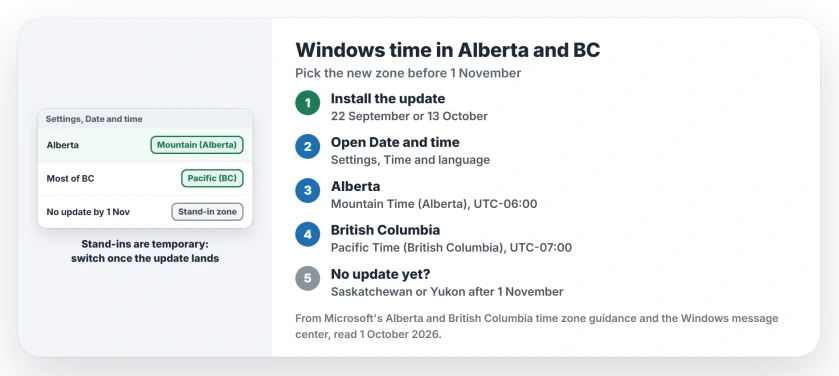
Status: checked 1 October 2026. Microsoft's new zones came with the 22 September update for Windows 11 24H2 and later. Other versions get them on 13 October, before the change on 1 November.
1. Install the update that brings the new zones
If your PC runs Windows 11 24H2, 25H2, 26H1 or 26H2, the zones came in the optional September 22 update. Other versions follow later.
In Microsoft's words: "Remaining versions of Windows will receive the update as part of October 2026 monthly quality update, scheduled for October 13, 2026." So run Windows Update and accept the update it lists.
Ours: this Windows 11 25H2 PC, without the optional September 22 update, has no Alberta or British Columbia zone in its list yet, though Yukon is there already. So the update matters.
2. Check the zone Windows picked
After the update, open Settings, then Time & language, then Date & time, and look at the time zone line.
If your PC has Set time zone automatically on, Windows should pick the new zone itself. That is the easy case. Microsoft says Alberta "shall be reflecting to (UTC-06:00) Mountain Time (Alberta) windows display name".
In British Columbia, the new name is (UTC-07:00) Pacific Time (British Columbia). Microsoft lists that zone for "Most of British Columbia".
3. Set it by hand if automatic is off
Some PCs have automatic time zone switched off, often on purpose at work. Then nothing changes unless you change it.
Microsoft's steps: turn off Set time zone automatically, open the Time zone list, and choose the new name for your area. Its last step is to "Confirm that the displayed date and time are correct".
The new Alberta zone also covers parts of the north. Microsoft says: "The Alberta time zone also applies to affected Northwest Territories locations, including Yellowknife and Inuvik."
4. No update by 1 November? Use a stand-in zone
If a PC cannot get the update in time, Microsoft names stand-in zones for after the change. For Alberta, Yellowknife and Inuvik, it is (UTC-06:00) Saskatchewan.
For most of British Columbia, the stand-in is (UTC-07:00) Yukon. Places in the southeast of the province that follow Alberta time take Saskatchewan too.
Both give the right offset. Treat them as temporary, because Microsoft warns that "These alternatives provide the required UTC offset but have different names, geographic mappings, and historical rules."
5. Switch back once the update lands
Microsoft is clear that the stand-ins "should not be treated as permanent replacements". Once the update arrives, pick the proper Alberta or British Columbia zone.
Before 1 November, leave your current zone alone. Microsoft says the existing zones "continue to provide the expected current offset" until the change.
If your iPhone shows the wrong time instead, the iPhone time page covers its automatic switch. And if your PC runs Windows 11 24H2, the 24H2 end of updates page explains what stops on 13 October.
Why will my Windows clock be wrong in Alberta after 1 November?
Alberta stays on UTC-6 for good, and the old Mountain Time zone in Windows still expects clocks to go back. Install the update and pick Mountain Time (Alberta).
What time zone should I choose in British Columbia on Windows?
After the update, choose (UTC-07:00) Pacific Time (British Columbia). Without the update, Microsoft suggests Yukon as a stand-in after 1 November.
When does Windows get the new time zones?
Microsoft says Windows 11 24H2 and later got them in the 22 September update. Other versions get them on 13 October 2026.
The Short Version
- Alberta and most of BC keep summer time from 1 November.
- Install the 22 September or 13 October update.
- Check Settings, Time & language, Date & time.
- Alberta picks Mountain Time (Alberta).
- BC picks Pacific Time (British Columbia).
- No update yet? Use Saskatchewan or Yukon for a while.
- Switch to the proper zone once it arrives.
Where to Next
Run Windows Update today and look for the new zone name in your list. If it is there, you are set for 1 November.
If your PC still shows no new zone after the October update, tell me your Windows version in a comment. I will add every case owners report to this page.

Isaac Smith is the founder and editor of PC Glance, a website that covers computers, laptops, and technology. He is a tech enthusiast and a computer geek who loves to share his insights and help his readers make smart choices when buying tech gadgets or laptops. He is always curious and updated about the latest tech trends.