A Windows clock that's an hour off in Alberta or British Columbia since 1 November is still on the old time zone. Both provinces stopped turning their clocks back that night, and so did Manitoba.
The old Windows zones still expect that change.
Install the latest Windows update, then pick the new zone in Settings > Time & language > Date & time. Outlook and Teams meetings that now show an hour off need their own fix, covered further down.
In this guide
What changed on 1 November
Alberta now stays on UTC-6 for good, and the same zone covers Yellowknife and Inuvik in the Northwest Territories. Most of British Columbia stays on UTC-7, and Manitoba stays on UTC-5.
Windows can't guess this, because its older zones still expect the clocks to go back in the fall. A PC on the old zone shows the wrong hour from that night on. All three changes are listed in the Windows message center.
A clock that goes wrong after every restart, wherever you live, is a different fault, and the size of the gap points at the cause.
1. Install the update that brings the new zones
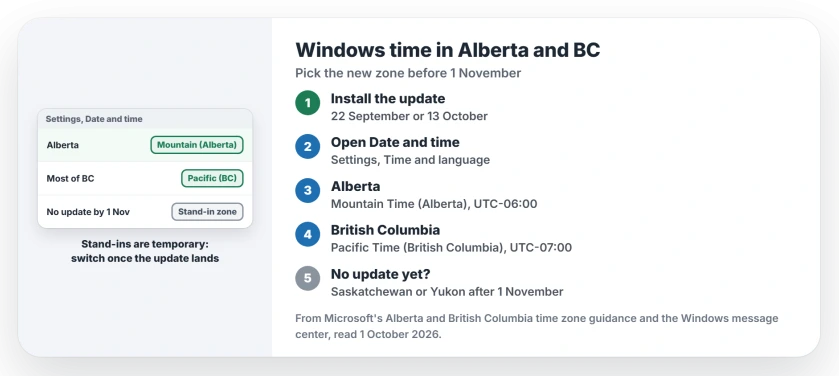
The new zones arrive through Windows Update. Windows 11 24H2 and later got the Alberta and British Columbia zones in the optional update of 22 September. Other supported versions got them in the monthly update of 13 October.
Manitoba's zone came with the October update too (KB5127648 for the two newest Windows 11 versions). Open Settings > Windows Update, select Check for updates, and install what it offers, including optional quality updates.
A PC on a version that no longer gets updates won't receive the new zones at all. In that case use the stand-in zones in step 4.
2. Check the zone Windows picked
After the update, open Settings > Time & language > Date & time and look at the time zone line. With Set time zone automatically on, Windows should move to the new zone by itself.
The names to look for are (UTC-06:00) Mountain Time (Alberta), (UTC-07:00) Pacific Time (British Columbia) and (UTC-05:00) Manitoba. If yours shows one of those and the clock is right, you're done on the Windows side.
3. Set it by hand if automatic is off
Some PCs have automatic time zone switched off, often on purpose at work, and then nothing changes until you change it. Turn off Set time zone automatically, open the Time zone list, and pick the new name for your area.
Check that the date and time shown now match a phone or a clock you trust. If the list is grayed out when you try, check Location and the automatic switch first.
4. No update yet? Use a stand-in zone
If the update can't be installed yet, Microsoft names stand-in zones with the right offset. For Alberta, Yellowknife and Inuvik, pick (UTC-06:00) Saskatchewan. For most of British Columbia, pick (UTC-07:00) Yukon.
Places in the southeast of British Columbia that follow Alberta time take Saskatchewan too. For Manitoba, pick (UTC-05:00) Eastern Time (US & Canada) and turn off Adjust for daylight saving time automatically.
These are temporary. They carry different names, regions and historical rules from the real zones, so move to the proper zone once the update is installed.
5. Fix Outlook and Teams meetings that show an hour off
This is the problem that lands in inboxes after the change. Microsoft's guidance, updated 2 November, says users must move to the new time zone, and that calendar events created before the change don't move by themselves.
Set the new zone in Outlook too. In the new Outlook, and in Outlook in a browser, open Settings > General > Language and time and change the current time zone. In classic Outlook, it's File > Options > Calendar, under Time zones.
Then go through your upcoming meetings, recurring ones first. If you organized a series that now shows the wrong hour, open it, set its time zone to the new zone and send the update. If someone else organized it, ask them to do the same.
The business side isn't finished yet. A fix that administrators can run for one-off meetings in Exchange Online was due on 4 November, while recurring meetings had no repair date.
Teams Rooms screens running an hour behind need an Edge update.
Keep Outlook and Teams up to date on iPhone, Android and Mac as well, because Microsoft fixes the time zone handling in those apps through their updates. If your iPhone's own clock is wrong, the iPhone time page covers its automatic switch.
If the time is still wrong
Run Windows Update once more and restart, then check the time zone line again. A PC still on Windows 11 24H2 should look at the 24H2 end of updates page, because updates for that version have stopped on Home and Pro.
On a work PC, the IT team may set the time zone centrally, so ask them before changing it. Meeting problems that survive all of this belong with whoever runs your Microsoft 365, because some of the repairs are admin-only.
Why is my Windows clock wrong in Alberta after 1 November?
Alberta now stays on UTC-6 all year, and the old Mountain Time zone in Windows still expects the clocks to go back. Install the latest update and pick (UTC-06:00) Mountain Time (Alberta).
What time zone should I choose in British Columbia on Windows?
Choose (UTC-07:00) Pacific Time (British Columbia) once the update is installed. Without the update, Yukon gives the right time until it arrives.
Why are my Outlook meetings an hour off after the time change?
Events created before 1 November keep the old time zone's rules, and Microsoft says they don't update by themselves. Set the new zone in Outlook, then have the organizer of each wrong meeting update its time zone and send the change.
The Short Version
- Alberta, most of British Columbia and Manitoba stopped changing their clocks on 1 November.
- Install the latest Windows update to get the new zones.
- Pick Mountain Time (Alberta), Pacific Time (British Columbia) or Manitoba in Date & time.
- No update yet? Use Saskatchewan, Yukon or Eastern Time with daylight saving off for a while.
- Set the new zone in Outlook too, and check recurring meetings, which don't move by themselves.
Checked November 8, 2026.