
You set the clock, restart, and it is wrong again. Sometimes it is out by an hour, sometimes by five or six, sometimes it is back on an old date. Syncing fixes it until the next restart.
I would look at how far off it is before changing anything. Whole hours point at a time zone or a second system such as Linux. A few minutes point at syncing. A reset date points at the small battery that runs the clock while the PC is off.
One Microsoft Q&A thread about the clock resetting at shutdown carries 1,800+ Same question votes.
Read the gap first
Whole hours, with the minutes right, mean something is reading the clock in the wrong zone. The 100+ asker on a new laptop saw "exactly 6 hours ahead of my local time" after every reboot.
A few minutes, the same each time, mean the sync is failing. One asker found "the clock/time on my computer is always about 5 minutes behind" after every restart.
A date and time that reset after the PC was off point at the hardware. The 1,800+ asker: "recently when I shut down my computer it resets the date and time".
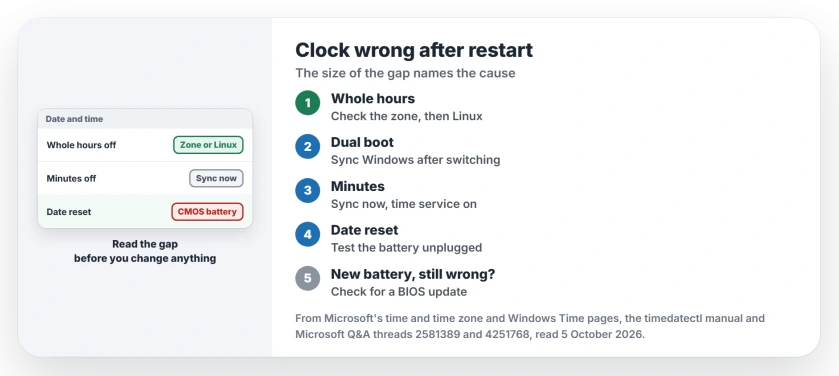
Status: checked 5 October 2026. A dual boot with Linux explained the whole-hour gap for one owner, and the accepted answer on the 1,800+ thread points at the CMOS battery for dates that reset.
Whole hours: the time zone, or Linux
Check the zone first. Microsoft's time and time zone steps use Settings, Time and language, Date and time, where you can set the zone automatically or pick it by hand.
If the zone list sits gray and will not let you pick, turning Location on unlocked it for owners.
If the zone is right and the hour is still wrong after each restart, ask whether Linux is on the same PC.
An owner on Windows 11 traced a one-hour error that way, in their words: "I figured out that the problem is caused because I'm dual booting Linux."
That reply has 200+ helpful votes. Another reader added: "I am also dual booting and time difference is 8 hours earlier every time I go into Windows".
Ours: Linux keeps the hardware clock in universal time and Windows reads it as local time. A gap that matches your zone's distance from UTC is that mismatch.
The quick fix for a dual boot
A dual booter on Windows 11 turns Set time automatically off and on again after starting Windows: "This fixes the time immediately." Sync now under Additional settings does the same job.
The Linux side can keep local time instead, with timedatectl set-local-rtc 1. Its own manual is cool on the idea: "If at all possible, keep the RTC in UTC mode." I would leave Linux alone and sync Windows after switching.
Minutes off: make the sync work
If you only see minutes of drift, press Sync now in Date and time. If it fails, run Command Prompt as administrator, then restart the time service: net stop w32time, then net start w32time, then w32tm /resync.
Microsoft says /resync tells the computer to "resynchronize its clock as soon as possible". The 100+ asker also found "my windows time service defaults to manual", so set Windows Time to Automatic in services.msc. Then restart and check.
Still stopped after the restart? The automatic service page points you to the event that records why Windows gave up on it.
Syncing needs your PC online. A 2017 reader behind an institute's proxy got an error saying no time data was available, which points at the network, not the clock.
A reset date: the CMOS battery
The accepted answer on the 1,800+ thread: "If either of them has failed the time will not be correct on the next startup and the time will revert to the initial BIOS default." Either means the battery or the clock chip.
A desktop keeps it as a coin cell on the motherboard. A 2011 answer named it: "Usually it's a CR2032 battery". For a laptop, a second answer on that thread said "you probably need a real computer shop".
Ours: I would test it before buying one. Set the right time in the BIOS, shut down, unplug the PC for an hour, then check the BIOS clock again. If it went back, the battery is your answer.
When a new battery did not help
A battery is not every answer. A 2014 owner fitted a new one and wrote: "it still doesn't work". A Windows 11 owner whose clock jumped to the year 3209 had also replaced it, and it did not help.
A date far in the future points somewhere else. An adviser on a 10+ thread wrote: "If your computer has a BIOS update available, the update might fix time-related problems." Read what a BIOS update involves first.
What did not help
Re-registering the time service, when the hardware clock was the problem.
The 5 minute asker had done it: "I have already tried registering/unregistering w32tm and then restarting the service, however, this issue still persists after a restart."
Resetting the clock device in Device Manager, for the same asker: "Resetting the real-time clock didn't help".
Why is my computer clock wrong every time I turn it on?
Check how big the error is. Whole hours point at the zone or another system, minutes at the sync, and a date reset at the battery that keeps the clock running while the PC is off.
A clock that far out also breaks secure websites. Chrome shows DATE_INVALID under its privacy warning then, and the other codes have causes of their own.
Why is my Windows clock exactly one hour off?
Daylight saving or the zone is set wrong, or Linux on the same PC keeps the clock in universal time. Some zones also change by law, and Windows needs an update to follow.
How do I make Windows sync the time now?
Open Settings, Time and language, Date and time, then Additional settings, and press Sync now. You need to be online.
The Short Version
- Whole hours? Check the zone, then ask about Linux.
- Minutes? Sync now, and set Windows Time to Automatic.
- Date reset after power off? Test the CMOS battery.
- A dual boot? Sync Windows after switching.
- New battery and still wrong? Look at a BIOS update.
Where to Next
Restart now and write down exactly how far off the clock is. The size of the gap picks your starting section.
Was it the zone, Linux or the battery for you? A comment with your gap helps the next reader read theirs.

Isaac Smith is the founder and editor of PC Glance, a website that covers computers, laptops, and technology. He is a tech enthusiast and a computer geek who loves to share his insights and help his readers make smart choices when buying tech gadgets or laptops. He is always curious and updated about the latest tech trends.