
Your Corsair EX400U works through a dock or on an iPhone, but plugged straight into your Mac it does nothing at all. That is annoying on a drive you bought for its 40Gbps speed. I would check its serial number and firmware first.
Corsair names a batch with a known fault and offers a tool for it. An M4 MacBook Pro owner raised the problem on MacRumors, and that thread has about 7,000 views.
What owners saw
The opening poster was clear about it. Their MacBook Pro "doesn't detect the SSD when I connect it using the included USB4 compatible cable", and in their words, "It doesn't show up on disk utility".
The drive itself was fine. It worked on an iPhone and on Windows PCs, and through an adapter on the Mac: "I tried to connect it using a borrowed Dell DA305 USB-C mobile adapter and it worked."
A later owner saw the same on an M2 MacBook Air. The drive "works fine through a CalDigit TS4 dock, works fine plugged straight into an iPhone".
Status: checked 1 October 2026. Corsair says a malformed USB serial number on some EX400U drives stops them mounting on Macs, and its correction utility fixes it for good.
1. Check whether your drive is on Corsair's list
The cause is documented by the vendor, so you do not have to guess. Corsair's help page says "The problem is caused by a malformed USB serial number presented to the host computer."
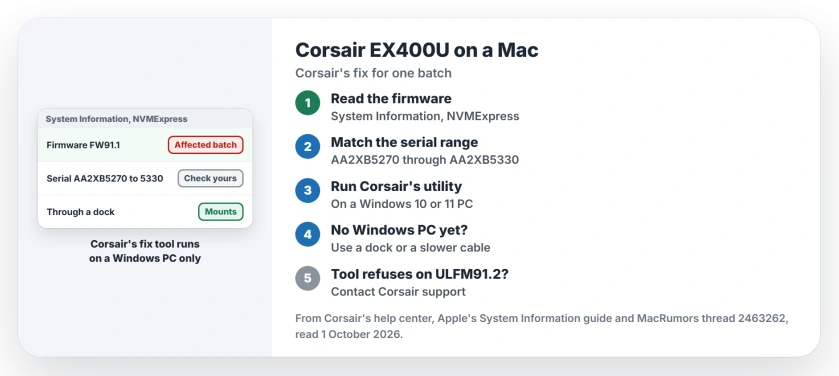
The fault sits in one batch. Corsair lists the 1TB, 2TB and 4TB models "using Firmware version FW91.1", with "Serial numbers beginning with AA2XB5270 through AA2XB5330".
You can read the firmware on the Mac itself. Corsair says it shows "in the MacOS System Information App, under NVMExpress", once the drive connects through a dock or adapter.
That app is the right place to look. In its System Information guide, Apple says the report covers "The hardware that's installed on or connected to your computer".
2. Run Corsair's utility on a Windows PC
Corsair made a tool for exactly this. In its words, "Running this utility updates the drive's settings and permanently resolves the issue."
It needs Windows, though. Corsair lists "Windows 10 (64-bit) and Windows 11", so borrow a PC if you do not own one.
Then follow Corsair's order. "Connect the EX400U to a Windows PC using the included USB-C cable", run the utility as an administrator, and start the update when the drive shows up.
Corsair's promise is plain: "After completing these steps, the EX400U should mount normally on macOS." It recommends running the tool on every drive in the range, even if you never use a Mac.
3. No Windows PC? Use a dock or a slower cable for now
The drive works through a hub because it drops to a slower mode, a member explained. "It works through hubs because as someone already stated this switches it to a different downgraded slower USB mode".
The same member gave a cheaper stopgap. You "can get a different USB cable that simply doesn't support 40Gbps" and it forces the slower link without a hub.
That gets your files back today, at a lower speed. Run Corsair's utility when you can, to get the full speed back.
4. If the tool says your drive is already up to date
One owner hit a snag. It is user-reported. Their drive had a newer firmware, ULFM91.2, from Corsair's general updater, and the fix tool refused to run.
In their words, the tool "displays that refusal to the user as a success message". They filed a ticket with Corsair support about it.
So if your drive sits in the serial range but on newer firmware, contact Corsair support with the serial number. That owner went further with a change of their own to the tool, which I would not copy.
Other drives, other causes
This fix is for one Corsair batch only. The same owner warned that on "a different SSD (Samsung T9, WD SN850P, OWC Envoy Pro, etc.)" the cause is something else.
If another drive will not mount, the external drive page works through the general checks. And if your SSD mounts but Spotlight cannot find its files, see the Spotlight reindex page.
And if the drive mounts but Finder copies fail with error -51, the Finder error -51 page covers a cause no disk tool shows.
Why does my Corsair EX400U not show up on my Mac?
Corsair says some EX400U drives present a malformed USB serial number, which can stop them mounting on Macs. Its correction utility fixes it.
Can I run the Corsair EX400U fix on a Mac?
No. Corsair lists Windows 10 (64-bit) and Windows 11 for the utility, so the drive needs a Windows PC for a few minutes.
Why does the EX400U work through a dock but not directly?
Owners report that a dock or hub drops the drive to a slower USB mode, which avoids the fault. Direct connection uses the full USB4 mode.
The Short Version
- Some EX400U drives do not mount on Macs.
- Corsair blames a malformed USB serial number.
- Check for firmware FW91.1 and serials AA2XB5270 to AA2XB5330.
- Run Corsair's correction utility on a Windows PC.
- A dock or slower cable works in the meantime.
- On newer firmware, contact Corsair support.
- Other SSD brands need other fixes.
Where to Next
Connect the drive through a dock or adapter and read its firmware in System Information. If it matches Corsair's list, run the utility on a Windows PC.
If the drive still will not mount after the fix, post your serial range and firmware in a comment. Each new case goes onto this page.

Isaac Smith is the founder and editor of PC Glance, a website that covers computers, laptops, and technology. He is a tech enthusiast and a computer geek who loves to share his insights and help his readers make smart choices when buying tech gadgets or laptops. He is always curious and updated about the latest tech trends.