
If you opened Edge and found your Collections retired, I know how much research can sit in there, and it is not lost yet. Microsoft left two ways back. Which one you use comes down to how you sign in to Edge.
Collections went for good in Edge 149, released on 4 June 2026. Owners on Microsoft's Q&A forum have been hunting for their saved pages ever since.
When did Collections go?
Microsoft's Collections page states it: "Collections is no longer available starting with Microsoft Edge version 149, released on June 04th, 2026."
Adding pages stopped earlier, in Edge 145. Since then, opening Collections shows a notice with two buttons, Move to Favorites and Export Your Data.
One owner summed up the shock: "I did find it in bing.com/saves but trying to back it up is INSANE." The steps in this page are quicker than what they went through.
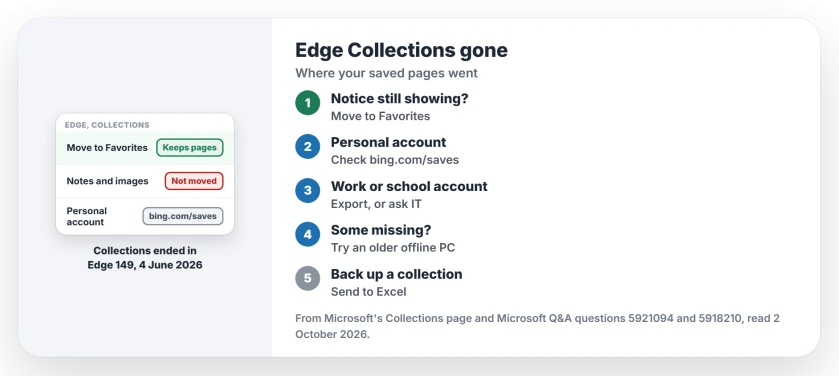
Status: checked 2 October 2026. Collections ended in Edge 149. Move to Favorites turns each collection into a Favorites folder; personal accounts can still see saved collections in Bing Saves.
1. If Edge still shows the notice, move to Favorites
On Edge 149 and later the pane is gone, but one owner still saw the notice in mid-June. If yours shows it, this is Microsoft's recommended route. In its words, it will "Move all saved pages from Collections to Favorites with one click."
Each collection becomes a Favorites folder: "Collections are converted into folders under Favorites, making them easier to find and manage." The folders land at the top level of your Favorites.
There is one catch. Microsoft says: "Only saved web pages (URLs). Images, notes, and other non-page items are not moved." Copy any notes you need before you press it.
2. Personal account? Look in Bing Saves
On current Edge versions, this is the way back. If you sign in to Edge with a personal Microsoft account, Microsoft says your collections stay reachable at bing.com/saves. Sign in there with the same account.
That is where one owner found theirs. Microsoft adds: "For personal accounts, Collections content remains accessible through Bing Saves instead of export."
3. Work or school account? Export your data
The Export Your Data button is for work and school accounts only. Microsoft says you can "export your Collections data for backup or offline use."
Check with your IT team before you choose, as Microsoft suggests. If the pane has already gone from your Edge, your IT team is the only route back for a work account.
4. Missing collections? Check another PC first
Some owners found gaps. One wrote that Edge "gave me a list of my collections but the problem is that was incomplete", and Bing Saves showed "no collections there; totally empty".
Another confirmed it: "Several of my Microsoft Edge Collections are missing, and they are not included in the exported CSV file or Bing Saves."
Ours: Microsoft says Collections syncs across signed-in devices, so an older PC that has stayed offline may still hold the full set. Open Edge on it before it connects, and move to Favorites there.
A spreadsheet backup: Send to Excel
While a collection still opens, Microsoft's page lists another exit: More options, then Send to Excel. That gives you a spreadsheet of the pages in it.
Ours: do this for the collections that matter most, as well as Move to Favorites. Two copies cost a minute.
Edge's writing assistant can surprise you too, with a blue dot over your text cursor that one switch turns off.
Dead ends owners hit
One owner spent hours on the phone with Microsoft support, who "after a few hours said there was no way to do this". They later found a free script on GitHub that copied Bing Saves into Favorites.
In their words: "it copied ALL my collections (100's of links) back into the Favorites folder in a sub folder." That is user-reported and third-party, so read its instructions closely before you run anything.
If Edge itself misbehaves after an update, the Edge yellow tint page covers one display fault. And to make another browser your default, the default browser page walks through it.
Where did my Edge Collections go?
Microsoft retired Collections in Edge 149 on 4 June 2026. Use Move to Favorites, or, with a personal account, open bing.com/saves to see what was saved.
Can I still get my Edge Collections back?
With a personal account, usually: Bing Saves still holds them. If your Edge still shows the Collections notice, Move to Favorites keeps the pages too.
Do notes and images move to Favorites?
No. Microsoft says only saved web pages move, so copy your notes and images out of each collection first.
The Short Version
- Collections ended in Edge 149, on 4 June 2026.
- Press Move to Favorites while the notice shows.
- Each collection becomes a Favorites folder.
- Notes and images do not move.
- Personal accounts can check bing.com/saves.
- Work accounts can export their data.
- An offline older PC may still hold missing ones.
Where to Next
Open Edge now, select Settings and more, then More tools, and look for Collections. If the notice appears, copy your notes and press Move to Favorites; if it is gone, sign in at bing.com/saves.
If some collections are missing everywhere, tell me whether you use a personal or work account. I will add any route back that owners confirm.

Isaac Smith is the founder and editor of PC Glance, a website that covers computers, laptops, and technology. He is a tech enthusiast and a computer geek who loves to share his insights and help his readers make smart choices when buying tech gadgets or laptops. He is always curious and updated about the latest tech trends.