
You delete a stack of Gmail messages in your browser, and later they are all back in your inbox, which is annoying after a clean-up. I would leave the Gmail tab open a little longer before you close it.
Owners found that a short wait is when your deletes stick. The fault started in Gmail on the web around mid-August, and one Gmail Help Community thread about it has 44 upvotes and 25 replies.
The warning that gives it away
The first owner spotted the clue: "When I tried to leave gmail right after, I'd get a popup that changes may not be saved". They left anyway, and the deleted emails returned.
Another owner described the same pattern: "If I just close the tab directly, the change is not being saved (and I will get a warning from browser about this)".
Owners read it the same way: the deletes look done on your screen but have not reached Google's servers yet, so closing the tab at that moment makes Gmail forget them.
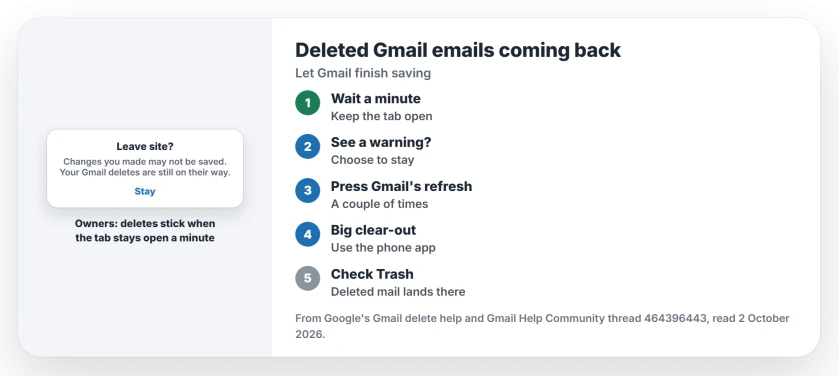
Status: checked 2 October 2026. No Google fix yet. Owners keep deletes by leaving Gmail open for a minute, refreshing before they leave, or deleting in the phone app.
1. Leave the tab open for a minute
This is the step owners agree on, and in their words, from one of them: "If I let the Gmail page sit open after deleting they don't come back but it takes a few minutes".
A second owner saw the same timing: "If I delete email and let tab sit open, it will get synced after couple of seconds/minutes".
Ours: delete your batch, read another email or two, then close Gmail. That small pause is the whole trick.
2. Never close through the warning
If your browser asks whether to leave because changes may not be saved, choose to stay. It costs you a minute. That box means Gmail is still sending your deletes.
Wait until you can leave without the warning. The first owner found that after about five minutes it sometimes worked, and sometimes did not.
3. Press Gmail's refresh button a couple of times
One owner found a quicker nudge: "when you delete from the inbox and press the refresh button a couple of times, THEN it will delete it like normal".
Use the round arrow inside Gmail, at the top of your message list, not the browser's own button. Ours: once the deleted emails stay gone after a refresh, it is safe to close the tab.
4. Delete in the Gmail app instead
For a big clear-out, try your phone, because in one owner's words: "The only way to reliably delete any emails is to do so from the app on my phone".
Another owner said the app was fine for them too. That is user-reported, and a third owner saw mail deleted in the app linger in a browser. Check Trash afterwards.
5. Check Trash, then tell Google
Google says, on its Gmail delete help: "When you delete a message in Gmail, it's moved to Trash". It stays there for 30 days before Gmail removes it for good.
So look in Trash after a clean-up, and if your deleted mail is not there but back in the inbox, the delete did not save.
A Gmail community volunteer urged reporting it: "To get this investigated, the issue needs to be reported directly to Google so their engineers are made aware of it".
What did not help
Before posting, the thread starter had tried the usual fixes: "Cleared cache/cookies, checked gmail Offline settings, cleared out trash/spam, even tried a different browser, same issue".
Another "tried different browsers (Edge, Safari, Firefox) and it makes no difference". One owner even switched DNS servers. Nothing changed.
Two faults that look similar
If your deleted mail returns on an iPhone instead, the iPhone deleted emails page covers that. And if the new Outlook is your Gmail app, the Outlook Gmail page has its own fault.
Why do deleted emails come back in Gmail?
Since mid-August, Gmail on the web has not always saved deletes before you leave the page. Owners see a changes may not be saved warning when this happens.
How do I make Gmail delete emails for good?
Leave the tab open for a minute after deleting, or press Gmail's refresh button a couple of times. Then check Trash to see they landed there.
Is it my browser or Gmail?
Owners saw it in Chrome, Brave, Edge, Safari and Firefox, so it is not one browser. Clearing the cache did not help them either.
The Short Version
- Gmail on the web can forget deletes.
- A changes may not be saved warning is the clue.
- Leave the tab open for a minute after deleting.
- Never close the tab through that warning.
- Pressing refresh a couple of times helps.
- The Gmail phone app deletes reliably.
- Check Trash after each clean-up.
Where to Next
Clear your inbox as normal, then wait a minute and press Gmail's refresh button before you close the tab. Then open Trash and check.
If your deletes still come back after that, tell me which browser you use. I will note it here, and the day Google fixes it.

Isaac Smith is the founder and editor of PC Glance, a website that covers computers, laptops, and technology. He is a tech enthusiast and a computer geek who loves to share his insights and help his readers make smart choices when buying tech gadgets or laptops. He is always curious and updated about the latest tech trends.