
You turn on your PC and Word and Excel have vanished, or they open saying Office is not activated. It is worrying when you paid for Office once and expected it to keep working. I would try a Quick Repair before anything else.
Microsoft has confirmed the fault and paused the update behind it. On its Q&A board, 30+ owners have signed up to one question on it, and 10+ to another.
What the update did
Microsoft says it "received reports of unexpected results on some devices running Office 2016 or Office 2019 after this update is installed". The update is KB5002907, meant for "devices not receiving updates to Microsoft 365 Apps".
On owners' PCs it arrived on 24 September as Click-to-Run Update Support. Carlos Góis reproduced it on two machines: "After the update/restart, Word, Excel and the other Office applications had disappeared".
Others kept the apps but lost the license. Lee B saw it on four PCs, where "running Word or Excel said Office was not Activated".
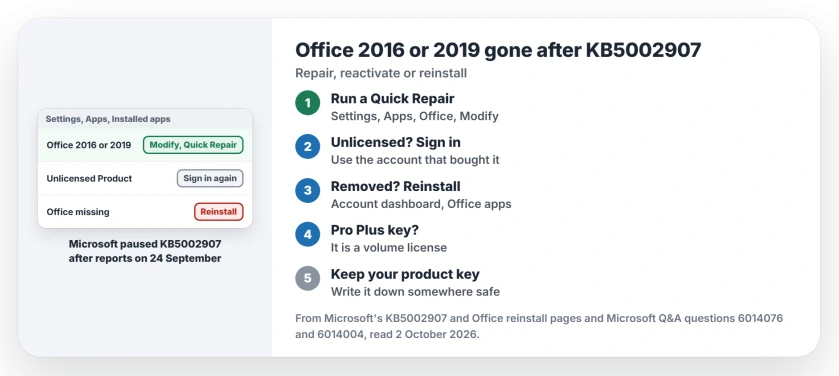
Status: checked 2 October 2026. Microsoft paused KB5002907 and says to reactivate Office, or reinstall it if it was removed. A Quick Repair brought Office back for one owner on two PCs.
1. Try a Quick Repair first
The most helpful answer on the 10+ question came from jmatsilv: "go to Settings then Apps, then Installed Apps, scroll down to Microsoft Office 2016 or 2019, then click the three dots and choose Modify, then Quick Repair".
In their words, it "Worked for me on two PC's one with Office 2019 Professional Plus and the other with Office 2016 Home & Student".
This only works while Office is still listed. The Office repair page explains Quick Repair and Online Repair if you need the longer one.
2. Reactivate if Office says unlicensed
Microsoft's own advice for this case is short: "Users should reactivate their purchased product". That means signing in.
Open Word and sign in using the account you bought Office with, the one tied to your purchase. One owner, lmacri, did that after a repair reinstall, to "sync to my Microsoft Account and reactivate my MS Office 2019 license".
Lee B typed the product keys in again instead: "Good thing I had a record of them". If Word's title bar shows Unlicensed Product after that, the unlicensed Office page works through the other checks.
3. Reinstall if Office was removed
Microsoft says that "In rare cases, the product may have been removed". Then you reinstall it. Its Office reinstall help starts at your Microsoft account dashboard.
From the Overview page, open Office apps, then "find the Office product you want to install and select Install". A volunteer moderator, Stefan Blom, agreed: "In most cases you reinstall using your associated Microsoft account".
Microsoft adds that "a one-time purchase version of Office is licensed for one install only". Use the same PC.
If Publisher came with your Office, it has its own end date, and the Publisher page explains what to save first.
4. Check where a Pro Plus key came from
This one is for Professional Plus. A volunteer moderator, EmilyS_726, warned that "Pro Plus is NOT personal license or lifetime license. These are volume licenses".
Volume licenses belong to an organization, so reactivating one can need that organization's IT. If you bought Office through an employer discount program, Stefan Blom pointed buyers to the program's own order history.
Keep your product key somewhere safe
Ours: once Office works again, write your product key down, or check it is linked to your Microsoft account. It takes a minute. Lee B only got four PCs working again because their keys were on record in a safe place.
What to skip
Microsoft says KB5002907 "is not a Windows operating system update". Rolling Windows back will not help.
Uninstalling Office yourself is not needed either while it is still listed. Every report of a repair or a reactivation working on this page is user-reported, from owners posting on Microsoft's own question board.
Why did Office 2016 disappear after a Windows Update?
An update called Click-to-Run Update Support, KB5002907, arrived on 24 September. On some PCs with Office 2016 or 2019 it removed Office or left it unlicensed. Microsoft has paused it.
How do I get Office 2019 back without a product key?
Sign in to your Microsoft account dashboard with the account linked to Office, and install it from Office apps. An MVP gave the same advice on the 30+ question.
Is KB5002907 still being installed?
Microsoft says it paused the rollout "To prevent additional devices from being affected". Owners hit in September still need to repair, reactivate or reinstall.
The Short Version
- KB5002907 removed or deactivated some Office 2016 and 2019 copies.
- Microsoft confirmed it and paused the update.
- Try Settings, Apps, Office, Modify, Quick Repair.
- Unlicensed? Sign in with your Microsoft account.
- Removed? Reinstall from your account dashboard.
- Pro Plus keys are volume licenses.
- Keep your product key on record.
Where to Next
Open Settings, then Apps, and look for Office in the list. If it is there, run a Quick Repair; if it is gone, sign in to your Microsoft account and reinstall it.
If none of it works, tell me which Office version you have and how you bought it. I will note on this page what finally got your copy working.

Isaac Smith is the founder and editor of PC Glance, a website that covers computers, laptops, and technology. He is a tech enthusiast and a computer geek who loves to share his insights and help his readers make smart choices when buying tech gadgets or laptops. He is always curious and updated about the latest tech trends.