

You right-click a link, open it in a new window, and Safari slips that window behind the one you are reading. It is annoying to hunt for every window you open. I would check one setting in Safari first.
The MacRumors member who started the thread saw it on every Mac they had updated to macOS 27 Golden Gate, and the same setting fixed all of them.
What owners saw
The thread starter, BGPL, put it simply: "Whenever I right click on a link to open a new window, it opens behind the current active window". In their words, it was "happening on all of my Macs with Golden Gate".
Another owner only saw it with a shortcut: "I tried opening a link with command-option-click, and it opened the new window behind the current window".
A third had it "sometimes, but not always", an on-and-off pattern that points at a setting rather than a broken Mac.
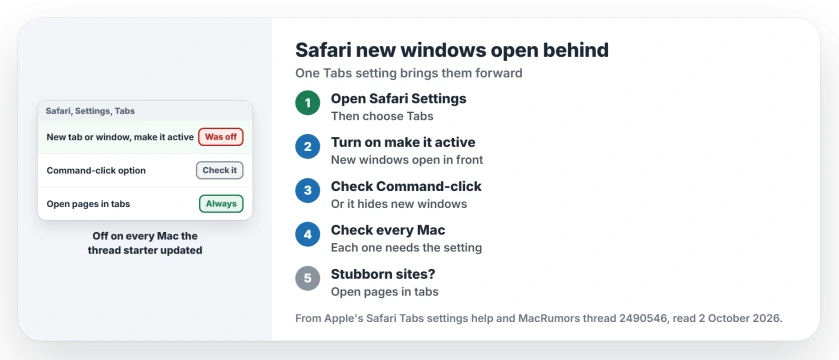
Status: checked 2 October 2026. The thread starter fixed it on every Mac by turning one Safari Tabs setting back on. One owner says it still fails on YouTube and eBay.
1. Turn on the make it active setting
Choose Safari, then Settings, then Tabs. Apple's Safari Tabs settings help lists the option "When a new tab or window opens, make it active".
Apple says that setting will "Make new tabs or windows open in front of the one" you are viewing, so tick it.
An owner, donawalt, pointed to it first, and then BGPL came back: "I figured it out, this is the setting in Safari under Tabs -> Navigation". That is the main fix.
2. Check the Command-click setting too
donawalt also tested the shortcut. With the Command-click checkbox on the same page unticked, they found that "Cmd-click opens a new window behind existing window".
Apple describes that checkbox as one to "Change what the listed shortcuts for opening links do". Tick it if you would rather get a tab than a hidden window.
3. Check every Mac you updated
BGPL found the setting off on each machine: "Weird that it unchecked this on all of my Macs".
Ours: if you use Safari on more than one Mac, open Settings and Tabs on each of them, because the setting does not seem to fix itself on the others.
4. Still behind on some sites? Use tabs
The setting did not help one owner with a new MacBook, who wrote that "it still doesn't work for me on YouTube and eBay".
Ours: in the same Tabs settings, change the option for opening pages in tabs to Always. Apple says that choice will "Open webpages in tabs", so nothing can hide behind your window.
5. Sequoia did not do this
The same owner noticed the difference on an older laptop: "My old Macbook with Sequoia 15.8 works fine on everything".
Going back to Sequoia is a big step for one setting. Try the setting first. The macOS 27 downgrade page explains what it costs before you try it.
What we do not know
Apple has not said why the update turned the setting off. This fix is user-reported, from the owners in the thread, and it is backed by Apple's own description of the setting.
Safari has other ways to surprise you on macOS 27. If it blocks a site with a warning instead, the not private connection page covers that.
Why do new Safari windows open behind on my Mac?
On macOS 27, owners found Safari's setting to make new windows active switched off. With it off, a new window opens behind the one you are using.
How do I get new Safari windows in front?
Choose Safari, Settings, Tabs, and turn on When a new tab or window opens, make it active, which applies to tabs and windows alike.
Why does Command-click open a hidden window?
When the Command-click option in Tabs is unticked, one owner found the shortcut opens a new window behind yours, so tick it to get a tab instead.
The Short Version
- Safari can open new windows behind yours.
- Owners saw it after macOS 27.
- Safari, Settings, Tabs.
- Turn on make it active.
- Check the Command-click option too.
- Check every Mac you updated.
- Stubborn sites? Open pages in tabs.
Where to Next
Open Safari's Settings, choose Tabs, and tick When a new tab or window opens, make it active. Then right-click a link and open it in a new window to test.
If a site still hides its windows behind yours, tell me which one, and I will list it here for other readers.

Isaac Smith is the founder and editor of PC Glance, a website that covers computers, laptops, and technology. He is a tech enthusiast and a computer geek who loves to share his insights and help his readers make smart choices when buying tech gadgets or laptops. He is always curious and updated about the latest tech trends.