

You open WSL from the Start menu, or type wsl in a terminal, and a black window flashes and vanishes before you can read a word.
I would not reinstall anything yet. In the clearest case on record, WSL was starting a distribution that cannot run a shell at all, because Docker Desktop's internal one had become the default.
The Super User question behind this page dates from October 2021 and has 79,342 views.
Why the window vanishes
Typing wsl on its own starts your default distribution, and if that distribution cannot start a shell, WSL exits and takes the window with it.
The asker had removed Ubuntu to set things up again, with Docker Desktop still installed, and their window "opens for less than a second and immediately disappears again".
Their list showed three distributions. The default marker sat on docker-desktop-data. The accepted answer called that "not actually a bootable instance, since it has no /init in it".
Docker's own documentation says Docker Desktop "runs inside its own docker-desktop WSL distribution", so those entries belong to Docker, not to you.
Microsoft's basic WSL commands page describes the default as "the default Linux distribution that WSL commands will use to run".
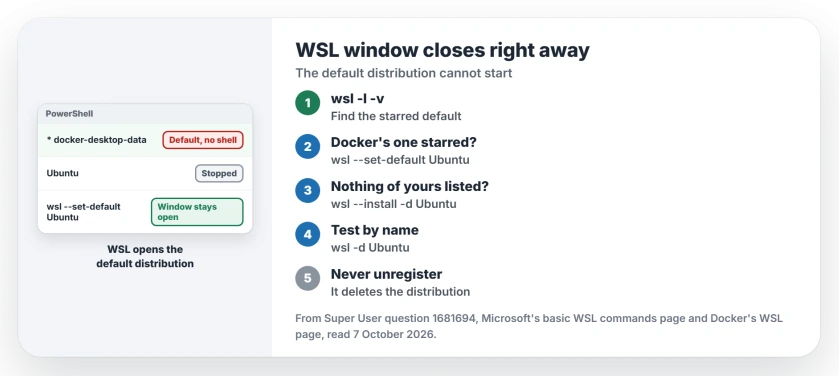
Status: checked 7 October 2026. A WSL window that closes at once points at the default distribution: one that cannot start, or none at all. Set your real one as the default, or install one.
Ours: this laptop has WSL 3.0.1.0 but no distribution. Typed into a terminal, a bare wsl printed one line saying so and handed the prompt straight back, and from a shortcut that same line closes before you can read it.
1. See which distribution is the default
Open PowerShell or Command Prompt, so the window stays open, and run wsl --list --verbose. Microsoft says it lists what is installed, "including the state (whether the distribution is running or stopped)".
In the asker's output, an asterisk marked docker-desktop-data. That starred line is your default.
wsl --status names it too, and Microsoft lists "default distribution type, default distribution, and kernel version" among what it shows.
Running a bare wsl in that open window also helps, and one owner suggested it "to see the reason it's quitting immediately on startup".
Their own cause was different: "it's a company laptop and my permissions changed". If your message mentions permissions, the fix belongs to whoever manages the laptop.
2. Make your real distribution the default
If the starred line is a docker-desktop entry, or anything you never use, point the default back at your own distribution, spelled exactly as your list spells it.
wsl --set-default UbuntuThat is the accepted fix. A commenter confirmed it in their words: running it from PowerShell "solved my issue with WSL restarting all the time when I was opening it".
On this laptop, wsl --help lists -s as the short form of the same switch. Docker will not mind, since its docs say "The Docker-WSL integration is enabled on the default WSL distribution".
3. An empty list? Install a distribution
If the list holds no distribution of your own, WSL has nothing to open, and a second owner hit exactly that: "I didn't have the Ubuntu distribution". They installed it, then made it the default.
wsl --install -d Ubuntu
wsl --set-default Ubuntu
To see other choices first, run wsl --list --online, which Microsoft describes as "the Linux distributions available through the online store".
4. Test your distribution by name
wsl -d Ubuntu starts that one distribution whatever the default is, so swap in your own distribution's name.
If it opens a shell while plain wsl still closes, the default was the whole problem. Step 2 fixes that for good.
If it closes too, the distribution itself is damaged, and our WSL ERROR_FILE_NOT_FOUND page deals with a distribution whose disk file has gone missing.
Unregistering will not fix a default
Unregistering looks like a clean restart. It is the wrong tool here.
Microsoft's commands page warns that it wipes the distribution's data, settings and software for good, while a wrong default needs one command. I would only unregister a distribution you have backed up, and never one of Docker's.
If WSL refuses to start at all, with an error code in place of a flashing window, our WSL 0x80370114 page covers the virtualization side.
Why did my default distribution change by itself?
The accepted answer's view is that Docker's distribution "got set as the default when you uninstalled Ubuntu". Ours: after removing the distribution you used, check the starred line again. It takes one command.
If WSL does open but warns that it could not mount one of your file systems, dmesg names the drive it tripped on.
The Short Version
- A WSL window that flashes and closes points at the default distribution.
wsl --list --verboselists them, and the starred line is the default.wsl --set-default Ubuntufixed it for owners whose default was Docker's.- No distribution of your own? Install one, then make it the default.
- Never unregister to fix this, since that deletes the distribution.
Where to Next
Start with wsl --list --verbose and read the starred line, which tells you which step you need.
Still closing with the right default? Run wsl in PowerShell, put what it prints in a comment, and I'll take a look.

Isaac Smith is the founder and editor of PC Glance, a website that covers computers, laptops, and technology. He is a tech enthusiast and a computer geek who loves to share his insights and help his readers make smart choices when buying tech gadgets or laptops. He is always curious and updated about the latest tech trends.