
You load your .ppk file into PuTTY, Pageant or TortoiseGit, and instead of signing in you get "PuTTY key format too new".
Your key is fine. I would not make a new one. The file was saved by a newer PuTTYgen than the program reading it, and one menu in PuTTYgen writes it out in the older format.
On Super User it has 288,013 views, and the accepted fix has 113 votes.
Why an older PuTTY refuses the file
PuTTY 0.75 came out on 8 May 2021, and its change log reads "Upgraded private key file format to PPK3, with improved passphrase hashing and no use of SHA-1".
So a key saved by PuTTYgen 0.75 or later is version 3.
That is documented by the vendor: PuTTY's manual says you may need version 2 for a file "to be loadable in older versions of PuTTY (0.74 and older)", or in tools that have not caught up.
You can see which one you have. Open the .ppk in Notepad: the first line starts PuTTY-User-Key-File-3 or PuTTY-User-Key-File-2. The manual says "The current file format version is 3."
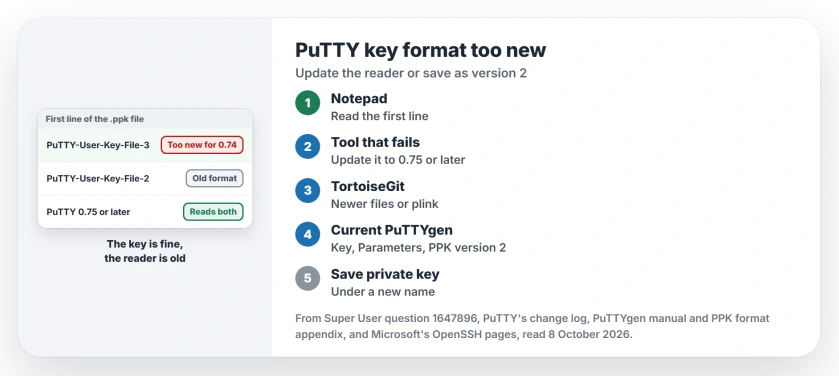
Status: checked 8 October 2026. PuTTYgen 0.75 and later save keys as PPK3, which PuTTY 0.74 and older cannot read. Update the old tool, or save the key again as PPK version 2.
Ours: PuTTY's latest release on 8 October 2026 is 0.85, from 16 August. FileZilla 3.65.0 on this laptop carries both header lines in its SFTP module, fzsftp.exe, so it reads either version.
1. Update the program that complains
The cleanest fix is a PuTTY of 0.75 or later on the side that fails. One answer said to install "at least 0.75 it will work fine", and that is the whole fix if you control that PC.
Watch for programs that bring their own copy. A commenter pointed out that "TortoiseGIt bundles outdated putty executables (0.73/0.74)", which is why it fails while your own PuTTY works.
One owner copied newer puttygen.exe and pageant.exe into the TortoiseGit bin folder. It worked, confirmed by an owner replying "Replacing the outdated Tgit ones worked well".
A third owner left the files alone and changed TortoiseGit's SSH client, under Settings and Network, to PuTTY's own plink, and wrote "and it works again".
2. Save the key as PPK version 2
If you are stuck with the old program, convert the file instead. You need a current PuTTYgen for this, because an old one cannot open the new file either.
- Open PuTTYgen 0.75 or later and click Load. Pick the .ppk and type its passphrase.
- Open the Key menu and choose Parameters for saving key files.
- Set PPK file version to 2 and click OK.
- Click Save private key and save it under a new name.
Petr Losev gave that menu path in the second answer on Super User, at 44 votes. A commenter who first tried it in an old PuTTYgen got the same too new message, and the fix was the current build.
The same change from a command line, for a key you have as an OpenSSH file:
puttygen id_rsa --ppk-param version=2 -o id_rsa.ppkKeep version 3 wherever you can. The manual warns "The version 2 format is less resistant to brute-force decryption". I would only save a version 2 copy for the one old tool that needs it.
The old PEM message is a different problem
The asker also tried their id_rsa file directly and got a message naming an OpenSSH SSH-2 private key in old PEM format. One commenter saw it from Pageant after converting.
The tool was handed the OpenSSH file. It wanted a .ppk. PuTTY's manual says the .ppk "is the one you will need to tell PuTTY to use for authentication". Load id_rsa into PuTTYgen and save it as a .ppk first.
Or use the ssh built into Windows
Windows 10 and 11 ship their own OpenSSH client, and it reads OpenSSH keys with no conversion at all. Microsoft's overview dates it to Windows 10 build 1809, when OpenSSH arrived as an optional feature.
On this laptop ssh -V reports OpenSSH_for_Windows_9.5p2. Microsoft's key management page covers ssh-keygen and ssh-agent.
To move a PuTTY key across, open it in PuTTYgen and use Conversions, then Export OpenSSH key. If you connect to a Windows PC and it says permission denied, our SSH permission denied page covers the account side.
If the ssh client is missing because adding the OpenSSH feature failed, our error 0x800f0954 page has that fix.
The Short Version
- PuTTYgen 0.75 and later save PPK version 3. PuTTY 0.74 and older call it too new.
- Update the program that fails. TortoiseGit carries its own old PuTTY.
- Or load the key in a current PuTTYgen and save it with PPK file version 2.
- An old PEM message means you gave the tool the OpenSSH file. Convert it first.
- Windows' own ssh reads OpenSSH keys directly.
Where to Next
Check the first line of your .ppk and the About box of the tool that fails. Both look right? Then drop the two version numbers into a comment, and I can say which side needs changing.

Isaac Smith is the founder and editor of PC Glance, a website that covers computers, laptops, and technology. He is a tech enthusiast and a computer geek who loves to share his insights and help his readers make smart choices when buying tech gadgets or laptops. He is always curious and updated about the latest tech trends.