
You press W in a chat box and the cursor jumps up a line, while the Up arrow types the letter w. A, S and D have traded places with the other arrows as well, and it can happen mid-game.
No need to reinstall a driver. I would try one key press first, since the swap lives inside the keyboard and not in Windows.
An October 2014 Super User thread on it has 550,741 views, and the same swap reached Microsoft Q&A again in June 2026.
Why the keys changed places
Many gaming keyboards can trade the WASD keys for the arrows. MonsGeek, one keyboard maker, puts it plainly: "you can swap the WASD keys and arrow keys by pressing Fn + W".
You can hit that pair without noticing. One Super User owner's cat did it by lying on the keyboard.
Windows on your PC never sees the switch. Microsoft's own remapping tool says "The Fn (function) key cannot be remapped (in most cases)", since the keyboard handles Fn itself.
An adviser on Microsoft Q&A summed it up: "This is a local hardware feature, not Windows feature".
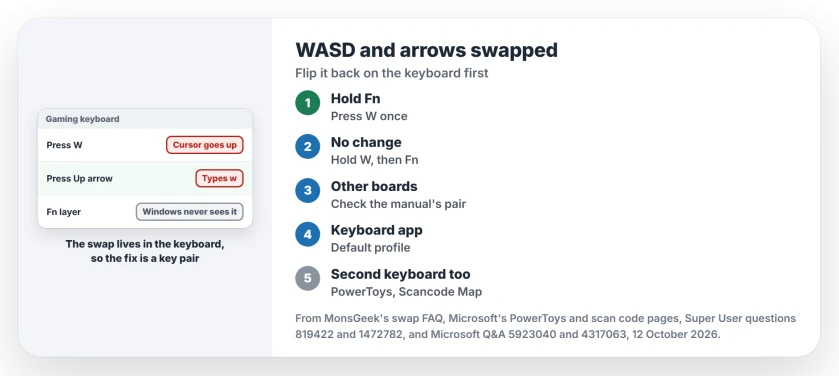
Status: MonsGeek's swap FAQ and Microsoft's remapping pages, set beside keyboard owners and this laptop's registry on 12 October 2026.
1. Hold Fn and press W
Find the Fn key on your board. The accepted answer says it sits "usually on the right side of the space bar", though on many laptops and compact boards it sits at the bottom left. Hold it, tap W once, and the arrows return.
Reported working by owners. Owners with a Redragon board, a Digital Alliance gaming keyboard and an unbranded one confirmed it under that answer. On Microsoft Q&A in 2025, one reply was simply "press fn w to switch them back".
One Redragon owner found the order mattered. They had to hold W first and then press Fn, so I would try that order before anything else.
2. When Fn and W changes nothing
Some boards use another pair. An Ozone Strike Pro owner needed the Ozone key with the left Windows key, and added "If Fn+W do not work (or you don't have an Fn key), simply read your keyboard's manual".
Unplugging helps on some keyboards. One owner fixed theirs by unplugging and plugging it back in, though a 2019 asker tried the same with no luck.
MonsGeek also lists a full reset, which suits a board where several things changed at once. Hold Fn and the tilde key on a 75% board, or both Windows keys on a full-size one, for 5 seconds to "reset all keys to their default layout".
That reset is MonsGeek's. Other makers use other keys, so look up your own model before you hold anything down.
3. Look inside the keyboard's own app
The maker's software can hold the swap in a profile. A Microsoft Q&A owner with a 60% board lost the Fn arrows after installing the maker's lighting driver, and only Fn and W still swapped.
Open the app, look for a game profile or a remap on W, A, S and D, and switch back to the default profile. A Razer owner learned that the app cannot rebind the Fn key itself, so look for the profile setting rather than a key remap.
4. Rule out a remap inside Windows
Plug in a second keyboard. If it types normally, your first keyboard holds the swap. If both swap, something in Windows is doing it.
Two places to check. Microsoft's PowerToys Keyboard Manager can remap keys, so open it and look at its list. Some other remapping tools write a Scancode Map registry value instead, which this command shows:
reg query "HKLM\SYSTEM\CurrentControlSet\Control\Keyboard Layout" /v "Scancode Map"Microsoft says to "remove the Scancode Map registry value and reboot" to undo those remaps. Ours: on this laptop the command reports that no such value exists, so no remap of that kind is set here.
Before you delete that value, I would export the key as a backup. It changes every keyboard on the PC, not only the gaming one.
Other keys acting strangely
Gaming boards lock more than the arrows. A dead Windows key is often a Fn lock or a game mode too, and holding Fn while you press the Windows key often brings it back.
If letters come out as different letters rather than arrows, that is a layout switch in Windows instead. The wrong characters section covers it.
The Short Version
- The swap is a keyboard feature, not Windows.
- Hold Fn and press W, or W and then Fn.
- Check your manual for the model's own key pair.
- Reset the profile in the keyboard's app.
- Test another keyboard, then look for PowerToys or Scancode Map.
Where to Next
Which keyboard flipped on you, and which press brought it back? Your comment with the model helps me list the pairs that work.

Isaac Smith is the founder and editor of PC Glance, a website that covers computers, laptops, and technology. He is a tech enthusiast and a computer geek who loves to share his insights and help his readers make smart choices when buying tech gadgets or laptops. He is always curious and updated about the latest tech trends.